
This free PDF merger combines up to 25 PDFs and images into one document directly in your browser, without uploading anything. It’s for anyone assembling contracts, invoices with receipts, job applications or scanned pages into one tidy file. Drag the files into order, merge them, and download a single PDF with no sign-up, no watermark and no daily limit.
Merge PDF files
Combine PDFs and images into one PDF, in the order you choose.
Up to 25 files, 1 GB in total on this device.
Split PDF
Extract the pages you need, or split a PDF into one file per page or per group of pages.
One PDF up to 1 GB on this device. Several files download as one ZIP file.
Compress PDF
Reduce PDF file size by re-compressing images and cleaning up the file. Text stays sharp and searchable.
One PDF up to 1 GB on this device.
PDF to Word
Turn a PDF into an editable Word document (.docx) that keeps its tables, images and formatting, or into plain text (.txt).
One PDF up to 200 MB and 2,000 pages.
PDF to PNG or JPG
Save every page, or the pages you pick, as PNG or JPG images.
One PDF up to 1 GB on this device. Several pages download as one ZIP file.
PNG or JPG to PDF
Combine images into one PDF. JPGs keep their original quality.
Up to 25 images, 1 GB in total on this device.
HEIC to PDF
Turn iPhone HEIC photos into one PDF. JPG, PNG and WebP images can go in the same PDF.
Up to 25 photos, 1 GB in total on this device.
Your files stay on this device. They are processed in your browser and never uploaded or stored.
How to combine PDF files for free (no upload)
To combine PDF files for free, open Soft Learn Hub’s Merge PDF tool, add up to 25 PDFs or JPG, PNG, WebP and HEIC images, drag them into order, then merge and download one PDF. It all runs in your browser, so files are never uploaded, and there’s no sign-up or watermark. Computers with 8 GB or more memory handle merges up to 1 GB; phones about 150 MB.
- Price
- Free, no watermark
- Account
- Not needed
- Uploads
- None; files stay on your device
- Files per merge
- Up to 25
- Accepted files
- PDF, JPG, PNG, WebP, HEIC (converted to JPEG in your browser)
- Max size
- Up to 1 GB per merge on computers with 8 GB+ memory; about 150 MB on phones
- Output
- One PDF download
On this page
How to merge PDF online free in 5 steps
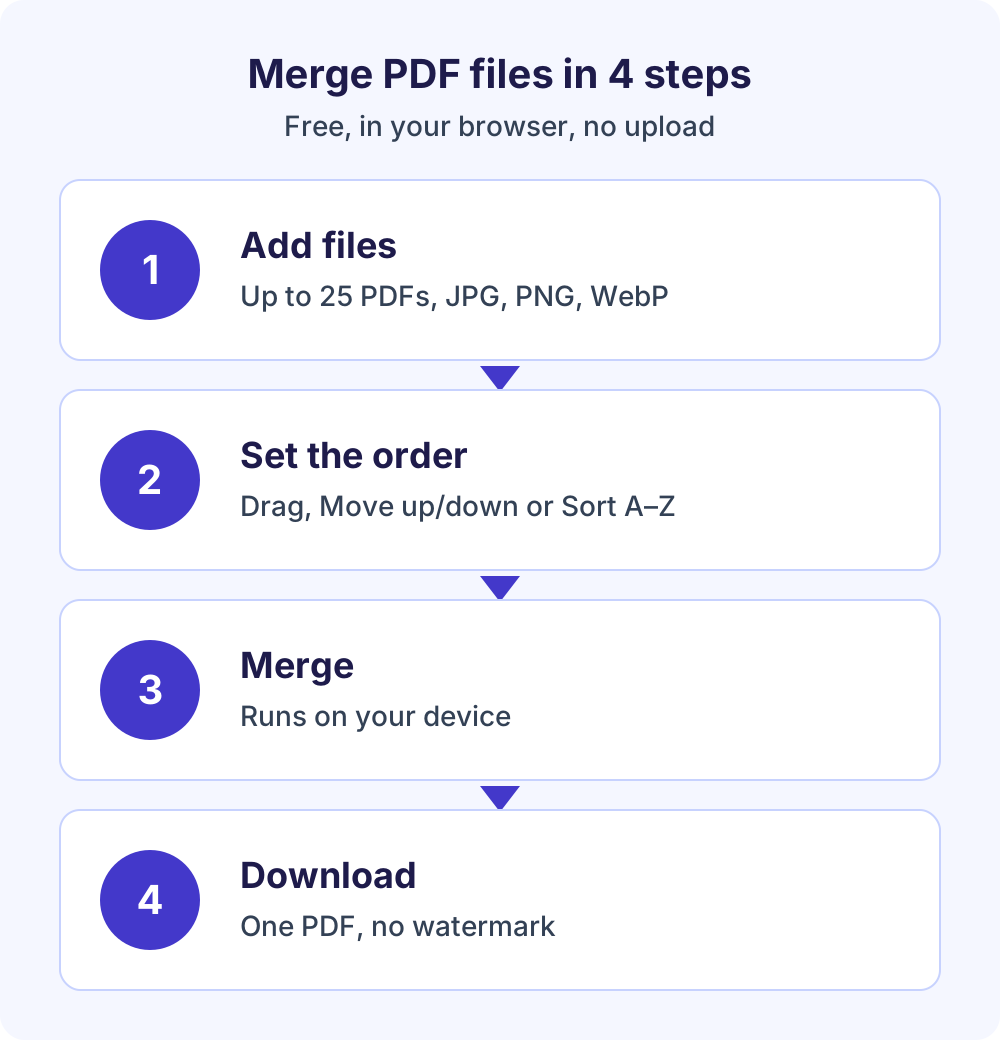
The tool above opens on the Merge tab. Here’s how to merge PDF files from start to finish.
- Add your files.
Drop up to 25 PDFs and JPG, PNG, WebP or HEIC images onto the tool, or choose them from your device. The tool shows the size limit for your device.
- Put them in order.
Drag files into place or use the Move up and Move down buttons. Sort A–Z orders the list by file name, and you can remove any file you don’t need.
- Check the page sizes.
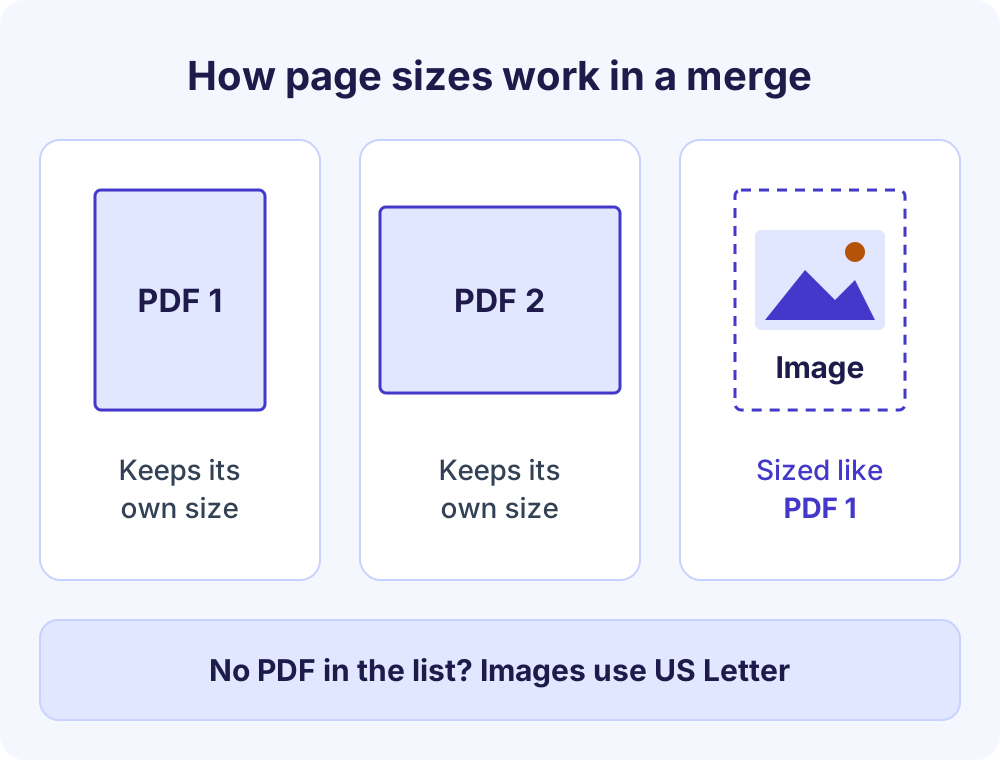
Each PDF keeps its own page sizes. Images become full pages sized to match the first PDF in the list, or US Letter if the list has no PDF.
- Merge the files.
Select Merge PDF. The work runs in a background Web Worker on your device, so the page stays responsive while large files are combined.
- Download or keep going.
Save the merged PDF, or choose “Continue with another tool” to send it to Compress PDF or another tab without selecting it again.
Why use a free PDF merger that runs in your browser
With an upload-based service, every document travels to a server you don’t control before you get the result back. This tool lets you merge PDF files on your device instead, using pdf-lib, an open-source library (MIT licence) that can create, modify and merge PDFs in a browser. It’s hosted on softlearnhub.com and loads only when you use the tool.
Your files are read into the browser’s memory, merged and offered as a download. They’re never sent to Soft Learn Hub or anyone else, and nothing is stored. The heavy lifting happens in a Web Worker, a browser feature that runs scripts on a background thread so the page doesn’t freeze.
What no upload means in practice
- Privacy: contracts, bank statements, ID scans and medical letters stay on your device.
- No transfer wait: nothing has to travel to a server and back, so the time depends on your device, not your connection.
- No caps: there’s no daily task limit or account wall, so you can combine PDF free as often as you need.
You can check this yourself. Press F12 in Chrome, Edge or Firefox, open the Network tab and run a merge. You’ll see page and library requests and normal page analytics, which never include your files, but no request carrying your documents.
What carries over when you combine PDFs
A merge brings your pages together, but not every feature of the source files comes along.
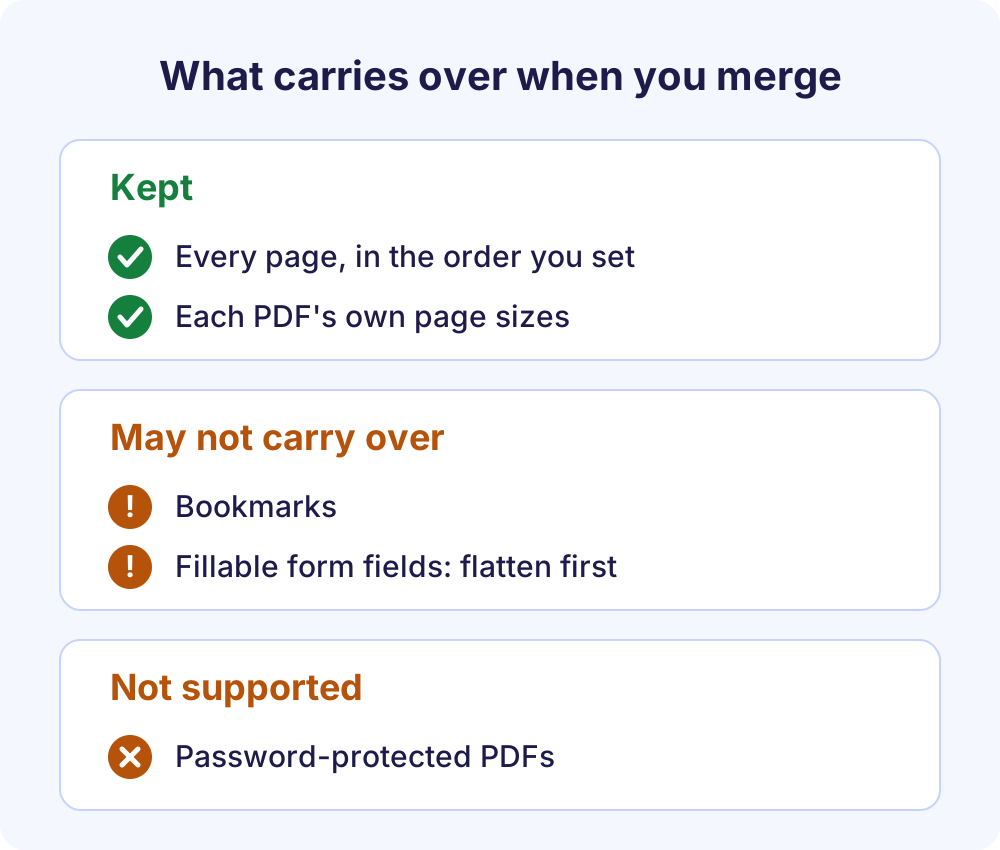
- Pages and page sizes: every page is included, and each PDF keeps its own page sizes, so a portrait report and a landscape chart can sit in the same file.
- Images: JPG, PNG, WebP and HEIC files become full pages sized to match the first PDF in the list, or US Letter if there’s no PDF. HEIC photos from iPhones are converted to high-quality JPEG in your browser first.
- Bookmarks: the clickable outline from the source PDFs may not carry over.
- Fillable forms: form fields may not carry over, so typed-in values could be lost. Flatten the form first.
- Password-protected PDFs: not supported. The tool tells you and asks you to remove the password first.
How to flatten a filled form before merging
Open the filled form in your browser or PDF viewer, choose Print, and pick a PDF printer such as Save as PDF or Microsoft Print to PDF. The new copy has the filled values printed onto the page as ordinary content, so they survive the merge. Keep the original in case you need to edit the fields later.
Free PDF merger vs typical upload-based PDF websites
Upload-based mergers can be handy, but free tiers often come with conditions. Services differ, so treat this as a general comparison.
| Feature | This free PDF merger | Many upload-based PDF websites |
|---|---|---|
| Where files are processed | In your browser, on your device | On the provider’s servers |
| Account | Never needed | Often required for more files or larger sizes |
| Watermark | None | Sometimes added on free plans |
| Daily limit | None | Free tiers often cap tasks per day |
| Ads inside the tool | None | Common on free versions |
| PDFs and images together | Yes: JPG, PNG, WebP and HEIC | Varies; some need a separate image-to-PDF step |
| Size limit | Your device’s memory, up to 1 GB | Set by the provider’s plan |
Merge size limits and email attachments
Because merging happens in your browser, your device’s memory sets the limit. The tool shows it and caps the total size to avoid crashing the browser.
| Device | Limit per merge |
|---|---|
| Computers with 8 GB or more memory | Up to 1 GB |
| Devices with 4 GB memory | About 400 MB |
| Phones and tablets | About 150 MB |
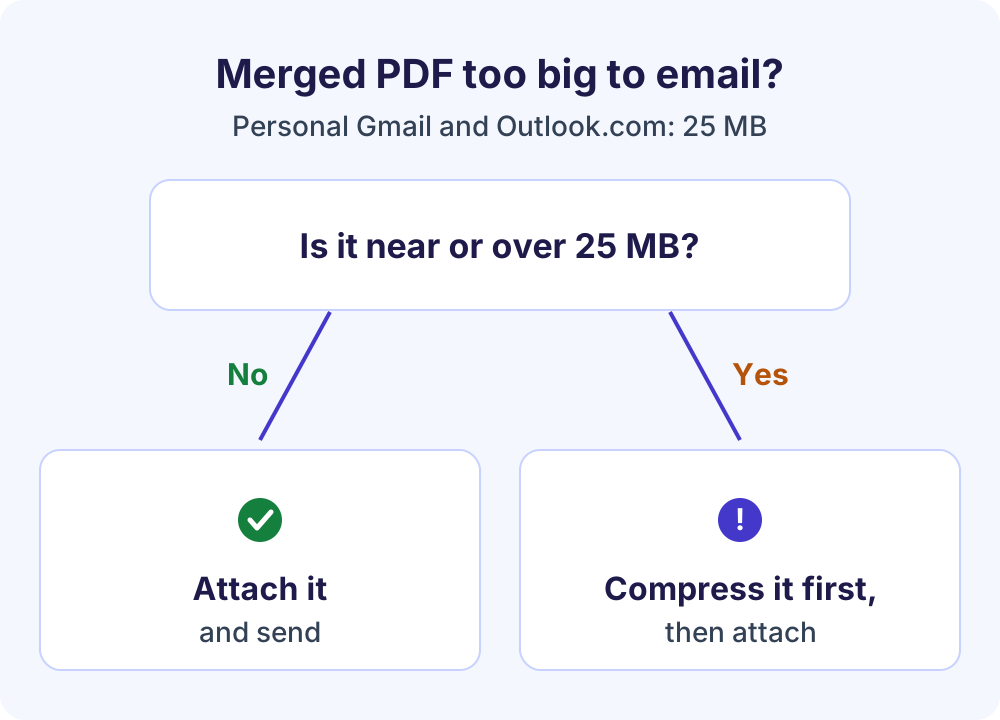
A merged file can easily outgrow email limits. Personal Gmail accounts allow 25 MB of attachments and swap bigger files for a Google Drive link, while Outlook.com caps each email at 25 MB, including text and attachments.
If the merged PDF is near or over 25 MB, run it through Compress PDF before you attach it. Image-heavy and scanned PDFs shrink the most.
Tips and troubleshooting
- Get the order right first time: name files with number prefixes such as 01-invoice and 02-receipt, then use Sort A–Z.
- Control the size of image pages: put a PDF first if you want images to match its pages. For A4 pages or margins around photos, convert them with PNG to PDF first, then merge the result.
- File too large on a phone: phones and tablets handle about 150 MB, so switch to a computer with 8 GB or more memory for merges up to 1 GB.
- Need to edit text afterward: convert the merged file with PDF to Word for an editable .docx.
Common merge jobs
Typical uses include joining an invoice from the free invoice generator with its receipts, placing a cover letter on letterhead from the letterhead maker in front of a proposal, and gathering signed pages or scanned forms into one application packet.
Frequently Asked Questions
Is this PDF merger really free?
Yes. You can combine PDF free of charge with no sign-up, no watermark, no daily task limit and no ads inside the tool. The only limits are 25 files per merge and a size cap based on your device’s memory, which is up to 1 GB on computers with 8 GB or more.
How to combine PDF files without uploading them?
Use a merger that runs in your browser, like this one. Add your PDFs, put them in order and select Merge PDF; the files are read into your browser’s memory and combined on your device. To confirm nothing is sent, watch the Network tab in your browser’s developer tools (F12) during the merge.
How many PDFs can I merge at once?
You can merge PDF files and images, up to 25 at a time, mixing PDFs with JPG, PNG, WebP and HEIC files. The total size is capped by your device: up to 1 GB on computers with 8 GB or more memory, about 400 MB on 4 GB devices and about 150 MB on phones and tablets.
Can I combine PDF and JPG files into one PDF?
Yes. Add JPG, PNG, WebP or HEIC images alongside your PDFs and arrange them in any order. Each image becomes a full page sized to match the first PDF in the list, or US Letter if there’s no PDF. For more page-size and margin choices, convert the images with PNG to PDF first.
Why are bookmarks or form fields missing after merging?
Bookmarks and fillable form fields from the source PDFs may not carry over into the merged file, although every page is still included. If you need the filled-in values, flatten the form first by printing it to a PDF printer such as Save as PDF, then merge the flattened copy.
Can I merge password-protected PDFs?
No. Encrypted, password-protected PDFs aren’t supported, and the tool tells you when it finds one. Open the file in an app where you know the password, save an unprotected copy and add that copy to the merge. Only remove passwords from documents you own or are allowed to change.
Can I merge PDFs on my iPhone or Android phone?
Yes. The merger works in current Chrome, Edge, Firefox and Safari on mobile as well as desktop. Phones and tablets have less memory, so merges there are capped at about 150 MB. For larger merges, use a computer: with 8 GB or more memory, the limit rises to 1 GB.
How do I make a merged PDF small enough to email?
Personal Gmail and Outlook.com accounts both allow about 25 MB per email. If your merged PDF is near or over that, choose “Continue with another tool” and pick Compress PDF, which can aim for under 1 MB, 500 KB or 200 KB and tells you if a target can’t be reached.
More free PDF tools
Like this free PDF merger, every tool below runs in your browser, and “Continue with another tool” moves your merged file between them without selecting it again.
- All free PDF tools: seven tools on one page.
- Split PDF: extract pages, or split a PDF into ranges, single pages or every N pages.
- Compress PDF: reduce PDF file size with three levels or a target size.
- PDF to Word: turn a PDF into an editable .docx or plain .txt file.
- PDF to PNG or JPG: save pages as images at 72, 150 or 300 DPI.
- PNG to PDF: combine up to 25 photos and images into one PDF.
- HEIC to PDF: turn up to 25 iPhone HEIC photos into one PDF.
- Free invoice generator: create invoices and quotes as PDFs, ready to merge with receipts.