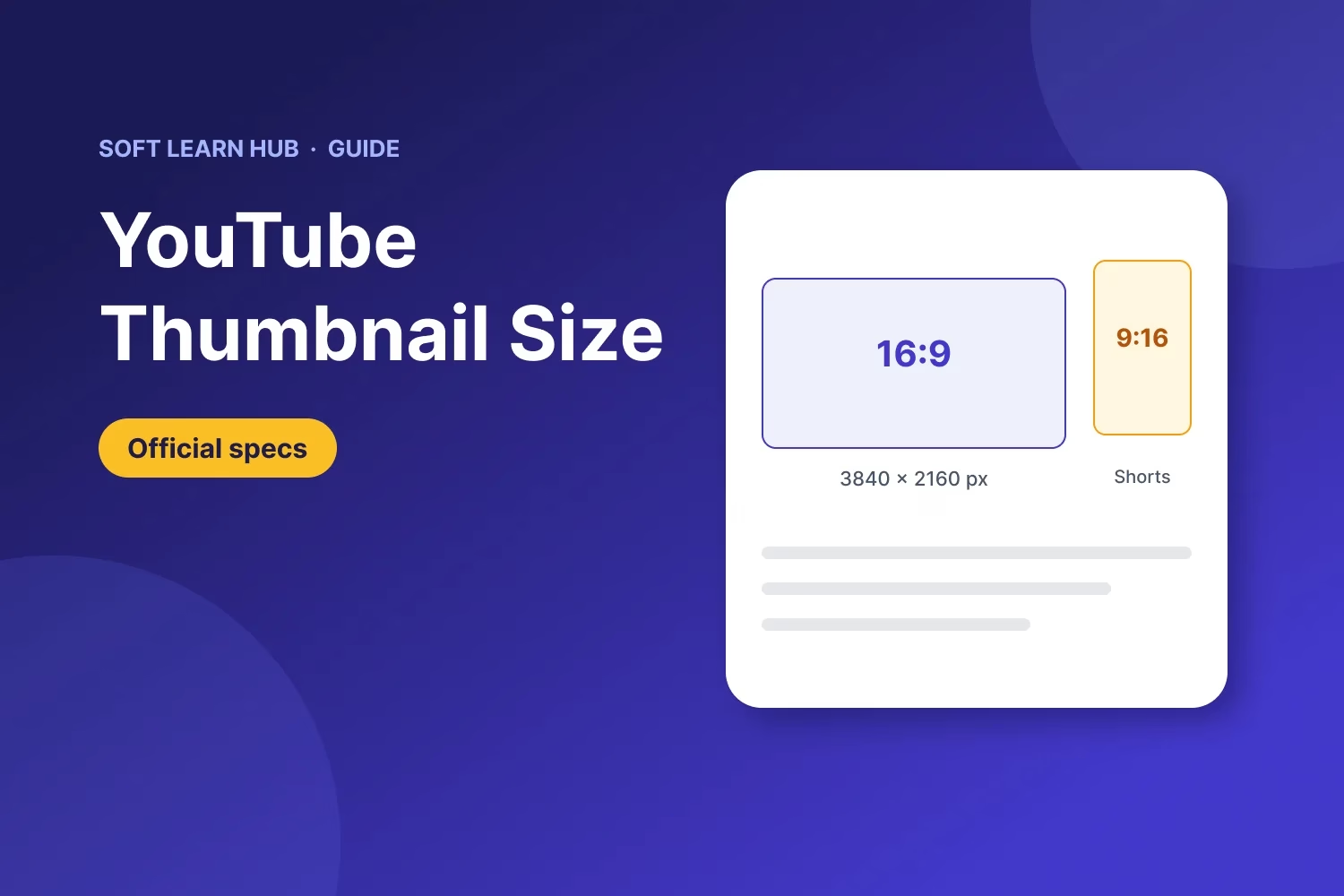
The recommended YouTube thumbnail size is 3840 x 2160 pixels with a 16:9 aspect ratio, according to YouTube Help. The minimum width is 640 pixels. Upload a JPG or PNG up to 50 MB from a computer, or up to 2 MB from the mobile app. Shorts thumbnails use 2160 x 3840 pixels (9:16).
This guide is for creators, marketers and small business owners who design their own thumbnails. You’ll get the full spec table, the sizes for Shorts and podcasts, how to keep text clear of YouTube’s overlays, design tips that hold up on a phone, and the exact upload steps for desktop, Android and iPhone.
In this guide
Key takeaways
- Use 3840 x 2160 px (16:9) for regular videos. Any 16:9 image that is at least 640 px wide is accepted.
- Shorts thumbnails are 9:16, ideally 2160 x 3840 px, and can only be added in YouTube Studio on a computer.
- Save files as JPG or PNG. Desktop uploads allow up to 50 MB, mobile uploads up to 2 MB.
- You need a verified account (phone verification) before the custom thumbnail option works.
- Design for a small screen: one big subject, a few words, and nothing important in the bottom-right corner.
What is the YouTube thumbnail size in 2026?
YouTube has raised its thumbnail guidance, and the numbers are bigger than most older articles suggest. Per the official YouTube Help page on custom thumbnails, the recommended resolution for a standard video is 3840 x 2160 pixels, which is 4K at 16:9. The minimum is 640 pixels wide.
Many older guides still quote a YouTube thumbnail size of 1280 x 720 pixels and a 2 MB cap. A 1280 x 720 image is above the minimum and still works, so you don’t need to redo old thumbnails. For new designs, working at 3840 x 2160 gives you a sharper result on large screens and TVs, and you can always export a smaller copy.
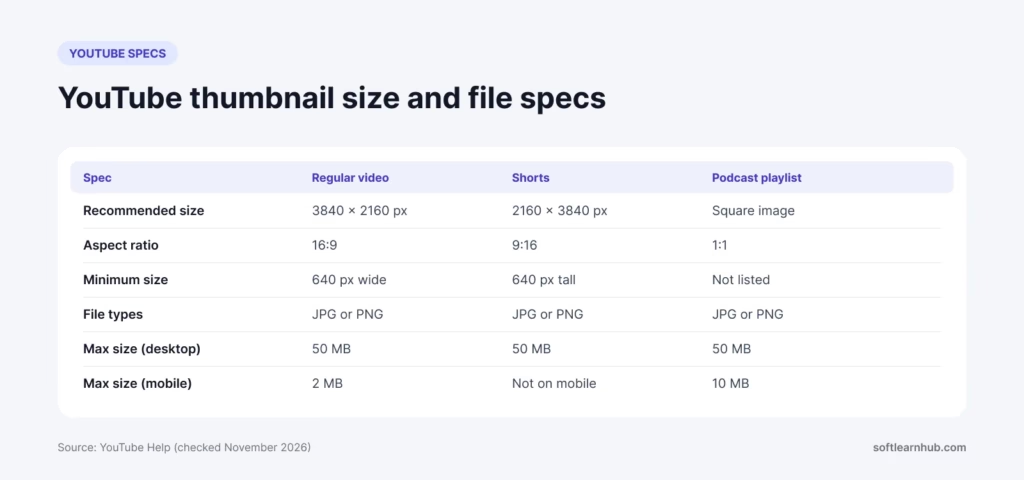
YouTube thumbnail dimensions at a glance
| Spec | Regular video | Shorts | Podcast playlist |
|---|---|---|---|
| Recommended size | 3840 x 2160 px | 2160 x 3840 px | Not listed (square image) |
| Aspect ratio | 16:9 | 9:16 | 1:1 |
| Minimum size | 640 px wide | 640 px tall | Not listed |
| File types | JPG or PNG | JPG or PNG | JPG or PNG |
| Max file size on desktop | 50 MB | 50 MB | 50 MB |
| Max file size on mobile | 2 MB | Not available on mobile | 10 MB |
Source for these YouTube thumbnail dimensions: YouTube Help, checked November 14, 2026. YouTube adjusts these limits from time to time, so check the help page if an upload gets rejected.
YouTube thumbnail resolution: why a bigger file helps
Your YouTube thumbnail resolution matters because thumbnails show up everywhere: tiny in search results on a phone, medium in the suggested column, and large on a TV home screen. A higher YouTube thumbnail resolution keeps edges and text crisp at every one of those sizes. YouTube compresses the image it serves, so starting from a clean, sharp file matters more than squeezing the file size down.
The trade-off is the mobile limit. If you upload from the YouTube or Studio app, the cap is 2 MB. A 3840 x 2160 JPG saved at high quality can land above that, so either upload from a computer or export a lighter copy (for example 1920 x 1080 at good JPG quality) for phone uploads.
Shorts thumbnail size and how vertical videos are handled
The YouTube thumbnail size for Shorts is vertical, at 9:16. YouTube recommends 2160 x 3840 pixels, with a minimum height of 640 pixels. There’s a catch: custom Shorts thumbnails can be added only in YouTube Studio on a computer, and your account must be verified.
Vertical videos have another quirk. If you give a vertical video a 16:9 custom thumbnail, YouTube replaces it with an auto-generated 4:5 thumbnail on the home, explore and subscription pages. Your custom image still appears in the watch feed, in watch history and on non-mobile platforms. If you care how a vertical video looks in feeds, design a 9:16 thumbnail for it instead.
How to add a Shorts thumbnail
- Sign in to YouTube Studio on a computer.
- Select Content in the left menu, then the Shorts tab at the top.
- Open the Short and click the edit (pencil) option.
- Under Thumbnail, click Upload file and choose your 9:16 image.
- Click Save.
Safe areas: where to put text and faces
YouTube doesn’t publish a pixel-exact safe zone inside the YouTube thumbnail dimensions the way it does for channel banners. Still, the interface places a few things on top of your image, and you should plan around them.
- Bottom-right corner: the video length badge sits here in most views. Keep text and faces out of it.
- Bottom edge: a red progress bar appears on videos a viewer has partly watched.
- Corners and edges: thumbnails are displayed with rounded corners and at very small sizes, so leave a margin around anything important.
A simple rule: keep your headline and main subject in the upper and left part of the frame, with breathing room around every edge. Then shrink the design to about 320 pixels wide on your screen and check whether it still reads.
How to upload a custom YouTube thumbnail
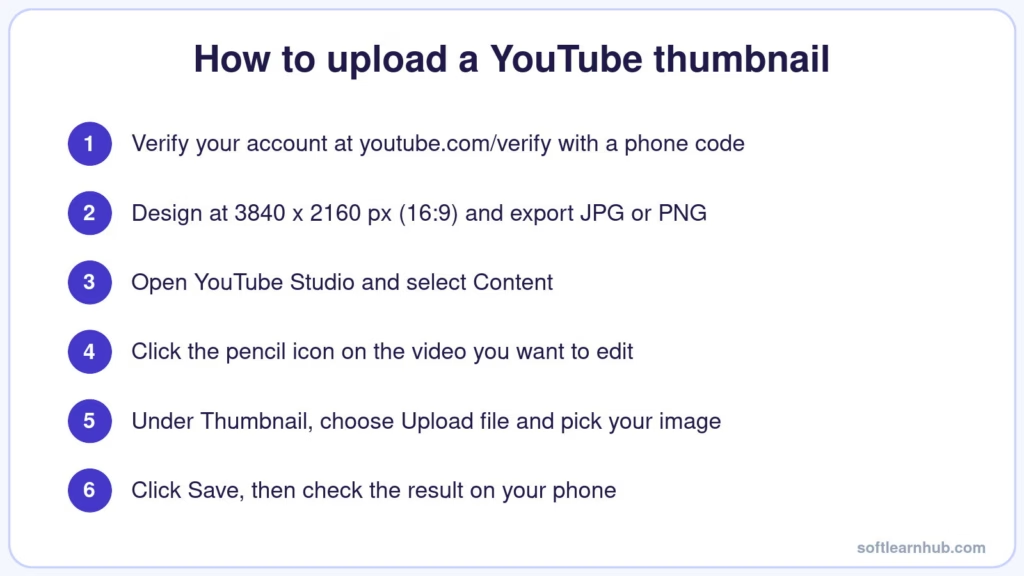
Once your image matches the YouTube thumbnail size and file limits, make sure you’re eligible. Custom thumbnails are an intermediate feature, which means you need to verify your account with a phone number at youtube.com/verify. You can confirm your status in YouTube Studio under Settings, then Channel, then Feature eligibility, as explained in YouTube’s feature eligibility guide.
On a computer (YouTube Studio)
- Sign in to YouTube Studio.
- Select Content from the left menu.
- Open the video and click the edit (pencil) icon.
- Under Thumbnail, choose Upload file and pick your image. You can also choose Get suggestions.
- Click Save.
On Android or iPhone
In the YouTube Studio app, tap Content, pick the video, tap the edit icon and choose Edit thumbnail. Pick a suggested frame or tap Custom thumbnail to choose an image from your phone, tap Select, then tap Save.
In the main YouTube app, tap your profile picture, open Your videos, tap More next to the video, then Edit, then Edit thumbnail. The rest of the flow is the same. Keep the 2 MB mobile limit in mind, and expect the new image to take a little while to appear everywhere.
Why can’t I upload a custom thumbnail?
- Not verified: the option stays locked until you complete phone verification.
- File too large: the image is over 2 MB on mobile or over 50 MB on desktop.
- Wrong format: use JPG or PNG. Convert WebP or HEIC files first.
- Daily limit reached: if you see a message that the daily custom thumbnail limit is reached, wait 24 hours. Limits vary by country or region, channel history and Community Guidelines strikes.
- Old image still showing: YouTube notes that thumbnail changes may take some time to appear.
YouTube thumbnail design tips that work on small screens
The right YouTube thumbnail size gets your image accepted. The design gets it clicked. These habits hold up across most niches.
Lead with one clear subject
Pick one focal point: a face, a product, or a before-and-after. Crowded thumbnails turn to mush at phone size. If you show a person, a close crop with a readable expression usually beats a wide shot. Cut the subject out cleanly so it stands off the background; a free background remover saves time here.
Use three to five words at most
The title already sits next to the thumbnail, so don’t repeat it. Add a short hook that the title doesn’t say. Use a heavy, simple font, strong contrast against the background, and a size that is still readable when the whole image is shrunk to the width of your thumb.
Keep contrast and color consistent
Bright subjects on darker or simpler backgrounds stand out in a busy feed. Pick two or three brand colors and reuse them so returning viewers recognize your videos at a glance. Check your design in both light and dark mode, since the page around your thumbnail changes color.
Match the promise of the video
A thumbnail that oversells the content may earn a click, but viewers leave fast when the video doesn’t deliver. YouTube’s spam policy also covers thumbnails that mislead viewers about what a video contains. Make the image honest and specific, and it keeps working long after upload day.
Test before you publish
Export the final design, open it on your phone, and look at it next to a few thumbnails from your niche. Channels with advanced features can also use A/B testing in YouTube Studio, which YouTube lists among its advanced features, to compare thumbnail options on real viewers.
If you manage other social profiles too, keep the visual style consistent across them. Our Facebook cover photo size guide covers the matching specs for your Facebook Page.
Recommended export settings
| Use case | Size | Format | Notes |
|---|---|---|---|
| Desktop upload, regular video | 3840 x 2160 px | JPG or PNG | Up to 50 MB |
| Phone upload, regular video | 1920 x 1080 px or smaller | JPG | Keep it under 2 MB |
| Shorts (desktop only) | 2160 x 3840 px | JPG or PNG | 9:16, at least 640 px tall |
| Older templates | 1280 x 720 px | JPG or PNG | Still above the 640 px minimum |
Whatever YouTube thumbnail dimensions you use, PNG suits flat graphics and text. JPG usually gives smaller files for photos. Either is fine as long as you stay under the size cap for the device you upload from.
Frequently asked questions
What is the best YouTube thumbnail size?
The best YouTube thumbnail size is 3840 x 2160 pixels at a 16:9 aspect ratio, which is YouTube’s current recommendation. It gives you a sharp image on phones, laptops and TVs. If you upload from the mobile app, export a smaller copy so the file stays under the 2 MB mobile limit.
Is 1280 x 720 still OK for YouTube thumbnails?
Yes. 1280 x 720 is a valid YouTube thumbnail size: it is 16:9 and well above the 640-pixel minimum width, so YouTube accepts it. It was the standard recommendation for years. For new designs, a larger canvas such as 3840 x 2160 looks crisper on big screens, but there’s no need to replace older thumbnails just because of size.
What is the maximum file size for a YouTube thumbnail?
On a computer, YouTube accepts thumbnails up to 50 MB for videos, Shorts and podcasts. On mobile, the limit is 2 MB for video thumbnails and 10 MB for podcast thumbnails. Use JPG or PNG. If an upload fails, compress the image or switch to YouTube Studio on a desktop.
Can I add a custom thumbnail to YouTube Shorts?
Yes, but only in YouTube Studio on a computer, and your account must be verified. Go to Content, open the Shorts tab, edit the Short and choose Upload file under Thumbnail. YouTube recommends a 9:16 image at 2160 x 3840 pixels with a minimum height of 640 pixels.
Why is the custom thumbnail option grayed out?
Usually your account isn’t verified yet. Verify with a phone number at youtube.com/verify, then check Settings, Channel, Feature eligibility in YouTube Studio. If you are already verified, you may have hit the daily custom thumbnail limit, so try again after 24 hours.
The bottom line
The right YouTube thumbnail size is easy to remember: design at 3840 x 2160 pixels in 16:9, export JPG or PNG, and keep phone uploads under 2 MB. For Shorts, switch to 9:16 and upload from a desktop. Verify your account first, keep text out of the bottom-right corner, and test the design at phone size. Want cleaner cutouts for your next thumbnail? Try our background remover tool, and find more creative shortcuts in our roundup of AI tools for marketing.