The Facebook cover photo size rules Meta officially publishes are simpler than most guides suggest, and several popular numbers aren’t Meta’s at all. This guide is for Page owners, group admins and event hosts who want a cover that stays sharp and uncropped on computers and phones. You’ll get Meta’s verified specs, a safe working canvas with exact safe-zone numbers, upload steps and a blur-fix checklist.
What is the Facebook cover photo size?
Meta says a Facebook Page cover photo must be at least 400 × 150 pixels and loads fastest as an sRGB JPG of 851 × 315 pixels under 100 KB. It displays at a 16:9 ratio on computers and 2.4:1 on phones, so one screen always crops part of it. For a sharp, crop-proof cover, design at 1640 × 924 pixels and keep text and logos inside the central 1640 × 600 band.
In this guide
Every spec below is current as of October 2026 and checked against Meta’s Help Center. Where Meta doesn’t publish a number, we say so and tell you what designers use instead.
Facebook cover photo size chart
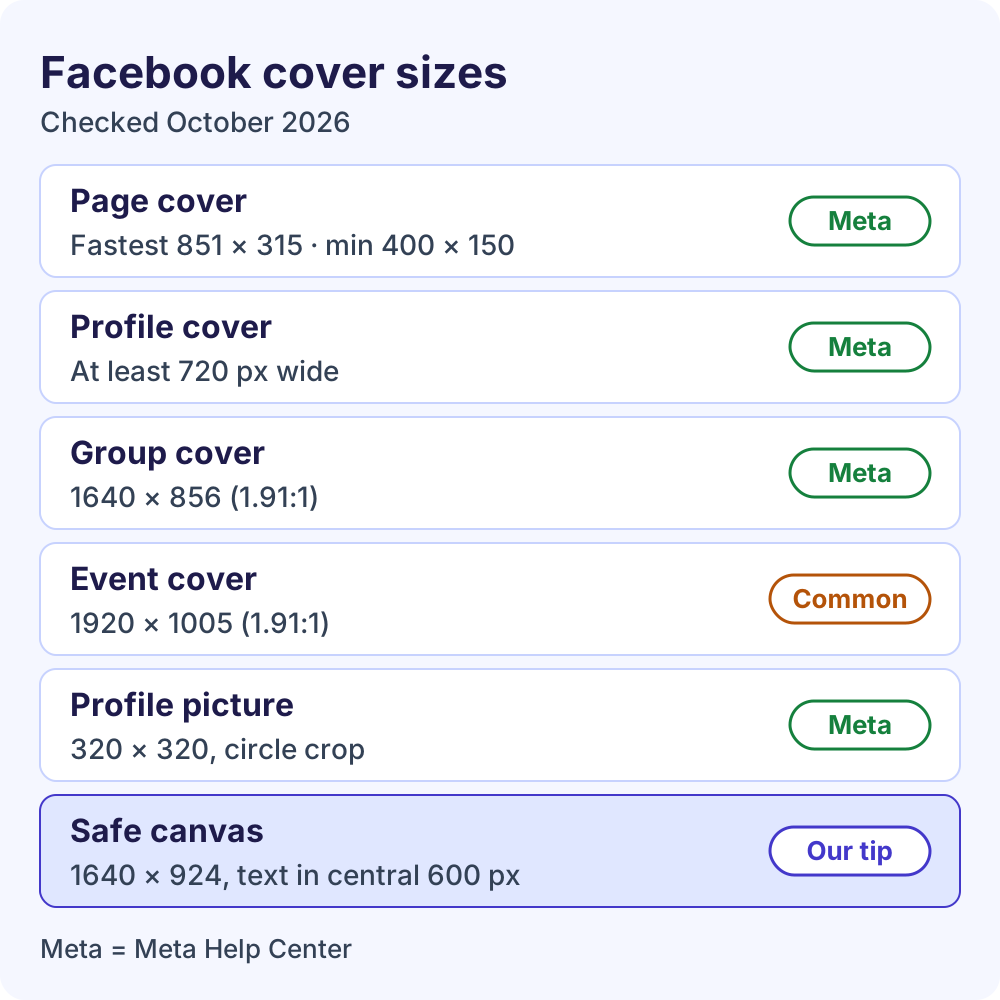
If you only need the Facebook cover size for a Page, profile, group or event, start here. The last column shows whether a number comes from Meta or from common design practice.
| Image | What Meta publishes | Size to design at | Source |
|---|---|---|---|
| Page cover photo | Minimum 400 × 150 px; loads fastest as an 851 × 315 px sRGB JPG under 100 KB; shown at 16:9 on computers and 2.4:1 on mobile | 1640 × 924 px (16:9), essentials in the central 1640 × 600 band | Meta specs + our safe-zone method |
| Personal profile cover | At least 720 px wide | 1640 × 924 px | Meta minimum + our method |
| Group cover photo | 1640 × 856 px (1.91:1) | 1640 × 856 px | Meta |
| Event cover photo | No size published | 1920 × 1005 px (1.91:1) | Common practice |
| Page profile picture | Shows at 176 × 176 px (computers) and 196 × 196 px (smartphones); 320 × 320 px for best quality; cropped to a circle | 320 × 320 px or a larger square | Meta |
| Cover video | Not covered in Meta’s current cover articles | Use a still image | Not verified |
Searching for the Facebook banner size? It’s the same image. “Banner” is just the everyday name for the cover photo, so the Page and profile rows above apply.
Which popular sizes aren’t from Meta?
You’ll see 820 × 312 px (desktop) and 640 × 360 px (mobile) quoted as the Facebook cover size almost everywhere. Meta’s dimensions article contains neither figure; it describes the views as ratios instead. Upload sizes such as 1640 × 624 px and 1640 × 720 px are designer conventions, not Meta rules.
Two numbers often labeled unofficial are in fact Meta’s: 851 × 315 px is its fastest-loading Page cover file, and 1640 × 856 px is its recommended group cover. The popular 1920 × 1005 px event size isn’t in Meta’s Help Center.
Facebook cover photo size in inches and cm
Facebook works in pixels only, so there’s no official size in inches or centimeters. The dpi or ppi value saved in your file doesn’t change how the image looks on screen.
If your design app insists on physical units, use inches = pixels ÷ ppi and cm = inches × 2.54. At 72 ppi, 851 × 315 px is about 11.8 × 4.4 inches (30 × 11.1 cm). At 300 ppi, the 1640 × 924 px canvas is about 5.5 × 3.1 inches (13.9 × 7.8 cm).
Facebook Page cover photo size, explained
The Facebook Page cover photo size rules come from one Meta Help Center article, Facebook Page profile picture and cover photo dimensions. Here is everything it specifies:
- Minimum size: at least 400 pixels wide and 150 pixels tall.
- Fastest-loading file: an sRGB JPG that’s 851 × 315 pixels and under 100 KB.
- Logos or text: a PNG file may give you a better result.
- Layout: the cover left-aligns with a full bleed (edge to edge), at 16:9 on computers and 2.4:1 on mobile devices.
- Overlap: your profile picture partly covers the left side, by about 40 pixels on mobile devices.
- Cropping: the cover may be cropped and resized to fit different screens.
Notice the catch. An 851 × 315 px file is roughly 2.7:1, wider than both display ratios. Because the cover fills its frame edge to edge, the file’s sides get trimmed: a little in the 2.4:1 view and a lot in the 16:9 view, where only about 560 of its 851 pixels across stay visible. That’s why we recommend a taller working canvas below.
Personal profile cover photo size
Personal profiles have their own Facebook cover photo size rule. Meta’s article on adding or changing your cover photo says the image has to be at least 720 pixels wide, with no published height or ratio. The 1640 × 924 px canvas clears that, so one design can serve your profile and your Page. If your profile is half-finished, set up your Facebook profile first.
Facebook cover photo size on mobile: the safe zone
One screen shows your cover at about 16:9 and the other at about 2.4:1, so no single file fits both without cropping. Many guides describe the shapes the other way round (820 × 312 on desktop, 640 × 360 on phones). The method below protects your content in both shapes, whichever description is right.
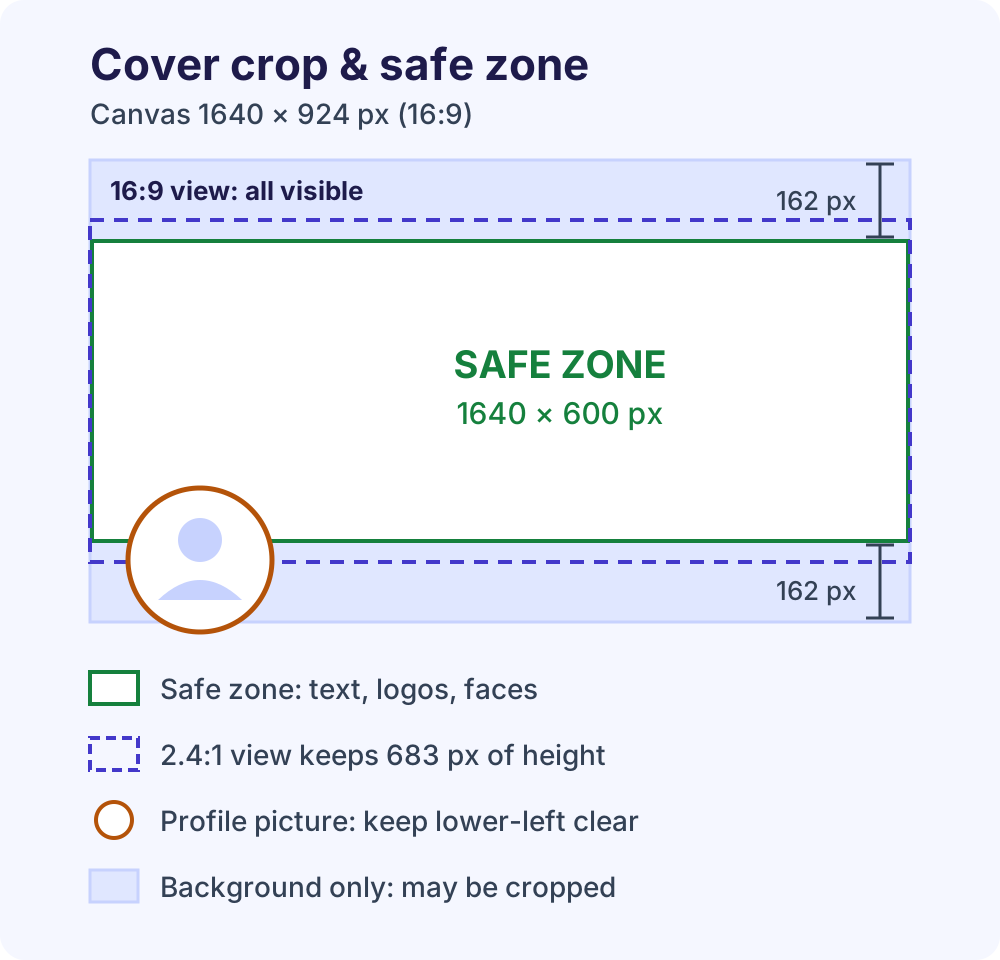
Use a 1640 × 924 px working canvas
- Canvas: 1640 × 924 px, a 16:9 shape. In the 16:9 view, the whole image shows.
- 2.4:1 view: the full width stays, but only 683 px of height (1640 ÷ 2.4).
- Wider layouts: at the 2.7:1 shape of Meta’s 851 × 315 file, visible height drops to about 607 px.
- Safe zone: the central 1640 × 600 band, from 162 px below the top to 162 px above the bottom. Text, logos and faces go here; background fills the rest.
When you set the cover, Meta’s editor lets you drag the image up or down, so you can nudge the band into place if the default crop sits too high or low.
Prefer Meta’s 851 × 315 file? Use this safe zone
If load speed matters more than extra sharpness, use Meta’s Facebook Page cover photo size of 851 × 315 px, or 1702 × 630 px at double size. Keep essentials in the middle 560 px of width (1120 px at double size), leaving about 145 px per side as background the 16:9 view may trim. A double-size file usually exceeds 100 KB, so it may load slightly slower.
Keep the lower-left corner clear
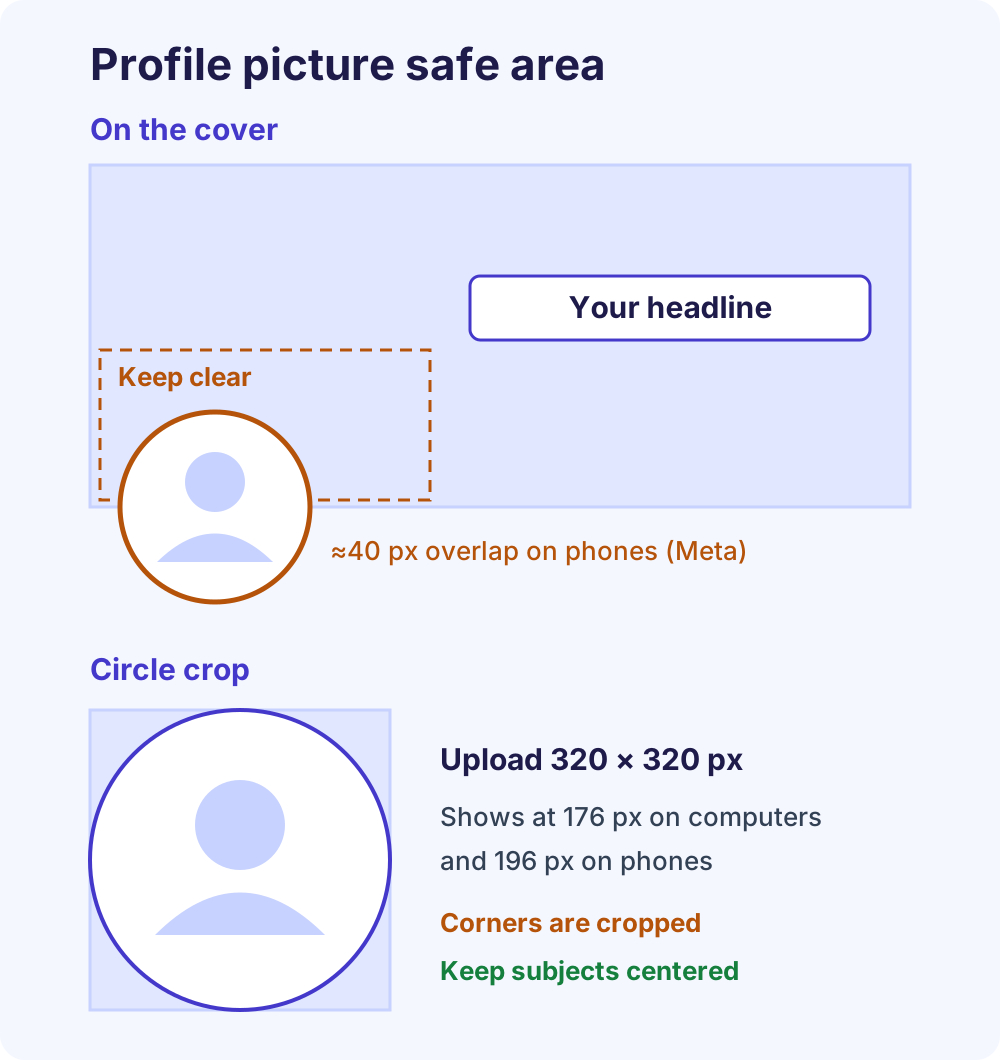
Meta says your profile picture partly covers the left side of the cover, overlapping it by about 40 pixels on mobile devices. That sounds small, but a cover shown 400 px wide at 2.4:1 is only about 167 px tall, so 40 px is nearly a quarter of its height.
Meta doesn’t publish the picture’s exact position, so treat roughly the lower-left quarter of the safe band as a no-text zone. Put your headline in the center or slightly right of it.
Facebook profile picture size
Your profile picture sits on top of the cover, so size the two together. Meta says a Page profile picture displays at 176 × 176 px on computers, 196 × 196 px on smartphones and 36 × 36 px on most feature phones, and should be 320 × 320 px for best quality.
It’s cropped to a circle, which hides the corners of your square. Keep faces and logos inside the circle with some padding, and use PNG for a logo or text. A logo on a clean background reads far better at small sizes than a busy photo; our free background remover cuts one out in your browser and exports PNG or JPG.
Facebook cover size for groups and events
Groups and events use a squarer 1.91:1 shape, so the Facebook Page cover photo size doesn’t carry over. Resize your Page cover before reusing it there.
Facebook group cover photo size
Meta recommends 1640 × 856 px, a 1.91:1 ratio, in its guide to changing a group’s cover photo. Only group admins can upload or change it. On a computer:
- Go to facebook.com/groups and open your group.
- Click Edit at the bottom right of the cover photo.
- Choose where the new image comes from, or select Reposition to adjust the current one.
- Drag the image into position and click Save Changes.
While you drag, the editor shows grey areas. Keep important information out of them, because Meta warns that group visitors on mobile devices may not see the entire image.
Facebook event cover photo size
Meta’s Help Center doesn’t publish a Facebook event cover photo size. Design tools and social media guides widely use 1920 × 1005 px, the same 1.91:1 shape as group covers, so one template can serve both. To add a cover photo to your event on a computer:
- From your Feed, click Events in the left menu (you may need See more first).
- Click Your events, then Hosting, and open your event.
- Click Edit, then Add, and pick a GIF, use the gallery or upload.
- Reposition the image and click Save.
In the app, open Events from the menu, select your event, then tap Manage and Edit. Meta notes you can’t edit the size of a cover photo after it’s added to an event, so crop to 1.91:1 before uploading.
How to upload and reposition your cover
Once your file matches the Facebook Page cover photo size, look for Edit cover photo at the bottom right of the cover. These paths follow Meta’s Page cover photo instructions.
On a computer
- Click your profile photo at the top right, click See all profiles and select your Page.
- Click your Page’s name in the left menu to open it.
- Click Edit cover photo at the bottom right of the cover.
- Choose Upload Photo for a new file, or Select photo to reuse one already on the Page.
- Drag the image up or down to position it, then click Save changes.
For a personal profile, click your profile picture at the top right, click your name, then follow steps 3 to 5. Meta notes all cover photos are public.
No Edit cover photo button? You may not have the right access, and an existing admin can add you as a Page admin. While you’re there, review your Page’s basic and advanced settings.
In the Facebook app
- Tap the menu or your profile picture and switch into your Page.
- Tap your Page’s name to open it.
- Tap Edit cover photo at the bottom right of the cover.
- Tap Upload photo for a new image, or Choose cover photo to reuse one.
- Position the image and save.
For your profile on iPhone, open the menu, tap your name, then tap your cover photo. Choose Upload Photo, Select Photo on Facebook or Create a Collage, drag it into place and tap Save. Labels can differ slightly between app versions.
Why your cover looks blurry and how to fix it
Most blurry covers come from one of six causes, and only some are about the Facebook cover photo size itself. Each has a quick fix.
| Cause | What you see | Fix |
|---|---|---|
| File too small | Soft or pixelated edges | Export at 1640 px wide. The 400 × 150 px minimum is a floor, not a target. |
| Text or logo saved as JPG | Fuzzy halos around letters | Export as PNG, which Meta suggests for logos or text. |
| Over-compressed JPG | Blocky patches, color banding | Re-export from the original at a high quality setting. |
| Wrong color profile | Dull or shifted colors | Convert to sRGB, the profile Meta names. |
| Text too small | Unreadable headline on phones | Make headline text at least 70 px tall on the canvas. |
| Wrong shape | Logo or face cut off | Use the 1640 × 924 px canvas and safe band. |
The text rule is arithmetic. A 1640 px cover shown about 400 px wide on a phone shrinks to roughly a quarter, so 70 px letters become about 17 px on screen. Also re-upload from your original export, never a screenshot or a copy downloaded from Facebook, which has already been processed once.
Facebook cover size and design checklist
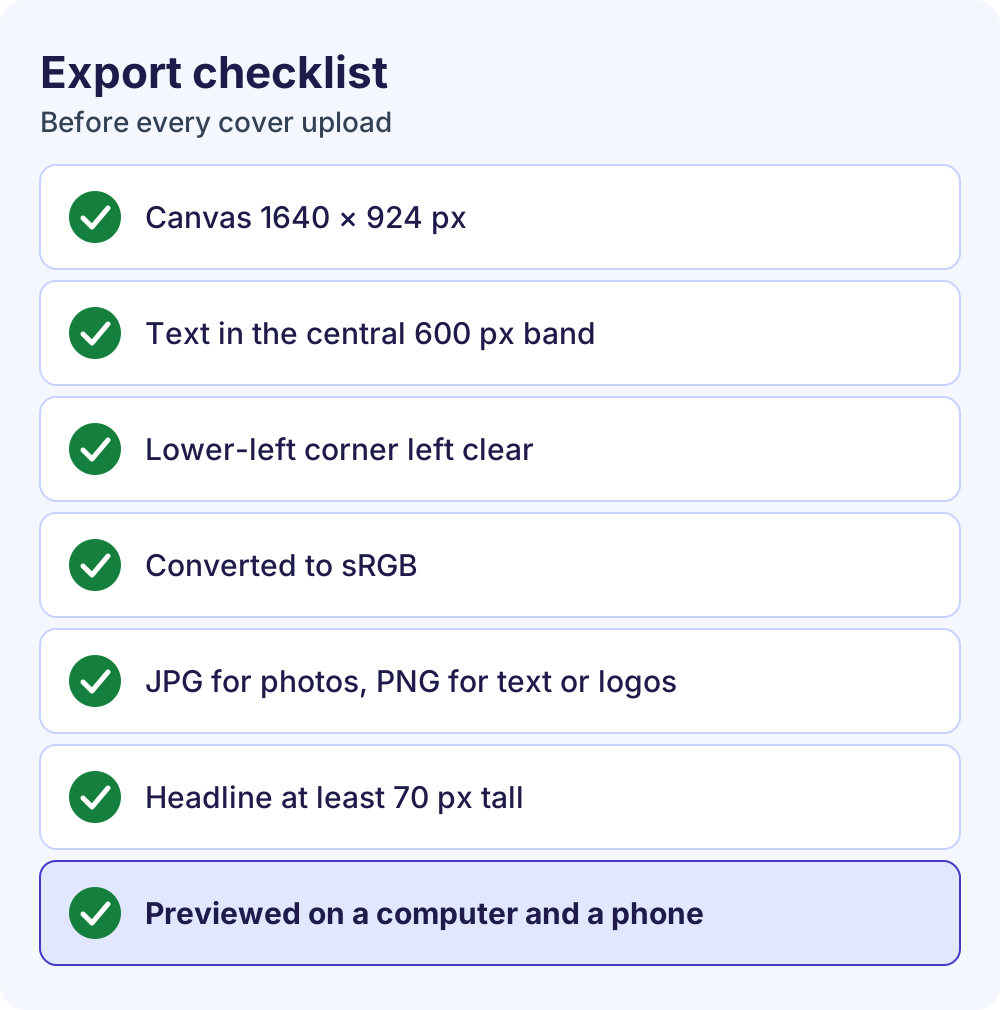
Run through this list before every upload. It takes two minutes and catches most crop and blur problems.
- Canvas: 1640 × 924 px for Page and profile covers, 1640 × 856 px for groups, 1920 × 1005 px for events.
- Text, logos and faces inside the central safe band, with the lower-left corner plain.
- One message only, readable in two seconds on a phone.
- Headline at least 70 px tall, with strong contrast.
- Exported in sRGB: JPG for photos, PNG for text or logos.
- Checked on a computer and a phone after upload.
What to put on your cover
The cover is the largest visual on your Page, so use it to answer “what is this business?” at a glance: your product or storefront, your team at work, or a branded graphic with one short line about what you do.
Make sure any name on the cover matches your Page name; if your brand changed, change your Facebook Page name first. A clear cover also supports your plan to get more followers on Facebook. Seasonal covers work too, as long as you swap them out when the promotion ends.
Common cover photo mistakes
- Putting a phone number or long URL in the image instead of the Page’s clickable contact fields.
- Using a stock photo that has nothing to do with the business.
- Cramming several messages into one cover.
- Reusing a Page cover on a group or event without resizing it to 1.91:1.
Frequently Asked Questions
What size should a Facebook cover photo be?
Meta’s official Facebook cover photo size for a Page is a minimum of 400 × 150 pixels, with an 851 × 315 pixel sRGB JPG under 100 KB loading fastest. For sharper results on high-resolution screens, design at 1640 × 924 pixels and keep text, logos and faces in the central 1640 × 600 band, so both the computer and phone crops keep them.
What is the Facebook cover photo size in inches or cm?
Facebook measures cover photos in pixels, not inches or centimeters, and the dpi saved in your file doesn’t affect how it displays. If your software needs physical units, divide pixels by the ppi: at 72 ppi, 851 × 315 px is about 11.8 × 4.4 inches, or 30 × 11.1 cm. Set the canvas in pixels whenever possible.
Is the Facebook banner size the same as the cover photo size?
Yes. “Banner” is the informal name for the cover photo, the wide image across the top of a Page or profile, so the Facebook banner size follows the same rules: a 400 × 150 px minimum, 851 × 315 px for the fastest load, and a 1640 × 924 px canvas for a crop-proof safe zone. Groups and events use different sizes.
What is the Facebook group cover photo size?
Meta recommends 1640 × 856 pixels, a 1.91:1 ratio, for Facebook group cover photos. Only group admins can upload or change the cover. When you reposition it, keep important information out of the grey areas the editor shows, because Meta warns that visitors on mobile devices may not see the entire image.
What is the Facebook event cover photo size?
Meta’s Help Center doesn’t publish a Facebook event cover photo size. Most design tools and guides use 1920 × 1005 pixels, a 1.91:1 ratio that matches group covers. Crop your image before uploading, because Meta notes you can’t edit the size of a cover photo once it’s been added to an event, then check the result on a phone.
Why does my Facebook cover photo look blurry?
Usually the file was too small and got enlarged, text or a logo was saved as a JPG, or the image wasn’t in the sRGB color profile. Re-export from the original at 1640 pixels wide, save text-heavy designs as PNG (Meta suggests PNG for logos and text), use sRGB, and keep headline text large enough to read on a phone.
Can I use the same cover photo on my profile and my Page?
Yes, as long as it meets both Facebook cover size rules. Meta requires personal profile covers to be at least 720 pixels wide, while Page covers need at least 400 × 150 pixels. A 1640 × 924 pixel image with its key content in the central band satisfies both. Group and event covers use a squarer 1.91:1 shape, so resize the design for those.
Can I use a video as my Facebook cover?
Meta’s current Help Center articles on Page and profile covers only describe photos, and we couldn’t find official cover video specs there. Older third-party guides list video lengths and sizes from earlier Page layouts, so treat them as unconfirmed. If the Edit cover photo menu on your Page doesn’t offer a video option, use a still image on the 1640 × 924 canvas.
Next steps
Now that you know the right Facebook cover photo size, build your canvas at 1640 × 924 px, keep everything important in the central band, and upload from a computer, where repositioning is easiest. Starting from zero? Create a Facebook business Page first. When you’re ready to promote it with paid campaigns, our Meta Ads management service can plan and run them.
Specs checked in October 2026 against Meta’s Help Center: Page profile picture and cover photo dimensions and group cover photos.