This guide shows Page managers how to change Facebook Page name details on a computer or in the Facebook app for iPhone and Android. You’ll get Meta’s current steps (checked October 2026), the naming rules that decide whether a request is approved, what happens to your username and web address, and fixes for when the Name option is missing or your request keeps getting rejected.
How to change your Facebook Page name
To change your Facebook Page name, switch into the Page, open Settings & privacy, then Settings, Page setup and Name. Click Edit next to the Page name, type the new name, select Review change and submit the request. Meta reviews every request against its Page name guidelines before the new name appears. You need Facebook access to the Page, not task access, and the change doesn’t affect your username or URL.
In this guide
In the app, the last button is Submit for approval instead of Request change. The sections below cover each device, the rules Meta applies and what to do when the change won’t go through.
Who can change a Facebook Page name?
Only people with Facebook access to the Page can request a new name. Meta says people with task access can’t request a name change, and task access doesn’t let them switch into the Page on Facebook at all.
| Access type | Can switch into the Page? | Can request a new name? |
|---|---|---|
| Facebook access with full control | Yes | Yes. Page information and all settings are full-control permissions. |
| Facebook access with partial control | Yes | Not listed. Meta lists Page settings under full control only. |
| Task access (Meta Business Suite, Ads Manager) | No | No. Meta says task access can’t request a name change. |
Meta’s guide to Facebook Page access places editing Page information and other settings under full control. So if you have partial control and can’t see the Edit button, ask someone with full control to make the change or to upgrade your access.
If you’re used to the older Page roles, think of full control as the old admin role. Whoever holds it can follow our guide on how to add an admin to a Facebook Page to give you the access you need.
Change Facebook Page name on a computer
On a computer, a Facebook Page name request takes about a minute once you’re switched into the Page. These are the steps in Meta’s Help Center article Change your Facebook Page’s name for the current Pages experience:
- Log in to Facebook and click your profile photo in the top right.
- Click See all profiles, then select the Page you want to rename.
- Click the Page’s photo in the top right.
- Click Settings & privacy, then Settings.
- Click Page setup, then Name.
- Under General Page settings, click Edit next to your current Page name.
- Type the new name and click Review change.
- Enter your Facebook password and click Request change.
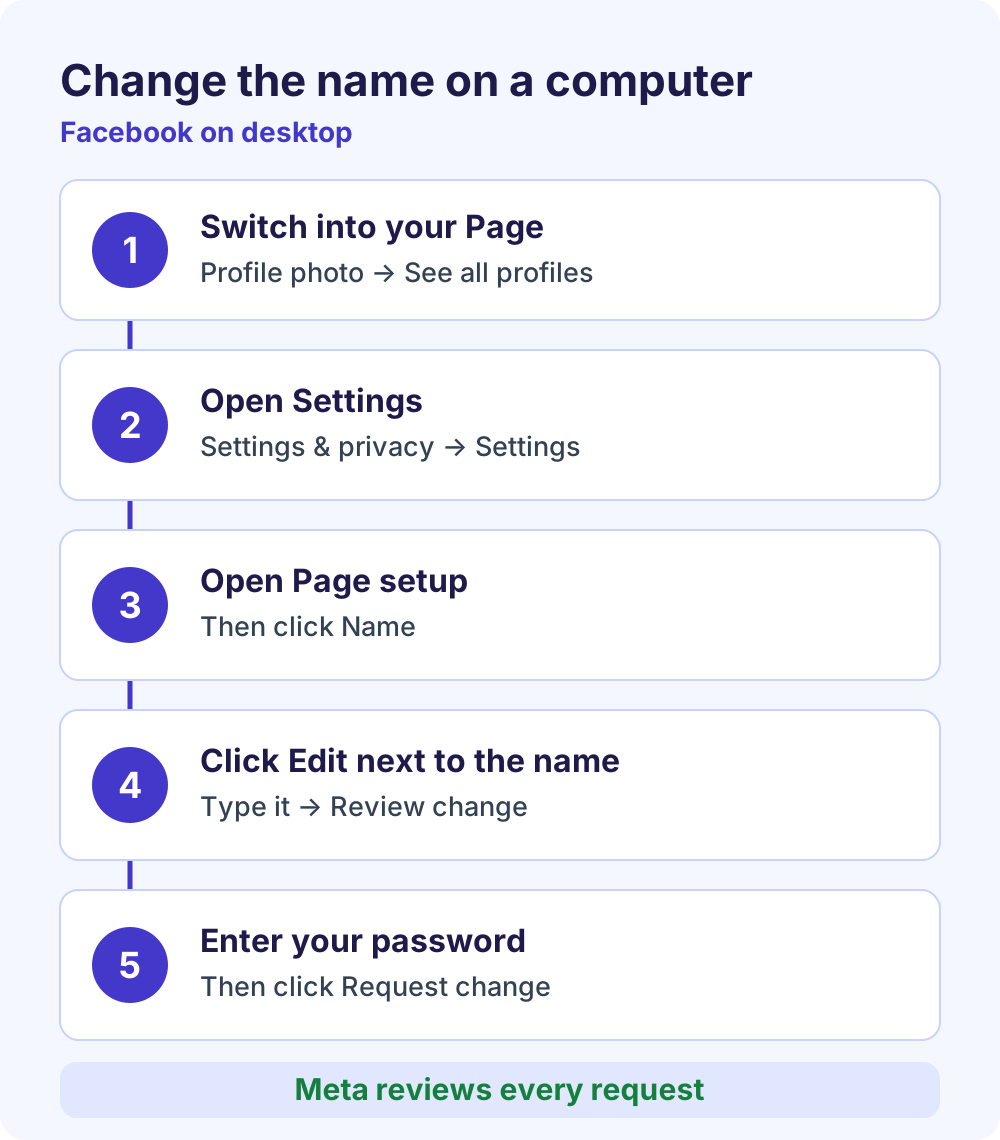
The password step is a security check. Because the new name is only a request at this point, keep using the old name in announcements until the new one actually shows on your Page.
While you’re in Settings, it’s worth checking the rest of your Page details too. Our Facebook Page settings guide explains the other basic and advanced options.
Change page name on Facebook in the mobile app
In the Facebook app for iPhone and Android, the path mirrors desktop and the final button is Submit for approval. Meta’s Help Center lists these steps for both apps:
- Tap Menu or your profile picture.
- Tap the Options dropdown, then select the Page you want to switch into.
- Tap Menu again.
- Scroll down, tap Settings & privacy, then tap Settings.
- Tap Page setup, then tap Name.
- Update the Page name and tap Review change.
- Tap Submit for approval.
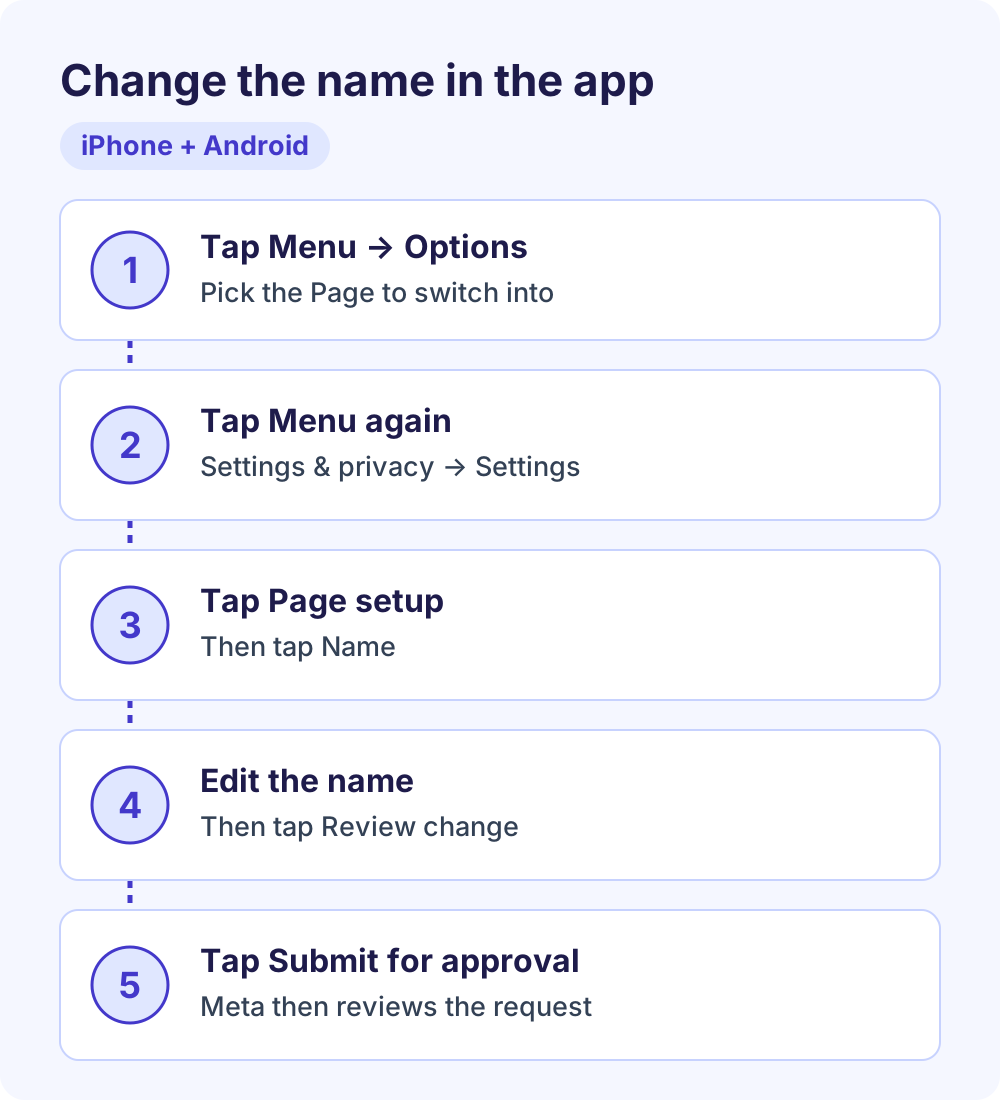
Meta’s Help Center places the Menu button at the top left, but its position can differ between iPhone and Android and between app versions. If you can’t spot it, tap your profile picture instead, which opens the same menu.
iPad, Facebook Lite and mobile browsers
Meta’s Help Center has separate tabs for iPad, Facebook Lite and mobile browsers, and menus there can be arranged differently. If you can’t find Page setup in one of them, switch to the main Facebook app or a computer, where the steps above are documented.
Facebook Page name rules: what gets approved
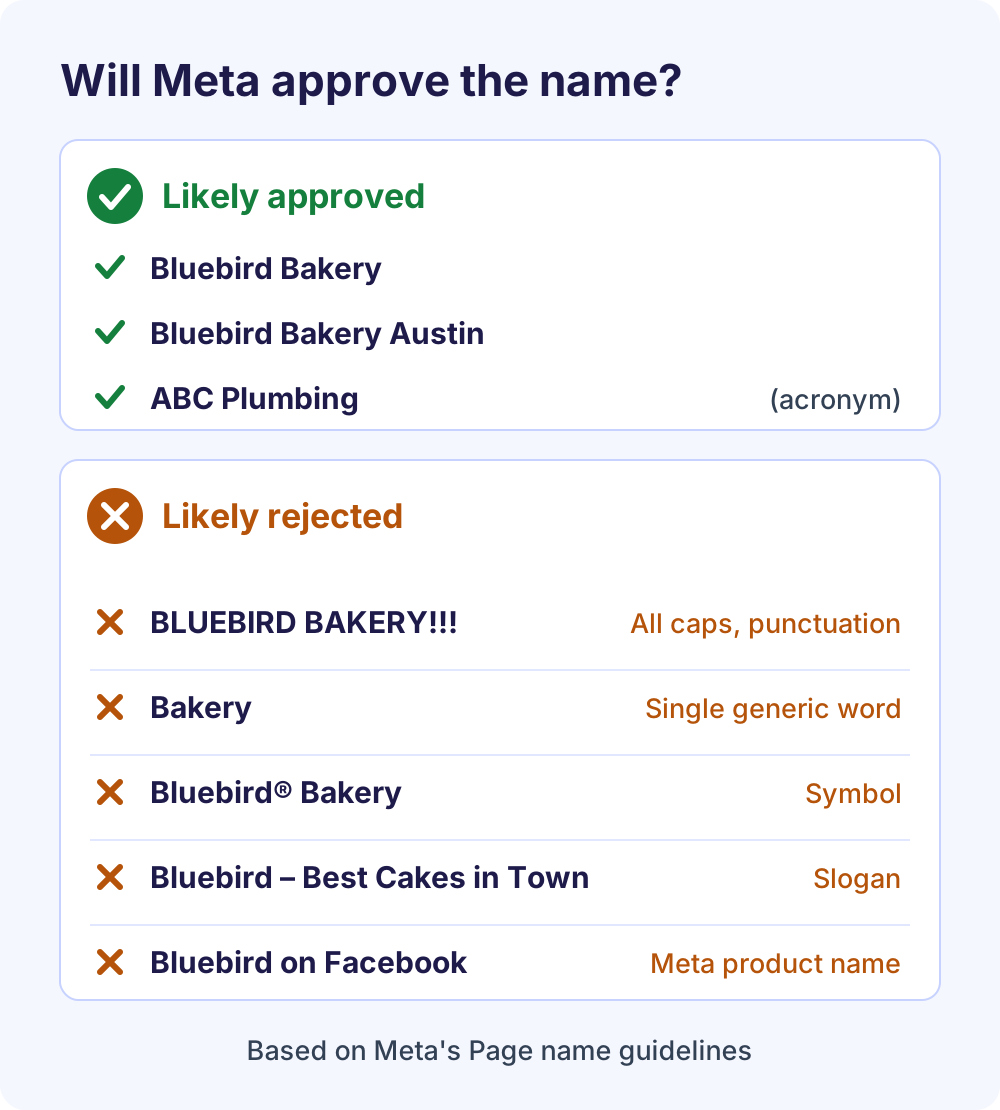
Meta approves a Facebook Page name when it accurately reflects the Page and follows the naming guidelines in its Help Center. Most rejections come from a short list of avoidable problems.
According to Meta’s guidelines for Facebook Page names, a Page name can’t include:
- Abusive terms or words that violate someone else’s rights, such as another company’s trademark.
- The word “Official”, unless it really is the official Page for that brand, place, organization or public figure.
- Improper capitalization. All caps isn’t allowed except for acronyms, so “SEO” is fine but “BLUEBIRD BAKERY” isn’t.
- Symbols or unnecessary punctuation, such as ® or a row of exclamation marks.
- Descriptions or slogans. Taglines like “best coffee in town” belong in your bio or About section, not in the name.
- Any variation of “Facebook” or “Meta”, or the names of other Meta products.
A name also can’t be only a single general word, such as “Pizza,” or only a general location, such as “New York.” Meta makes exceptions for organizations that represent a place, like a city’s mayor’s office, and for names that accurately describe the Page, such as a tourism board’s destination Page.
Extra rules when you rename an existing Page
Renaming adds one more test. Meta’s Page policies say a name change must not create a misleading or unintended connection and must not substantially change what the Page is about. You also can’t use a rename to turn a product Page, or a generic or opinion Page, into a brand Page.
Meta’s Help Center adds that it limits significant name changes that could make people feel misled. A typo fix or an added city keeps the Page’s subject the same, which is what these rules ask for. Renaming a Page to an unrelated brand is the kind of change they’re written to stop.
How long does approval take, and how often can you change it?
Meta doesn’t publish a fixed review time or a fixed waiting period between Facebook Page name changes. It does say that a recent name change, by you or anyone else with Facebook access, can stop you from requesting another one for now.
Review time
Every request goes to Meta for approval before the new name shows publicly. Meta doesn’t give a timeframe for Pages. Small corrections are often decided quickly, but some requests take several days, so submit well before a launch date, new signage or an ad campaign that uses the new name.
Is there a 60-day limit?
You’ll often read that an approved Page name locks you in for 60 days. Meta documents a 60-day limit for personal profile names: you can change your own name on Facebook every 60 days. Its Page name article doesn’t give a number. It only says the option may not appear if the name was changed recently.
So treat every approved Page name as one you may have to keep for a while. Check spelling, spacing and capitalization twice before you submit, and get sign-off from anyone else who manages the brand.
| Question | What Meta’s Help Center says (October 2026) |
|---|---|
| Who can request a new Page name? | People with Facebook access to the Page, not task access |
| Where is the setting? | Settings & privacy, Settings, Page setup, Name |
| Is the request reviewed? | Yes, it’s submitted for approval |
| How long does review take? | No timeframe published |
| How often can you change it? | No fixed limit published for Pages; a recent change can block a new request |
| Does the username or URL change? | No, the username stays the same |
| Personal profile names | A separate rule: once every 60 days |
Does a new Page name change your username or URL?
No. Meta states that changing your Facebook Page name won’t affect its username, and the username is what appears in your Page’s web address (facebook.com/yourusername). Links to your Page keep working because nothing in them changes.
| Setting | What it is | Changes when you rename? | How to edit it |
|---|---|---|---|
| Page name | The display name at the top of your Page | Yes, after approval | Page setup, Name, then Review change |
| Username | The @handle shown under your Page name | No | Page setup, Name, Edit next to the username (computer only) |
| Web address | facebook.com/ plus your username | Only if you change the username | Follows the username |
If the old username no longer fits, you can change your Page’s username and web address separately. Meta says you can only do this while logged in on a computer, the username must be available, and usernames can contain only letters, numbers and periods.
Changing the username changes your Page’s web address, so update your website, email signature, QR codes and printed materials at the same time. For personal profiles, Meta warns that you may not be able to get an original username back after changing it, so don’t release a handle you might want later.
Can’t change your Facebook Page name? Troubleshooting
When the Name option is missing, greyed out or your request keeps failing, the cause is almost always access, timing, a Page restriction or the name itself. Start with the decision tree, then use the fixes below.
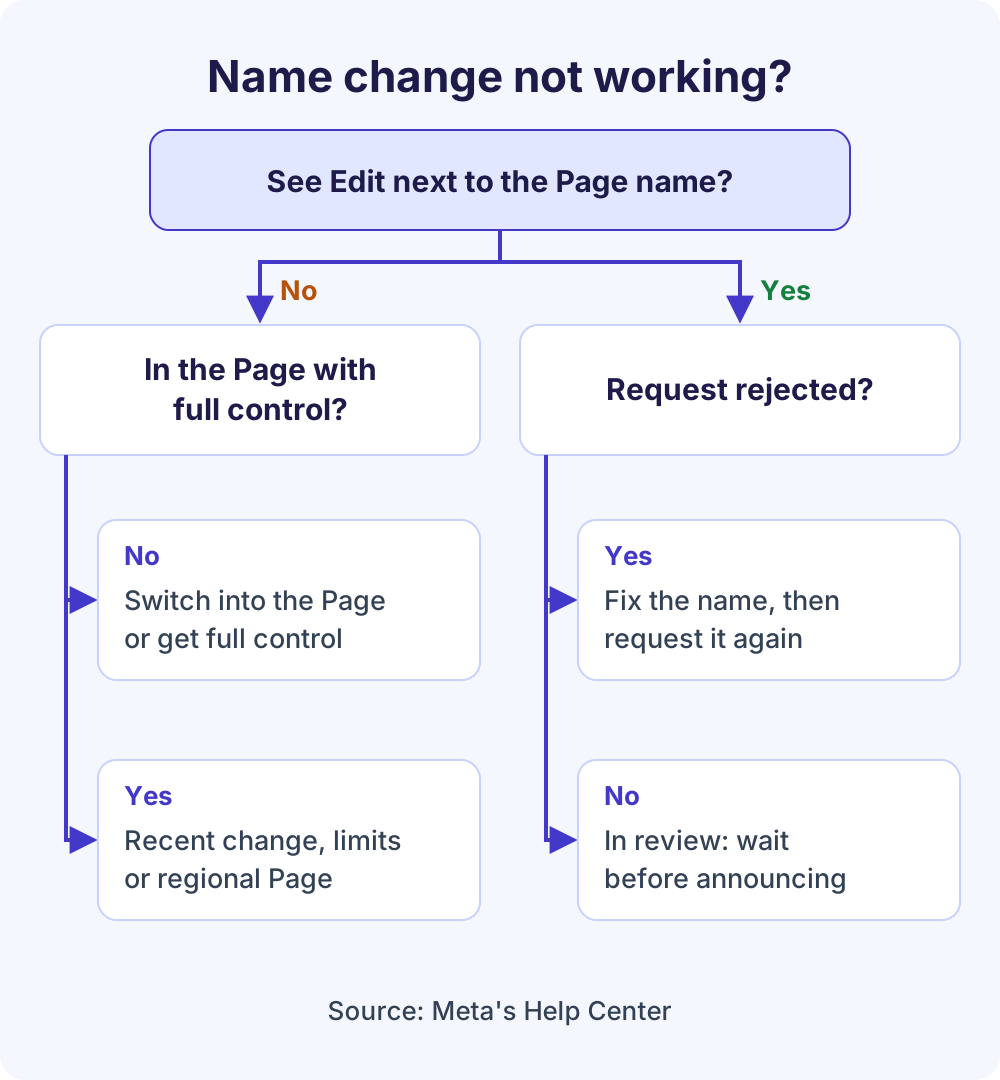
The Name option or Edit button is missing
- You’re still on your personal profile. Settings opened from your own profile change your personal name, not your Facebook Page name. Switch into the Page first through See all profiles.
- Your access doesn’t allow it. Task access can’t request name changes, and Page information settings are a full-control permission. Ask a person with full control for help.
- The name was changed recently. If you or anyone else with Facebook access renamed the Page recently, the option can disappear for a while. Meta doesn’t say how long, so wait and check again later.
- There are limits on your Page. Meta can restrict Pages that break its Community Standards or Page policies. Check your Page’s notifications and status for warnings, and resolve or appeal them first.
- It’s a regional Page. Meta says you can’t change the name of a regional Page that’s part of a global Page. Talk to whoever manages the global Page structure.
Your name change was rejected
A rejection means Meta found a problem with the Facebook Page name itself, not with the steps. Compare your new name against the rules above, paying special attention to capitalization, symbols, slogans, generic words and anything that changes what the Page is about.
If the Name option is still available, request a plainer version, for example the exact business name without a tagline. If your business genuinely rebranded, make sure the new name already appears on your website and in the Page’s bio, so the change matches what people see elsewhere.
Your request is still pending
Meta’s Help Center doesn’t describe a way to speed up a Facebook Page name review. Leave the request alone, avoid announcing the new name until it shows on the Page, and keep running the Page as usual while you wait.
Your Page is verified or has a large following
Meta’s Page name article doesn’t list separate steps for verified Pages. When Meta launched Meta Verified for businesses, it said verified businesses can’t freely change details such as their name and must go through verification review again to do so. If your Page has a badge, contact the support that comes with your subscription before a rebrand.
Meta doesn’t publish different Facebook Page name rules based on follower count. The same policy applies to every Page: the new name must not mislead people or change what the Page is about.
You changed a name in Meta Business Suite
Meta’s Help Center documents Page name changes through the Page’s own settings on Facebook. If you renamed something in Meta Business Suite, such as your business portfolio, and the Page still shows its old name, request the change from Page setup, then Name, as described above.
Small tweak or full rebrand?
A Facebook Page name correction that keeps the Page’s subject, such as fixing a typo or adding a location (“Bluebird Bakery” to “Bluebird Bakery Austin”), fits Meta’s rules well. A rename to an unrelated name is where its policy against misleading name changes comes in.
If your business has genuinely rebranded, put the new name on your website, signage and the Page’s bio before you submit. Consistent public information makes it clear the Page still represents the same business.
If the Page’s subject has changed completely, for example you closed a bakery and opened a fitness studio, a rename runs against Meta’s rule that name changes must not substantially change what a Page is about. In that case, create a new Facebook business Page for the new business and use the old Page to point followers to it. Once your followers have moved, you can deactivate or delete the old Page.
What to update after the new name is approved
Approval only changes your Facebook Page name. Nothing else updates automatically, so work through this checklist so customers aren’t confused:
- Username (@handle). Update it if it still reflects the old name, then update every link to the Page.
- Profile picture and cover photo. Replace graphics that show the old name or logo. Our Facebook cover photo size guide has the current dimensions.
- Bio and About details. Search the intro, description and contact details for the old name.
- Linked Instagram account. Instagram has its own name and username settings, so check them separately.
- Ads and scheduled posts. Your ads show your Page’s name, so review active creatives, captions and scheduled content that mention the old brand.
- Your website, email signature and Google Business Profile. Match the name everywhere customers find you.
- An announcement post. Tell followers the Page is the same business under a new name. To grow the audience after a rebrand, see how to get more followers on Facebook.
Frequently Asked Questions
Can I change my Facebook Page name?
Yes, if you have Facebook access to the Page. Switch into the Page, go to Settings & privacy, Settings, Page setup and Name, then edit the name and submit it. Meta reviews the request against its Page name guidelines. People with only task access, such as those who manage the Page from Meta Business Suite or Ads Manager, can’t request a name change.
How long does a Facebook Page name change take to be approved?
Meta doesn’t publish a fixed review time for Page names. Small corrections are often decided quickly, while other requests can take several days. The old name stays on the Page until the new one is approved, so plan any rebrand announcement, ads or printed materials around the approval rather than the day you submit.
How often can you change a Facebook Page name?
Meta doesn’t publish a fixed limit for Pages. Its Help Center says the option may not appear if you or someone else with access changed the name recently. The widely quoted 60-day rule is Meta’s documented limit for personal profile names, so don’t assume it applies to your Page either way.
Will I lose followers, likes or reviews if I change my Page name?
No. Renaming edits your existing Page rather than creating a new one, so followers, likes, reviews and posts stay attached. Only the displayed Facebook Page name changes once Meta approves it. Tell your audience about the change with a short post so existing followers recognize the new name when it appears in their feeds.
Does changing my Facebook Page name change the URL?
No. Meta states that changing a Page’s name won’t affect its username, and the username is what forms your Page’s web address. If you want a new address to match the new name, change the username separately while logged in on a computer, then update every link that points to the old address.
Why can’t I change my Facebook Page name?
The usual reasons are that you haven’t switched into the Page, your access doesn’t include Page settings, the name was changed recently, the Page has restrictions, or it’s a regional Page within a global Page. If the option appears but requests keep failing, the new name probably breaks one of Meta’s naming rules.
How do I change a Facebook business Page name on my phone?
In the Facebook app, tap Menu, use the Options dropdown to switch into your business Page, then tap Menu again. Go to Settings & privacy, Settings, Page setup and Name. Edit the name, tap Review change, then tap Submit for approval. Business Pages use the same steps as any other Facebook Page.
Can I use “Official” in my Facebook Page name?
Only if the Page really is the official Page of that brand, place, organization or public figure. Meta’s Page name guidelines don’t allow “Official” otherwise. Fan Pages and resellers should choose a name that makes the relationship clear without implying they are the brand itself, because the new name must not mislead people.
Next steps
Once your new Facebook Page name is live, refresh your cover image and username so the whole Page matches, then tell your followers. When the rebranded Page is ready to promote, our Meta Ads management service can plan and run Facebook and Instagram campaigns around the new name.
Photo by Brad Starkey on Unsplash