
JSON-LD vs Microdata is one of the few structured data questions with a clear answer, and the answer has not changed since Google started recommending JSON-LD. Yet most of the sites we audit still carry Microdata from an old theme, a mix of both, or a JSON-LD block nobody has looked at in years. This guide explains what each format is, shows the same markup written both ways, and covers the cases where Microdata is still the right call and how to migrate when it is not.
JSON-LD vs Microdata: the short answer
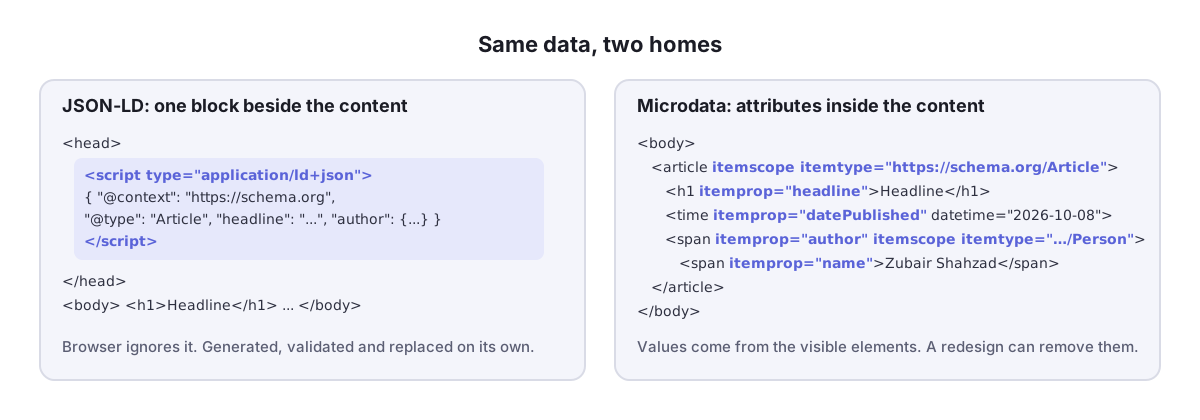
JSON-LD and Microdata are two ways to add schema.org structured data to a web page. JSON-LD is a standalone JSON block in a script tag, separate from the visible HTML; Microdata is a set of attributes added to the HTML elements themselves. Google reads both and recommends JSON-LD because it is easier to generate, validate and maintain. Use JSON-LD for new work; keep Microdata only where it already works.
Both formats express exactly the same vocabulary, so there is no schema.org type you can describe in one and not the other, and no rich result that is only available to one. The difference is purely in how the data is attached to the page, and that difference is what decides which one is easier to keep correct.
In this guide
What is JSON-LD?
JSON-LD stands for JavaScript Object Notation for Linked Data. It is ordinary JSON with two special keys: @context, which says which vocabulary the terms come from (for us, always https://schema.org), and @type, which says what kind of thing the object describes. The block sits inside <script type="application/ld+json">, anywhere in the <head> or <body>, and the browser ignores it completely. Only crawlers read it.
<script type="application/ld+json">
{
  "@context": "https://schema.org",
  "@type": "Article",
  "headline": "JSON-LD vs Microdata: Which Schema Format Should You Use?",
  "image": "https://softlearnhub.com/wp-content/uploads/json-ld-vs-microdata-code.jpg",
  "datePublished": "2026-10-08",
  "author": { "@type": "Person", "name": "Zubair Shahzad" },
  "publisher": {
    "@type": "Organization",
    "name": "Soft Learn Hub",
    "logo": { "@type": "ImageObject", "url": "https://softlearnhub.com/logo.png" }
  }
}
</script>
Because the block is self-contained, you can generate it from a database, a form or a template without touching the page layout, and you can validate it on its own: paste it into our Schema Validator and every property is checked against the vocabulary and Google’s required fields in one pass. Nested objects (the Person inside the Article, the ImageObject inside the Organization) read exactly the way the data is structured.
What is Microdata?
Microdata is an HTML specification that adds three attributes to ordinary elements. itemscope marks an element as describing a thing, itemtype says what kind of thing (a schema.org URL), and itemprop on any descendant marks that element’s content as a property of it. The value of the property is whatever the element already contains: the text of a <span>, the href of a link, the src of an image, the datetime of a <time> element.
<article itemscope itemtype="https://schema.org/Article">
  <h1 itemprop="headline">JSON-LD vs Microdata: Which Schema Format Should You Use?</h1>
  <img itemprop="image" src="https://softlearnhub.com/wp-content/uploads/json-ld-vs-microdata-code.jpg" alt="...">
  <time itemprop="datePublished" datetime="2026-10-08">8 October 2026</time>
  <span itemprop="author" itemscope itemtype="https://schema.org/Person">
    <span itemprop="name">Zubair Shahzad</span>
  </span>
  <div itemprop="publisher" itemscope itemtype="https://schema.org/Organization">
    <meta itemprop="name" content="Soft Learn Hub">
    <div itemprop="logo" itemscope itemtype="https://schema.org/ImageObject">
      <meta itemprop="url" content="https://softlearnhub.com/logo.png">
    </div>
  </div>
</article>
Notice the <meta itemprop> elements for the publisher. The publisher’s name and logo are not visible on the page, so Microdata needs hidden elements to carry them, which is awkward and, taken too far, starts to look like the hidden content Google’s policies warn against. Microdata is at its best when every property is something a visitor can already see.
And RDFa?
RDFa is the third format Google accepts. Like Microdata it lives in HTML attributes (vocab, typeof, property), but it comes from the W3C’s linked-data world and can mix vocabularies more freely. Outside Drupal, which emits it by default, and some academic and government publishers, it is rare, and nothing in Google’s documentation favours it. If you are choosing today, the real contest is JSON-LD vs Microdata, and RDFa is only relevant if your platform already produces it.
JSON-LD vs Microdata side by side
| JSON-LD | Microdata | |
|---|---|---|
| Where it lives | One <script> block, head or body | Attributes on the HTML elements that show the content |
| Google’s recommendation | Recommended format | Supported |
| Bing, Yandex, AI crawlers | Supported | Supported |
| Ties data to visible content | No; you must keep it in sync yourself | Yes, by construction |
| Hidden or off-page properties | Natural (publisher logo, sameAs, IDs) | Needs <meta> or <link> elements |
| Nested objects | Plain nested JSON | Nested itemscope, follows the DOM tree |
| Generated by | Any template, CMS plugin, tag manager, generator form | Theme templates only |
| Validation | Paste the block into any validator | Validate the whole page; errors depend on surrounding HTML |
| Typical failure | JSON syntax error drops the whole block | A redesign silently removes attributes |
| Effect on page weight | One extra script, usually 1 to 5 KB | Slightly more markup on existing elements |
| Can be injected by JavaScript | Yes; Google renders it (with caveats) | Yes, but rarely done |
| Best for | Nearly everything in 2026 | Legacy themes, data that must mirror visible content |
Why Google recommends JSON-LD
Google’s introduction to structured data says it recommends JSON-LD “where possible” and gives the reason: it is easier to implement and maintain at scale. In practice that comes down to four things.
- Separation from layout. Designers can restyle the page without breaking the markup, and SEOs can change the markup without touching templates.
- Complete graphs. Modern SEO plugins emit one
@graphthat links the WebSite, Organization, WebPage, Article, Person and Breadcrumb together with@idreferences. Expressing those cross-references in Microdata is possible but nobody enjoys it. - Tooling. Generators, validators and tag managers all work on JSON-LD natively. A form like our Schema Markup Generator can produce a complete, valid block in a minute; there is no equivalent for Microdata because the output would have to be your page’s HTML.
- Fewer accidental errors. Microdata breaks when someone moves a
<div>; JSON-LD breaks when someone types a bad comma, and a validator catches the comma. Our guide to structured data errors lists both kinds.
Bing reads both formats equally, and the AI crawlers behind ChatGPT search, Perplexity and Google’s AI Overviews extract JSON-LD cleanly because it is already machine-readable JSON. Nothing about Microdata is penalised; JSON-LD is simply where the ecosystem invests.

When Microdata still makes sense
JSON-LD vs Microdata is not a fight we pick on existing sites. We would not add Microdata to a new site, but we also do not rip it out on sight. It earns its place in three situations.
- It already works. A theme emitting valid Microdata Breadcrumbs, Products or Articles that pass the Rich Results Test is not a problem to solve. Migrate when you redesign, not before.
- Data that must mirror the visible page. Prices, stock status, event dates and review scores change constantly, and Microdata reads them from the same element the visitor sees, so they cannot drift apart. With JSON-LD you have to make sure the template fills both from the same variable.
- Platforms that only expose templates. Some older storefronts and static site builders let you edit HTML but offer nowhere sensible to inject a script block. Attributes on existing elements are the pragmatic route.
The one thing to avoid is describing the same item in both formats on the same page. Google treats the two as separate items, so a Microdata Product and a JSON-LD Product become two Products, with duplicate-item warnings and a coin-flip over which one Google trusts. Different items in different formats (JSON-LD Organization from your plugin, Microdata Breadcrumb from your theme) are fine, if untidy.
Where to put JSON-LD schema markup
Google accepts the script in the <head> or the <body>, and in our testing it makes no difference to detection. Three practical rules do matter. Put it in the server-rendered HTML where you can; Google renders JavaScript, but a block injected late by a tag manager is more fragile and other crawlers may never see it. Keep one block per logical item, or one @graph containing them all, rather than scattering a dozen tiny blocks. And never wrap the script in an HTML comment or a conditional that the live page might not evaluate; the number of “my schema disappeared” tickets that come down to a commented-out block is not small.
Migrating from Microdata to JSON-LD
- Inventory what the Microdata currently says. Run a representative page of each template through the Schema Validator in URL mode; it extracts Microdata as well as JSON-LD and lists every type and property found. Save the report.
- Check what your SEO plugin already emits. On WordPress, Rank Math or Yoast is probably already producing JSON-LD for Article, Breadcrumb and Organization. If so, the theme’s Microdata for those types is a duplicate, and migration is mostly deletion.
- Rebuild the gaps in JSON-LD. Anything the plugin does not cover (Product, Event, Course, LocalBusiness details) goes into a JSON-LD block fed from the same data the template uses for the visible content. The generator gives you the structure; your template fills the values.
- Validate the new block before removing the old attributes. Required fields, value types and dates all checked; see our schema markup validation guide for the checklist.
- Remove the Microdata attributes (
itemscope,itemtype,itemprop) from the templates in one release, so the page never carries both formats for the same item. - Re-test the live URL in the Rich Results Test, compare against the saved report, and watch the Search Console Enhancements reports for the next crawl cycle. Item counts should stay flat; if a type disappears, the plugin and your block disagree about something.

Common JSON-LD mistakes, and their Microdata twins
Each side of JSON-LD vs Microdata fails in its own way. Knowing the pattern tells you where to look when a validator or Search Console reports a problem, and most of these take under a minute to fix once you can see them.
- A string where an object belongs.
"author": "Zubair Shahzad"fails Google’s check; it wants{"@type": "Person", "name": "Zubair Shahzad"}. The Microdata twin is anitemprop="author"on a plain span with no nesteditemscope, which produces the same bare string. - Nested objects without
@type. A publisher or offer object with properties but no type is an “unnamed item”. In Microdata it is anitemscopewithout anitemtype. - Relative URLs.
"image": "/uploads/photo.jpg"is rejected; use the fullhttps://URL. Microdata reads thesrcorhrefas written, so a relative path in the HTML becomes a relative path in the data. - Broken JSON. A trailing comma, curly quotes pasted from a document, or a comment turns the whole block into “unparsable structured data”. Microdata has no equivalent; a stray attribute only drops one property.
- Properties attached to the wrong item. In JSON-LD this is a property that lands outside its object after a bracket slip. In Microdata it is the more common case of a missing nested
itemscope, so the author’snamebecomes the article’sname. - Dates and prices as humans write them.
"datePublished": "8 October 2026"and"price": "$19.99"both fail. Use ISO 8601 dates and plain numbers in both formats; in Microdata the<time datetime="2026-10-08">element carries the machine value while showing the human one. - Editing in a visual editor. WordPress converts straight quotes to curly ones when a JSON-LD block is saved through the visual tab of a Custom HTML block. Paste once, in the code view, and leave it. Microdata survives the visual editor better, but not a theme change.
The validator catches every JSON-LD item on this list and most of the Microdata ones. The exception is the “wrong item” problem, which produces technically valid markup with the wrong meaning; for that you have to read the extracted items and check they say what you intended.
How search engines and AI crawlers read each format
Google parses JSON-LD, Microdata and RDFa into the same internal graph before it decides anything about rich results, so the format never changes the outcome for a given set of data. Bing does the same, and both treat the page’s visible content as the truth the markup must agree with. The AI crawlers that feed ChatGPT search, Perplexity and Google’s AI Overviews work from the rendered HTML, and JSON-LD hands them a clean, machine-readable summary of the page (type, headline, author, date, organisation) without parsing the layout.
The practical JSON-LD vs Microdata difference is extraction effort and robustness, not ranking. A JSON-LD block survives a redesign, a Microdata block survives a visual-editor edit, and neither survives a tag manager that fails to fire. Whichever you use, the page has to be crawlable and the markup has to be in the HTML the crawler receives; our Bing Webmaster Tools guide shows how to confirm what a second major crawler actually extracted.
Which should you use? A decision in four questions
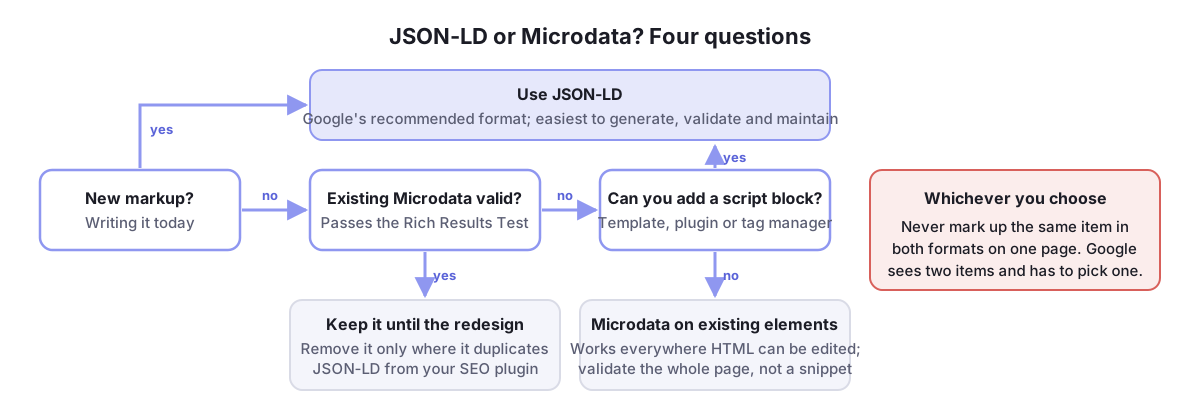
- Is this new markup? Use JSON-LD. There is no scenario in 2026 where new Microdata is the better choice for a site you control.
- Does the page already have valid Microdata? Leave it until the next redesign, unless it duplicates JSON-LD from a plugin, in which case remove the duplicate.
- Does the data change often and need to match the page exactly? JSON-LD is still fine, but generate it from the same variables as the visible content; never hand-write a price.
- Can you not add a script block at all? Then Microdata on the existing elements is your answer, and it works.
Whichever side of JSON-LD vs Microdata you land on, test with a vocabulary validator first and the Google Rich Results Test second. The format decides how easy the markup is to maintain; the tests decide whether it works.
Frequently Asked Questions
Is JSON-LD better than Microdata for SEO?
Neither side of JSON-LD vs Microdata ranks better; Google extracts the same data from both. JSON-LD is better for SEO work because it is easier to generate, validate and keep correct, so pages marked up in JSON-LD tend to have fewer errors and more complete data.
Does Google still read Microdata in 2026?
Yes. On JSON-LD vs Microdata Google’s answer is still “both”: Microdata and RDFa remain fully supported formats for every rich result type. Google recommends JSON-LD but has not deprecated the others.
Can I use JSON-LD and Microdata on the same page?
You can, as long as they describe different items. Marking up the same Product or Article in both formats creates two separate items and Google has to choose between them, which usually produces duplicate warnings.
Does JSON-LD go in the head or the body?
Either. Google reads it from both, and we have never measured a difference. Most plugins place it in the head; placing it in the body is common for blocks generated inside page content and works just as well.
What is a JSON-LD generator?
A form that asks for the properties of a schema type and outputs the finished script block. It removes syntax mistakes and remembers Google’s required fields for you. Our Schema Markup Generator covers the common types and the Schema Validator checks the result.
Can JSON-LD be added with JavaScript or a tag manager?
Yes, and Google will render and read it, but it is more fragile: the script must fire before rendering finishes and other crawlers may not run JavaScript at all. Server-rendered JSON-LD is the safer default.