
Local business schema markup is code that describes your business, including its name, address, phone number, opening hours and location, in a format search engines can read directly instead of guessing from page text. This guide is for owners, marketers and developers who want LocalBusiness JSON-LD that is right the first time: Google’s required and recommended properties, a complete example, hours patterns, multi-location and service-area setups, WordPress steps and a testing routine.
What is local business schema markup?
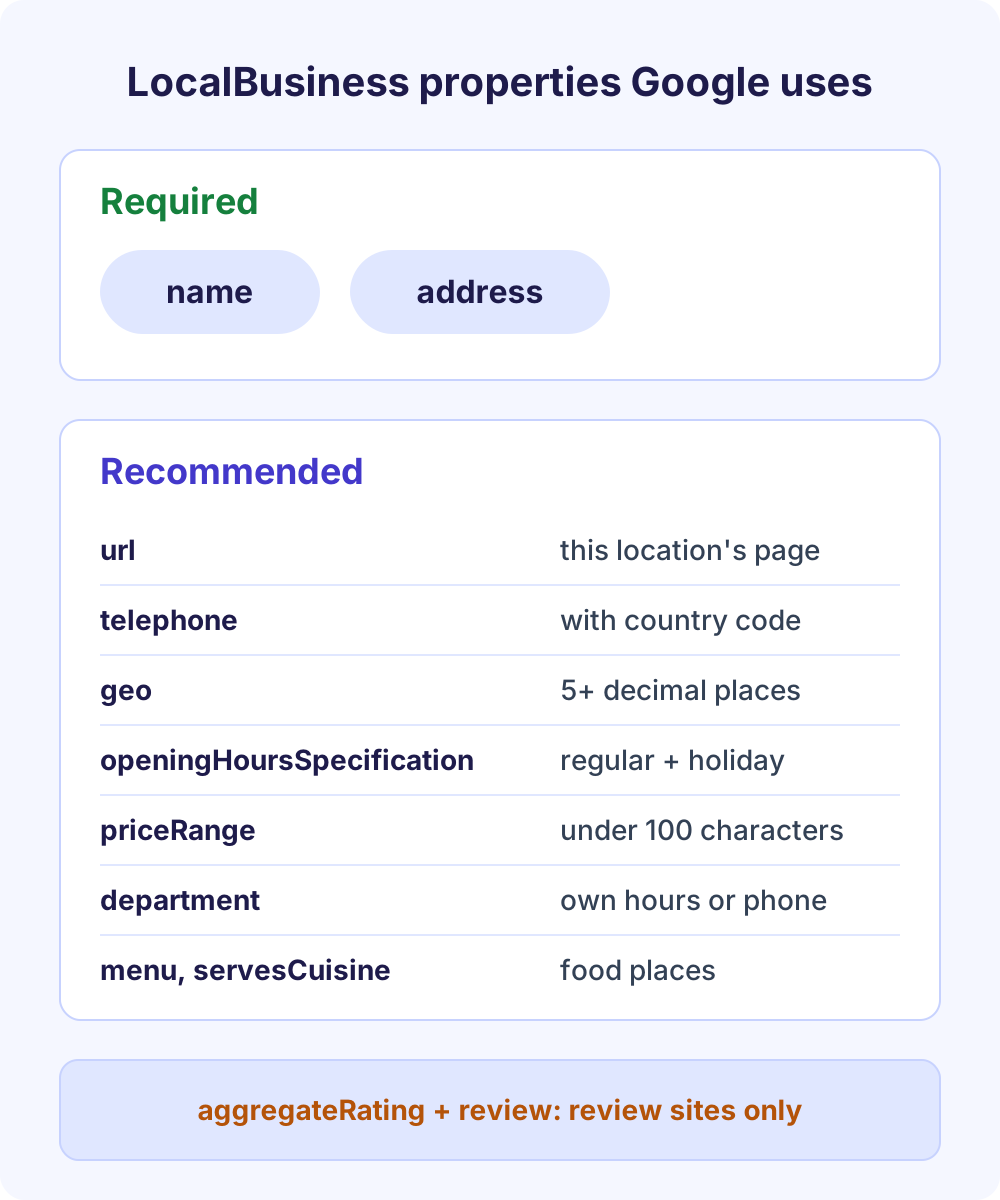
Local business schema markup is structured data, usually JSON-LD, that uses the schema.org LocalBusiness type, or a subtype such as Dentist or Restaurant, to describe a business’s name, address, phone, hours and coordinates. Google requires only name and address and recommends url, telephone, geo, openingHoursSpecification and priceRange. It helps Google understand your business details, but it never guarantees a rich result or a higher local ranking.
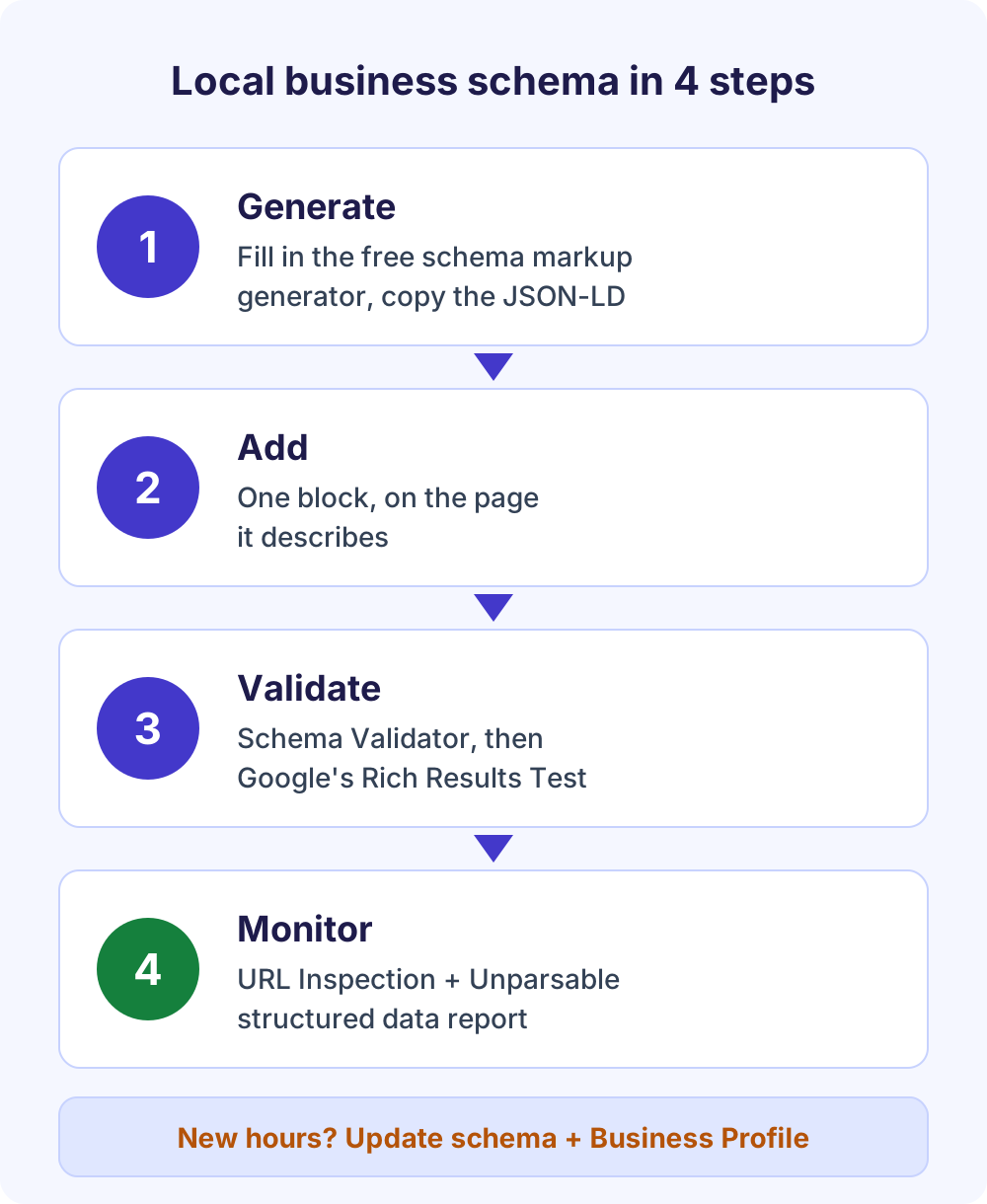
The quickest route is a four-step loop: build the code in our free local business schema generator, add it to the one page it describes, check it with our free Schema Validator, then confirm it in Google’s Rich Results Test and watch Search Console.
In this guide
Required and recommended LocalBusiness properties
Google’s Local business structured data guide lists only two required properties, name and address. Everything else is recommended. Required properties decide whether the markup is eligible at all; recommended ones make it more complete, and Google’s general guidelines say the more recommended properties you provide, the higher quality the result is for users.
| Property | Google status | What to enter |
|---|---|---|
name | Required | The business name exactly as customers see it on signage and your Business Profile. |
address | Required | A PostalAddress with as many parts as apply: streetAddress, addressLocality, addressRegion, postalCode, addressCountry. |
url | Recommended | The full URL of this specific location’s page. It must be a working link. |
telephone | Recommended | The main customer phone number, including country and area code. |
geo | Recommended | Latitude and longitude with at least 5 decimal places. |
openingHoursSpecification | Recommended | Regular hours, plus seasonal or holiday changes using validFrom and validThrough. |
priceRange | Recommended | A relative price such as $$. Google won’t show it if it’s 100 characters or longer. |
department | Recommended | A nested entry for each department that has its own hours or phone number. |
menu, servesCuisine | Recommended (food) | Menu URL and cuisine type for restaurants, cafes and similar places. |
aggregateRating, review | Review sites only | Only for sites that publish reviews of other local businesses. Skip them on your own site. |
Properties such as image, description and sameAs (links to your official social profiles) are valid schema.org properties that Google’s guide doesn’t list for a standard local business listing (it asks for image only in its limited-access restaurant carousel). Add them when they’re accurate.
Local business schema markup example (complete JSON-LD)
Below is a complete, valid block for one location of a dental practice. Swap in your own details, and make sure every value matches what visitors can see on the page.
Example only: Bright Harbor Family Dental is a fictional business. The address, phone number, coordinates and example.com URLs are placeholders.
{
  "@context": "https://schema.org",
  "@type": "Dentist",
  "@id": "https://www.example.com/locations/denver/#dentist",
  "name": "Bright Harbor Family Dental",
  "url": "https://www.example.com/locations/denver/",
  "image": "https://www.example.com/images/denver-reception.jpg",
  "telephone": "+1-303-555-0142",
  "priceRange": "$$",
  "address": {
    "@type": "PostalAddress",
    "streetAddress": "1420 Larimer Street, Suite 200",
    "addressLocality": "Denver",
    "addressRegion": "CO",
    "postalCode": "80202",
    "addressCountry": "US"
  },
  "geo": {
    "@type": "GeoCoordinates",
    "latitude": 39.74796,
    "longitude": -104.99872
  },
  "openingHoursSpecification": [
    {
      "@type": "OpeningHoursSpecification",
      "dayOfWeek": ["Monday", "Tuesday", "Wednesday", "Thursday"],
      "opens": "08:00",
      "closes": "17:00"
    },
    {
      "@type": "OpeningHoursSpecification",
      "dayOfWeek": "Friday",
      "opens": "08:00",
      "closes": "14:00"
    },
    {
      "@type": "OpeningHoursSpecification",
      "opens": "00:00",
      "closes": "00:00",
      "validFrom": "2026-12-24",
      "validThrough": "2026-12-26"
    }
  ],
  "parentOrganization": {
    "@id": "https://www.example.com/#organization"
  }
}
Here is what each part does:
@type:Dentistis the most specific fit, as Google asks.@idandurl: a stable identifier and the page for this location, not just the homepage.geo: five decimal places, the minimum Google asks for.openingHoursSpecification: Monday to Thursday hours, a short Friday and a December 24 to 26 holiday closure. Weekends are left out because the practice is closed.parentOrganization: optional; links this branch to the brand’s Organization markup on the homepage.
How to add local business schema to your website
Generate the code, add it to one page, validate it, then monitor it. Every tool below is free and none needs an account.
Step 1: Generate the code with a free local business schema generator
Open the Schema Markup Generator. Local Business is the default type, and the tool runs in your browser with no sign-up.
- Pick the closest of the 12 Business types, from Dentist and Restaurant to Legal service. If yours isn’t listed, pick the nearest and edit
@typelater. - Fill in the required Business name, Street address and City, then Phone, Website URL, Opening hours and a Photo or logo URL.
- Add Price range, coordinates and social profile URLs if you have them. The code updates as you type and lists missing fields.
- Leave Include <script> tag ticked and click Copy code.
One detail: the Opening hours field writes the compact schema.org openingHours format (Mo-Fr 09:00-17:00), while Google’s guide documents openingHoursSpecification. For holiday hours, or to match Google exactly, use the opening hours patterns below. The schema markup generator guide walks through every field.
Step 2: Add it to the page it describes
Google’s guidelines say to put structured data on the page it describes and never to mark up content visitors can’t see. For one location, that’s usually the homepage or contact page, wherever your name, address, phone and hours are visible. The script can sit in the <head> or <body>; Google reads JSON-LD in either. See the WordPress section to avoid duplicates.
Step 3: Validate before and after publishing
Paste the code into the free Schema Validator before you publish. It catches broken JSON, misspelled types, wrong value formats and missing Local business fields, and explains each issue by property path. It doesn’t rewrite the code; fix the field in the generator and copy again. If it lists aggregateRating or review as recommended, skip them unless your site reviews other businesses.
After publishing, test the live URL in Google’s Rich Results Test, which supports Local business, and fix any critical errors. Our schema markup validator guide explains how to read both reports.
Step 4: Monitor in Search Console
Search Console has no dedicated Local business report, so monitoring means a few separate checks. They’re covered in testing and monitoring below.
Opening hours examples, including holiday hours
Use openingHoursSpecification with dayOfWeek, opens and closes in 24-hour time. Google’s guide shows patterns for regular, late-night, 24-hour, closed and seasonal hours, and seasonal or holiday changes use validFrom and validThrough dates in YYYY-MM-DD format.
| Situation | How to write it |
|---|---|
| Regular weekday hours | dayOfWeek as an array of days, plus opens and closes, such as 09:00 and 21:00. |
| Open past midnight | One entry on the day you open: Saturday, opens 18:00, closes 03:00. |
| Open 24 hours | opens 00:00 and closes 23:59. |
| Closed all day | opens 00:00 and closes 00:00 for that day. |
| Holiday or seasonal closure | opens and closes 00:00, with validFrom and validThrough covering the dates. |
| Shorter hours on one date | Real opens and closes times, with validFrom and validThrough set to the same date. |
Here is a holiday closure plus a half day on New Year’s Eve, ready to add to the openingHoursSpecification array:
{
  "@type": "OpeningHoursSpecification",
  "opens": "00:00",
  "closes": "00:00",
  "validFrom": "2026-12-24",
  "validThrough": "2026-12-26"
},
{
  "@type": "OpeningHoursSpecification",
  "opens": "08:00",
  "closes": "12:00",
  "validFrom": "2026-12-31",
  "validThrough": "2026-12-31"
}
Google’s example shows only a closure; the half day reuses the same date properties with real times. Schema.org also has specialOpeningHoursSpecification, but Google’s guide doesn’t list it, so validFrom and validThrough are the safer choice in your LocalBusiness schema. Set the same special hours in your Business Profile too.
How to choose the right LocalBusiness subtype
Google tells you to use the most specific LocalBusiness subtype possible. Schema.org’s LocalBusiness page lists 30 more specific types as of October 2026, and many of those have more specific children of their own.
| Business | Most specific type | Where it sits |
|---|---|---|
| Dental practice | Dentist | LocalBusiness |
| Restaurant | Restaurant | FoodEstablishment |
| Coffee shop or bakery | CafeOrCoffeeShop, Bakery | FoodEstablishment |
| Law firm | LegalService or Attorney | LegalService |
| Plumber or electrician | Plumber, Electrician | HomeAndConstructionBusiness |
| Hair or nail salon | HairSalon, NailSalon | HealthAndBeautyBusiness |
| Auto repair shop | AutoRepair | AutomotiveBusiness |
| Real estate agency | RealEstateAgent | LocalBusiness |
| Shop | Store or a Store subtype | LocalBusiness |
If two types genuinely fit, such as a bakery that is also a cafe, Google says to list them as an array, for example ["Bakery", "CafeOrCoffeeShop"]; it doesn’t support additionalType. If nothing fits, plain LocalBusiness is a valid fallback.
LocalBusiness vs Organization: LocalBusiness is a subtype of both Organization and Place. Use Organization for the brand, usually on the homepage or About page, and LocalBusiness for each location or service area. Google’s Organization guide points ecommerce sites without a storefront to the OnlineStore type instead.
Service-area businesses with no street address
If you travel to customers and don’t serve them at your address, Google’s Business Profile help on service areas says to remove the address from your profile. Mirror that in your schema: keep the public parts of the address, drop streetAddress, and add areaServed.
Google’s Local business guide doesn’t cover service-area businesses directly and still lists address as required, so a partial address plus areaServed is the honest compromise. It never publishes a street address you hide everywhere else.
{
  "@context": "https://schema.org",
  "@type": "Plumber",
  "name": "Northline Plumbing",
  "url": "https://www.example.com/",
  "telephone": "+1-512-555-0187",
  "address": {
    "@type": "PostalAddress",
    "addressLocality": "Austin",
    "addressRegion": "TX",
    "postalCode": "78701",
    "addressCountry": "US"
  },
  "areaServed": [
    { "@type": "City", "name": "Austin" },
    { "@type": "City", "name": "Round Rock" },
    { "@type": "City", "name": "Pflugerville" }
  ]
}- Fictional example: Northline Plumbing and its details are placeholders.
- Use
areaServed: it accepts a Place, AdministrativeArea, GeoShape or text, and supersedes the olderserviceArea. - Match your profile: Business Profile allows up to 20 service areas, within about two hours’ driving of your base. List the same towns in both.
- Expect one warning: the generator asks for a street address, so delete that line and add
areaServedby hand. The validator will then flagstreetAddressas recommended, which is expected here. - Hybrid businesses with a storefront that also travel can show the full address plus
areaServed.
Multi-location businesses and departments
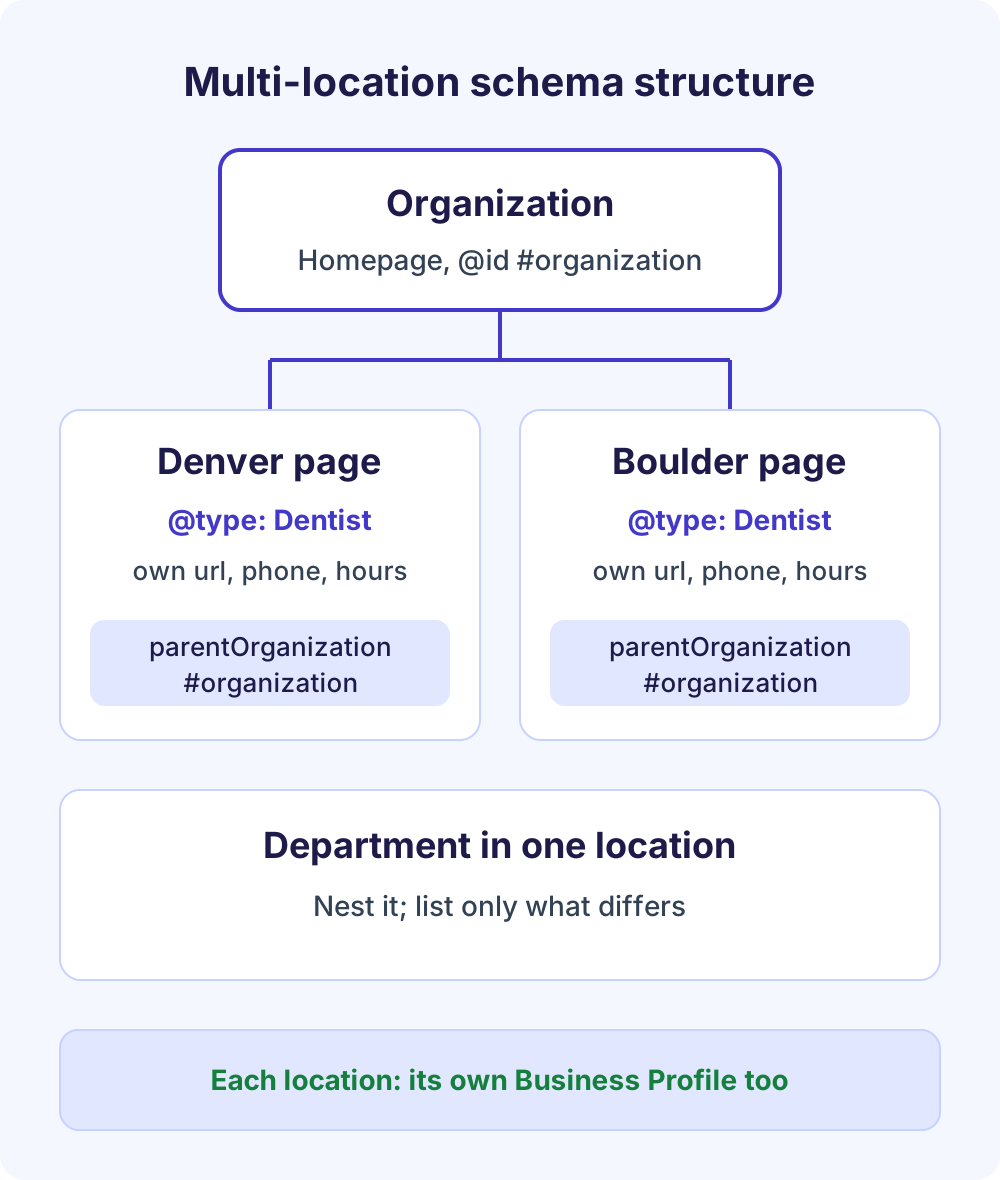
Give every location its own page and its own LocalBusiness block, with url pointing to that page. Google defines url as the URL of the specific location, so one site-wide block can’t represent several branches.
- Homepage: add Organization markup for the brand, with an
@idsuch ashttps://www.example.com/#organization. - Location pages: one subtype block per branch, with its own name, address, phone, hours, geo and url.
- Connect them: add
parentOrganizationpointing to the brand’s@id; it replaces the olderbranchOf. Google doesn’t require it. - Store locator: link every branch, but keep each branch’s markup on its own page.
- Business Profile: each location keeps its own profile with matching details.
Departments are different. When one location has a department with its own hours or phone, such as a pharmacy inside a store, nest it with department and define only what differs. Google’s naming rule is store name plus department name (“gMart Pharmacy”), unless the department has its own brand.
How to add LocalBusiness schema in WordPress without duplicates
Use one source of LocalBusiness markup per page: your SEO plugin’s local module or a block you paste yourself, never both. Two blocks with slightly different hours or phone numbers send mixed signals.
Option 1: Rank Math’s Local SEO module
- Make sure the Local SEO and Schema modules are on under Rank Math SEO → Dashboard → Modules.
- Go to Rank Math SEO → Titles & Meta → Local SEO and set the site to represent a company rather than a person.
- Choose your Business Type, then fill in the address (with a two-letter country code such as US), phone number, opening hours, price range and geo coordinates.
- Select your About and Contact pages, save, and test the homepage in the Rich Results Test.
Per Rank Math’s Local SEO documentation, Use Multiple Locations is a PRO feature that adds a locations post type and hides the single-location fields.
Option 2: Paste the generator’s code in a Custom HTML block
In the block editor, open the page that shows your business details, add a Custom HTML block and paste the generator’s output, script tag included. Page builders have an equivalent HTML element. Avoid theme options that inject code into every page’s header, which repeats one location’s markup site-wide.
Check for duplicate markup
Paste the page URL into the Schema Validator, which checks every JSON-LD and Microdata block on the page. If two Local business items describe the same location, remove one. Common culprits are a second SEO plugin, a theme’s built-in schema and review widgets.
Local business schema vs Google Business Profile
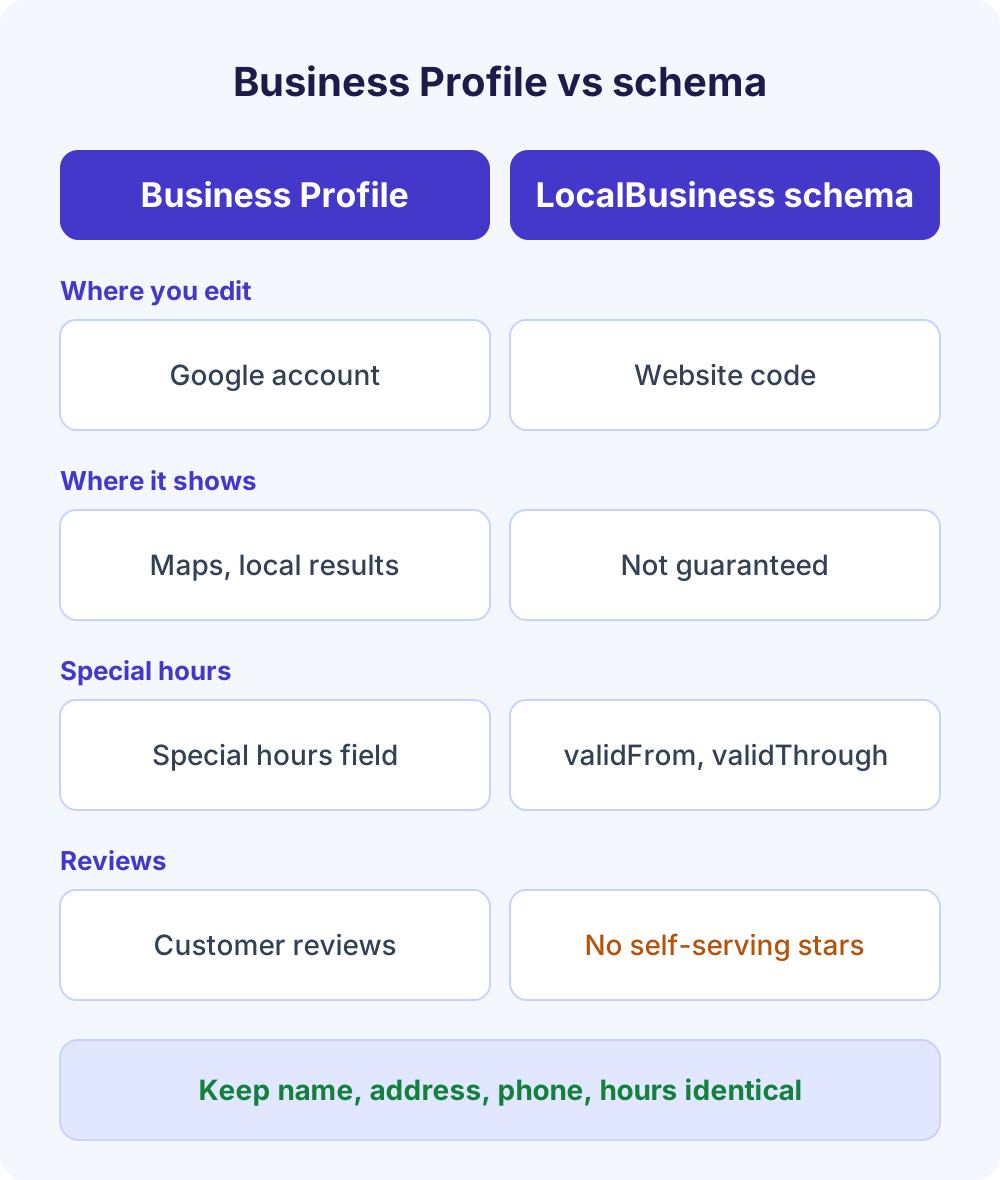
You need both. Your Business Profile is what Google shows on Maps and in local results, and you edit it directly. Local business structured data describes the same facts on your own website, where Google reads them alongside your page content.
Google’s Local business guide (updated September 2026) says results may show a knowledge panel with business details, and that the markup lets you tell Google about hours, departments and more. It doesn’t promise the markup changes that panel, and it doesn’t mention Business Profile. Google’s Business Profile help says profiles are compiled from several sources, including a business’s official website, licensed data and owners who claim their profile.
| Question | Google Business Profile | LocalBusiness schema |
|---|---|---|
| Where do you edit it? | In your Google account | In your website’s code or SEO plugin |
| Where does it show? | Maps and local results in Search | No guaranteed display; it informs Google’s understanding |
| Holiday or special hours | The profile’s special hours setting | validFrom and validThrough in openingHoursSpecification |
| Service areas | Up to 20 service areas | areaServed |
| Reviews and stars | Customers review you on Google | No self-serving review markup |
What about AI search? Google’s guidance on AI features says no special schema.org markup is needed to appear in AI Overviews or AI Mode. It does recommend structured data that matches the visible text and an up-to-date Business Profile. Our local SEO guide for small businesses covers the profile and reviews side.
How to test and monitor local business structured data
Validate the code before publishing, test the live URL with Google, then watch Search Console. There’s no Local business report in Search Console, so these checks fill the gap.
- Schema Validator (ours): catches syntax, vocabulary and value errors plus Google’s required fields.
- Rich Results Test: confirms Google can read the live markup and separates critical errors from non-critical warnings. It uses a smartphone crawler by default.
- Schema Markup Validator: validator.schema.org checks JSON-LD, RDFa and Microdata against schema.org in general, but not against Google’s feature requirements.
- URL Inspection: confirms Google can crawl and index the page. Its enhancements list doesn’t include Local business, so an empty list there isn’t an error.
- Unparsable structured data report: lists markup with serious syntax errors. Fix the template, then click Validate Fix; validation can take up to about two weeks.
- Manual Actions report: check it if you ever used review markup, because guideline violations can lead to a manual action.
Re-test whenever your hours, phone or address change, and after major plugin updates. Keep your sitemap current; Google notes recrawling can take several days.
Common local business schema errors and fixes
Most problems come from details that drift out of sync or from properties used in the wrong place. Use this table as a pre-publish check.
| Error | Why it matters | Fix |
|---|---|---|
Missing name or address | Both are required | Add a full PostalAddress, or a partial one for a service-area business |
| Hours differ from the page or profile | Markup must match visible content | Update the page, schema and Business Profile together |
geo with 3 or 4 decimals | Google asks for at least 5 | Copy coordinates from a map at full precision |
| Phone without country code | Google asks for country and area code | Use a format like +1-303-555-0142 |
| Star ratings for your own business | Self-serving reviews aren’t eligible | Remove aggregateRating and review |
Generic LocalBusiness type | Google wants the most specific subtype | Switch to Dentist, Restaurant, Plumber and so on |
| Two blocks for one location | Conflicting data | Keep the plugin or the manual block, not both |
| Trailing comma or curly quotes | The JSON won’t parse | Rebuild in the generator, then validate |
The review rule deserves emphasis. Google’s review snippet guidelines say that pages using LocalBusiness or Organization markup aren’t eligible for star review snippets when the business controls the reviews about itself, such as reviews of a business placed on that business’s own website. The rule names LocalBusiness and Organization; product reviews follow their own rules, covered in our product schema markup guide.
Frequently Asked Questions
Should I use LocalBusiness schema or Organization schema?
Use LocalBusiness, or a more specific subtype, for any place customers visit or any business serving a defined local area. Use Organization for the brand as a whole, usually on the homepage. LocalBusiness is itself a subtype of Organization, so a single-location business can use LocalBusiness alone, while chains use both.
Which page should local business schema go on?
Put it on the page that describes the business and shows its name, address, phone and hours, usually the homepage or contact page. Businesses with several branches add one block to each location page. You don’t need it on every page; Google asks you to put markup on the page it describes.
Do I need local business schema if I have a Google Business Profile?
Yes, they do different jobs. Your Business Profile is where you manage what Google shows on Maps and in local results. LocalBusiness schema describes the same facts on your own website in machine-readable form. Google compiles profiles partly from website content, so keep both identical to avoid conflicting signals.
Does local business schema improve local rankings?
Google doesn’t list structured data among its local ranking factors. Its Business Profile help says local results depend mainly on relevance, distance and prominence, and that you can’t pay for a better ranking. Use schema to make your details unambiguous, and put ranking effort into your profile and reviews.
Is there a free local business schema generator?
Yes. Our free Schema Markup Generator builds LocalBusiness JSON-LD from a form, with 12 business types, live checks for missing fields, and copy or download options. It runs in your browser with no sign-up. Check the output with our free Schema Validator, then confirm it in Google’s Rich Results Test.
Can I add star ratings to my LocalBusiness schema?
Not for reviews of your own business on your own site. Google’s review snippet guidelines make LocalBusiness and Organization pages ineligible for star snippets when the business controls the reviews about itself. The aggregateRating and review properties are for sites that review other local businesses. Collect reviews on your Business Profile instead.
How long does Google take to pick up new LocalBusiness markup?
Google has to recrawl and reprocess the page first, which Google says can take several days. You can help by requesting indexing in URL Inspection and keeping your sitemap current. Even then, Google may or may not show the details you marked up, because structured data never guarantees a particular appearance in Search.
Next steps
Open the free Schema Markup Generator, build your LocalBusiness block, and run it through the Schema Validator before you publish. If you also use FAQ schema elsewhere, read our FAQ schema markup guide first, because Google no longer shows FAQ rich results. For multi-location setups or a full local audit, our SEO and local SEO service can handle it for you.