
Most people open the Google Rich Results Test, see a green tick and assume the job is done. Then the rich result never appears, and the markup gets blamed. The test is more useful than that, and more limited, once you know what each line of its report is actually telling you. This guide covers how to run it, how to read every status, why “eligible” is not a promise, and what to do when your validator says one thing and Google says another.
What is the Google Rich Results Test?
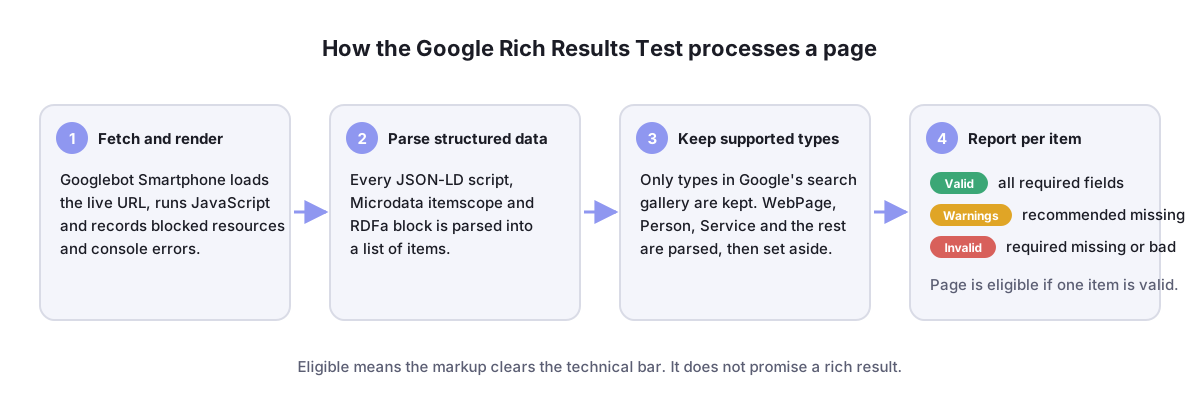
The Google Rich Results Test is Google’s free tool that checks whether a page’s structured data can produce rich results in Google Search. You enter a URL or paste code, Google renders the page as Googlebot does, reads every JSON-LD, Microdata and RDFa block, and reports each supported type as valid, valid with warnings or invalid. A clean result means eligible, not guaranteed.
It lives at search.google.com/test/rich-results and needs no account, although signing in lets you jump to Search Console reports from the results. The tool replaced the older Structured Data Testing Tool as Google’s official schema tester, and that change explains most of the confusion around it: the old tool told you whether your markup was correct; the new one tells you whether Google can use it. Those are different questions, and the rest of this guide keeps them apart.
In this guide
Rich Results Test vs the old Structured Data Testing Tool
If you search for a “schema tester” or “rich snippet testing tool” you still find tutorials built around the Structured Data Testing Tool, which Google deprecated in July 2020 and switched off the following year. It checked everything against the full schema.org vocabulary and listed every property it found, which made it a good general-purpose schema checker. The Rich Results Test deliberately does less: it only reports the types that Google can show as a rich result, and it only flags the properties that affect that result.
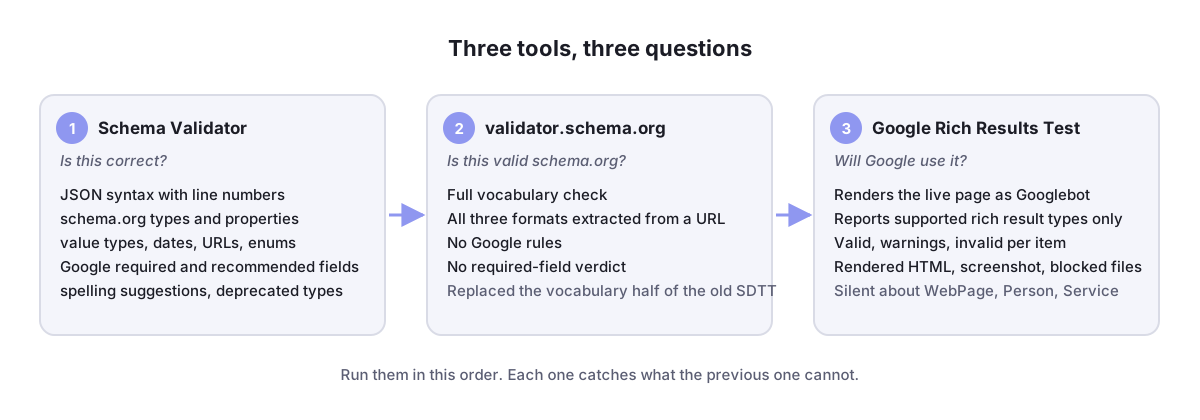
The vocabulary half of the old tool moved to validator.schema.org, which schema.org launched in 2021. So the modern workflow uses two tools where there used to be one: a validator for “is this correct schema.org?” and the Rich Results Test for “will Google do anything with it?”. Our free Schema Validator combines both checks and adds spelling suggestions, which is why we run it first and the Google test last.
How to run the Rich Results Test step by step
- Choose URL or Code. Testing a URL is the honest test, because Google fetches and renders the page exactly as Googlebot would, including JavaScript. Testing pasted code is quicker while you are still editing, but it skips everything that can go wrong on the live page.
- Pick the crawler. The default is Googlebot Smartphone, which is what Google uses to index most sites. Switch to Desktop only if your desktop and mobile pages serve different HTML.
- Wait for the fetch. A URL test usually takes ten to thirty seconds. If it fails to fetch, the page is blocked by robots.txt, requires a login, returned an error or timed out; none of those are markup problems.
- Read the top-line status, then expand each detected item. The next section explains every state you can see.
- Open “View tested page”. This shows the HTML Google rendered, a screenshot and a More info tab with HTTP response headers, blocked resources and JavaScript console messages. When the test finds less markup than you expect, the answer is almost always in here.
- Preview, then fix. The Preview button shows how an eligible item could appear in search results. Fix anything invalid, re-test the live URL, and only then move on.

How to read the results: every status explained
The report has two levels. The page-level line summarises everything Google found; the item-level entries tell you what to fix. Here is what each state means and what to do about it.
| What you see | What it means | What to do |
|---|---|---|
| Page is eligible for rich results | At least one supported type was found with no errors | Check each item for warnings, then test the live URL if you tested code |
| Valid | The item has every required property and no invalid values | Nothing, unless you want the recommended properties too |
| Valid with warnings | Required properties are present; recommended ones are missing or odd | Add the recommended fields when you have real data for them; never invent values |
| Invalid | A required property is missing or a value is the wrong type | Fix the named property; the item earns nothing until it is valid |
| Page is not eligible for rich results | No supported type was detected, or every detected item is invalid | Confirm the markup is in the rendered HTML, then check the type is one Google supports |
| Fetch or crawl error | Google could not load the page | Check robots.txt, authentication, server errors and response time; re-test |
Two details trip people up. First, a warning is not an error: a page with nothing but “valid with warnings” items is still eligible. Second, the test groups items by rich result feature, not by schema.org type, so a Product with a nested AggregateRating can appear under both “Product snippets” and “Review snippets”, and an error in the rating shows up in both places.
What “eligible” really means, and what it doesn’t
Eligible means the markup clears the technical bar. Google’s own documentation says rich results are never guaranteed, and in practice four other things decide whether you see one:
- The markup must match the visible page. Google’s structured data policies require that a marked-up rating, price or FAQ is something a visitor can actually see. The test cannot check this; a manual action can.
- Some features are restricted by site type. Since August 2023, FAQ rich results are shown only for well-known government and health sites, and How-to rich results were removed entirely a month later. Your FAQ markup can be perfectly valid and still produce nothing, which is exactly what our FAQ schema guide explains.
- Quality and relevance still apply. A page that would not rank well without markup does not start ranking because of it. Rich results change how a result looks, not whether it earns the position.
- Indexing comes first. The test fetches the page live; it does not tell you whether the page is indexed, and a page Google has not indexed cannot show a rich result. Use URL Inspection in Search Console for that.

Errors and warnings you’ll see most often
Google’s messages are short and sometimes cryptic. These are the ones we meet most, with the fix that usually works. The fuller list, including what Search Console reports after publishing, is in our guide to validating schema markup before you publish.
| Message | Usual cause | Fix |
|---|---|---|
| Missing field “image” | Article, Recipe or Product without an image property | Add a full https:// URL to a crawlable image; for Article, Google wants at least 1200 px wide |
| Missing field “offers” (or “review” or “aggregateRating”) | Product with a name but nothing Google can show | Add an Offer with price and priceCurrency; see the product schema guide |
| Invalid object type for field “author” | "author": "Jane Smith" as plain text | Use {"@type": "Person", "name": "Jane Smith"} |
| Value in field “price” must be numeric | "$19.99" | "price": "19.99", "priceCurrency": "USD" |
| Invalid value in field “datePublished” | A local date such as 10/08/2026 | ISO 8601: 2026-10-08 or 2026-10-08T09:00:00+05:00 |
| Missing field “ratingCount” or “reviewCount” | AggregateRating with only a ratingValue | Add the real count; a rating with no count is also a policy problem |
| Parsing error: missing ‘,’ or ‘}’ | Hand-edited JSON | Paste the block into the Schema Validator, which reports the line and column |
| Unnamed item or duplicate field | Two plugins both writing the same type | Keep one source of markup per type; our LocalBusiness guide covers the common plugin overlap |
Which structured data types the test reports
The Rich Results Test lists only the features in Google’s search gallery: Article, Breadcrumb, Course, Dataset, Event, FAQ, Image metadata, Job posting, Local business, Organization, Product, Profile page, Q&A, Recipe, Review snippet, Software app, Video and a handful of niche ones such as Vacation rental and Vehicle listing. Markup for anything else, including WebPage, Person, Service and CollectionPage, is parsed and then set aside, so a page that carries only those types reports “not eligible” even when the markup is flawless.
That is not a reason to remove the markup. Google reads it for understanding the page, and answer engines such as ChatGPT search, Perplexity and Google’s AI Overviews lean on structured data that never produces a visible rich result. It is a reason to test those types with a vocabulary validator instead, because the Rich Results Test will simply stay silent about them.
Why your validator passes but the Rich Results Test fails
This is the most common support question we get about structured data, and the cause is almost never the code you pasted. It is the gap between that code and what Googlebot receives.
- The markup is injected by JavaScript. Google renders JavaScript, but a tag manager that fires late, or a script blocked by robots.txt, leaves the rendered HTML without the block. Check the HTML tab under “View tested page”.
- A plugin rewrote it. SEO plugins merge, strip or duplicate schema. The code in your Custom HTML block is not what ends up in the page; the URL test shows the final result.
- Caching served an old version. Purge the page cache and any CDN before re-testing; the test does not bypass them.
- Googlebot is blocked or redirected. Bot protection, country redirects and login walls all change what Google sees. The More info tab lists blocked resources and the HTTP status.
- The type is not supported. As above: valid
Servicemarkup is “not eligible” by design. - The page has a manual action. If Search Console shows a structured data manual action, the test still reports eligible items; rich results are withheld regardless.
Using the test with Search Console
The Rich Results Test checks one URL right now. Search Console tells you how the whole site is doing over time, and the two are built to be used together. Under Enhancements (or Shopping for merchant listings) Search Console keeps a report for every rich result type it has found on your site, with the same valid, warning and error categories as the test. Clicking an error lists the affected URLs, and each URL opens in the Rich Results Test with one click. Once you have fixed the template, the Validate fix button asks Google to recrawl the affected pages and tracks the result for about two weeks.
URL Inspection, also in Search Console, adds the piece the test cannot: whether the page is indexed, when it was last crawled and which enhancements Google recorded for it at that crawl. If URL Inspection shows no enhancements but the live test shows eligible items, the fix simply has not been recrawled yet. Request indexing and wait rather than changing anything else. If you also want the page checked in Bing, URL Inspection in Bing Webmaster Tools shows the structured data it extracted.
A pre-publish testing routine that catches everything
- Generate the markup with a form, not by hand. The Schema Markup Generator writes valid JSON-LD and flags required fields as you type.
- Paste it into the Schema Validator to catch misspelled properties, wrong value types and Google’s required fields before the page exists.
- Publish, purge the cache, then run the Rich Results Test on the live URL with Googlebot Smartphone.
- Open “View tested page” and confirm the block is in the rendered HTML and nothing is blocked.
- Request indexing in URL Inspection, then check the Enhancements report a week later to confirm Google recorded the items at crawl time.
Five steps, about ten minutes per template, and it removes nearly every “my rich result disappeared” conversation we used to have. If you would rather we audit the structured data across your site, our SEO and GEO service starts with a free written review.
Frequently Asked Questions
Is the Google Rich Results Test free?
Yes. It is free and has no usage limits, and you do not need a Google account to run it. Signing in only adds links to your Search Console property when the tested URL belongs to a verified site.
Does the Rich Results Test check all schema markup?
No. It parses all of it but only reports types that can produce a Google rich result. For a full schema.org vocabulary check use a validator such as ours or validator.schema.org, then use the Google test for eligibility.
What replaced the Structured Data Testing Tool?
Two tools. The Rich Results Test took over Google-specific checks in 2020, and validator.schema.org, launched by schema.org in 2021, took over general vocabulary validation. Tutorials that still show the old tool’s screenshots are out of date.
Why does my page say “not eligible” when the markup is valid?
Usually because the type has no rich result feature (WebPage, Person, Service), the markup is missing from the rendered HTML, or the only detected items have errors. Open “View tested page” and search the HTML for application/ld+json to see what Google actually received.
How long until rich results appear after the test passes?
After Google recrawls and reindexes the page, which can take days to a few weeks. Requesting indexing in URL Inspection speeds it up for a single URL. The Enhancements report in Search Console confirms when the items were recorded.
Can I test a page that is not live yet?
Yes, with the Code tab: paste the page’s HTML or just the JSON-LD block. Remember that a code test skips rendering, caching and crawl blocks, so always repeat the test on the live URL once it is published.