To delete your Facebook account, go to Settings and privacy, then Settings, then Meta Account. Open your account details, click Deactivation or deletion, choose the profile and follow the prompts. You have about 30 days to change your mind. If you only want a break, deactivate instead, because you can come back whenever you want.
Before you use the delete Facebook account option, it’s worth knowing exactly what goes and what stays. This guide uses the steps in Meta’s Help Center as we checked them in November 2026, and it covers the parts many guides skip: your Pages, your Meta Quest purchases and the apps you log in to with Facebook.
In this guide
Key Takeaways
- Deactivating is temporary and keeps your photos and posts. Deleting is permanent.
- You can cancel a deletion within 30 days by logging back in, though Meta says the window varies by region.
- Content can take up to 90 days to be fully removed.
- Pages that only you control are deleted with your account, so hand them over first.
- Download a copy of your information first. If deletion is already scheduled, you have to cancel it before you can export.
Should you deactivate or delete your Facebook account?
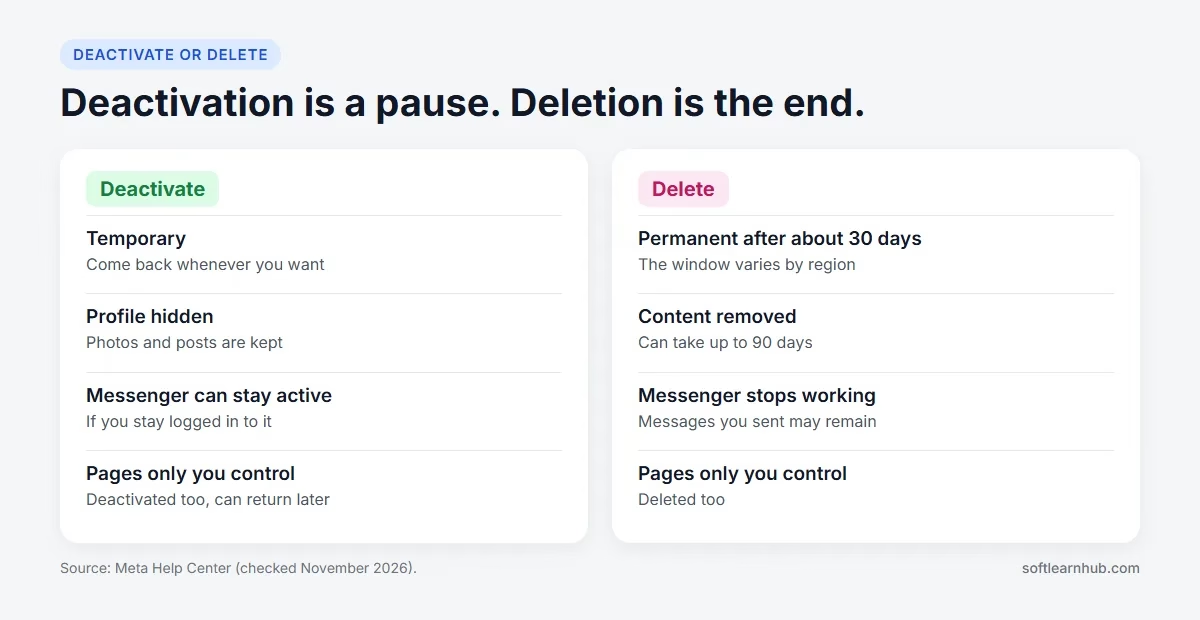
Deactivate if you want a break. Delete if you’re sure you’re finished with Facebook. Meta’s comparison page sets out the differences, and the chart below sums up what matters most.
| Question | Deactivate | Delete |
|---|---|---|
| Can you come back? | Yes, whenever you want | Only by cancelling within the window |
| Your photos and posts | Kept | Removed |
| Messenger | Can stay active if you stay logged in to it | Stops working |
| Messages you sent | May stay visible to recipients | May stay visible to recipients |
| Pages only you control | Deactivated, can return later | Deleted |
If you’re unsure, deactivate first. You keep your content, and you can still delete your Facebook account later.
What to do before you delete your Facebook account
A little preparation here can save years of photos.
1. Download your information
Meta’s export tool saves a copy of your information.
- Click your profile picture, then Settings and privacy, then Settings.
- Click Accounts Centre, then Your information and permissions.
- Click Export your information, then Create export.
- Choose your profile, then choose to export to your device or another service.
- Set the date range, format and media quality, then click Start export.
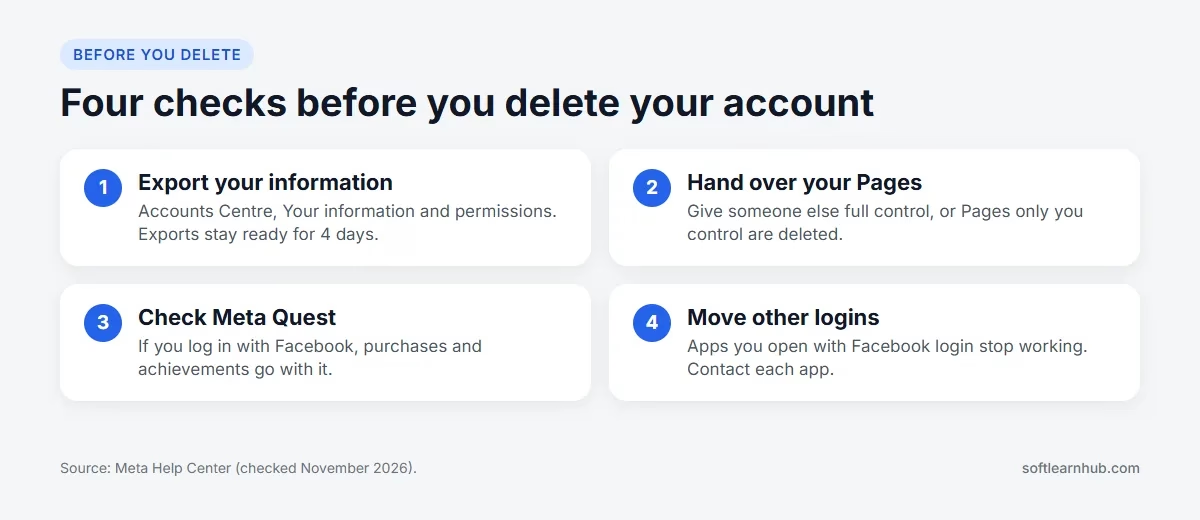
You can pick HTML or JSON, and the export stays ready to download for 4 days. If your account is deactivated, reactivate it first. If it’s scheduled for deletion, cancel the deletion first.
2. Hand over your Pages
Pages that only you control are deleted with your account. If a business depends on one, give someone else full control first. Our guide on adding an admin to a Facebook Page walks through it. If you only want a Page gone, not your whole account, read how to delete a Facebook Page instead.
3. Check Meta Quest
If you log in to Meta Quest with Facebook, deleting your profile deletes your Quest information too, including app purchases and achievements. Store credits are lost as well, so check this before you continue.
4. Move your other logins
Any app you open with Facebook login, such as Spotify or Pinterest, stops working that way after deletion, and you’d need to contact those apps to recover the account. Set up another way to log in to each one first.
How to delete Facebook account on a computer
Meta shows one of two layouts, so check which label you see in your settings, then follow the matching steps.
If you see Manage account
- Click your profile picture in the top right of Facebook.
- Select Settings and privacy, then click Settings.
- Click Meta Account at the top left of your screen.
- Click Manage account, then Manage.
- Click Deactivation or deletion.
- Follow the instructions, click Continue, then confirm.
If you see Accounts
- Click your profile picture, then Settings and privacy, then Settings.
- Click Meta Account.
- Click Personal details, then Account ownership and control.
- Click Deactivation or deletion.
- Click the profile you want to delete, then Continue.
- Follow the on-screen instructions to delete your profile.
How to delete Facebook account on your phone
These are the iPhone app steps from Meta. On Android the Menu button sits at the top left instead.
- From your main profile, tap Menu in the bottom right of Facebook.
- Scroll down and tap Settings and privacy, then Settings.
- Tap Meta Account.
- Tap Manage account, then Manage. If you don’t see this, tap Personal details, then Account ownership and control.
- Tap Deactivation or deletion.
- Choose the profile, then tap Delete account.
- Tap Continue, then follow the instructions to confirm.
Removing the app from your phone doesn’t delete your account. Your profile stays as it was until you complete these steps.
How to deactivate your Facebook account
Deactivation takes a similar route. Meta’s deactivation steps are:
- Click your profile picture, then Settings and privacy, then Settings.
- Click Accounts Centre in the top left.
- Click Manage accounts, then Manage next to your profile. If you see Accounts instead, click Personal details, then Account ownership and control.
- Click Deactivation or deletion.
- Choose the account, then select Deactivate account.
- Click Continue and follow the instructions to confirm.
To come back, log in again. Meta says you can return whenever you want.
What people can still see when you deactivate Facebook
When you deactivate your Facebook account, others can’t view your profile, but a few traces can remain. This surprises people who expect to vanish completely.
- Messages you sent may still be visible to the people who received them.
- Your name may still appear in your friends’ friend lists.
- Group admins may still see your posts and comments in their groups.
- Messenger stays active if you remain logged in to it, and people can still message you by name.
So if your goal is to stop people contacting you, deactivating Facebook alone may not be enough. Log out of Messenger too, or delete your Facebook account if you’re sure.
Alternatives to deleting your Facebook account
Deleting is a big step, and it isn’t always the right fix. If the real problem is one of these, there may be an easier option that keeps your photos and contacts.
- Too much time on the app: deactivate your Facebook account for a few weeks, or remove the app from your phone and see how it feels.
- Privacy worries: review who can see your posts and profile. Our guide to setting up your Facebook profile covers the Privacy Checkup.
- The wrong name on your account: you don’t need a new account. See how to change your name on Facebook.
- A business Page you no longer use: unpublish or delete the Page and keep your profile. Our Facebook Page settings guide shows where each option is.
- Wanting a clean start: you can delete your Facebook account and later create a new personal account, but your old posts, photos and friends won’t come with it.
If none of these fit and you still want to leave, go ahead. Just finish the four checks above first, because deletion can’t be undone once the waiting period ends.
What happens after you delete your Facebook account?
Deletion doesn’t happen the second you confirm. There’s a waiting period, then a removal period.
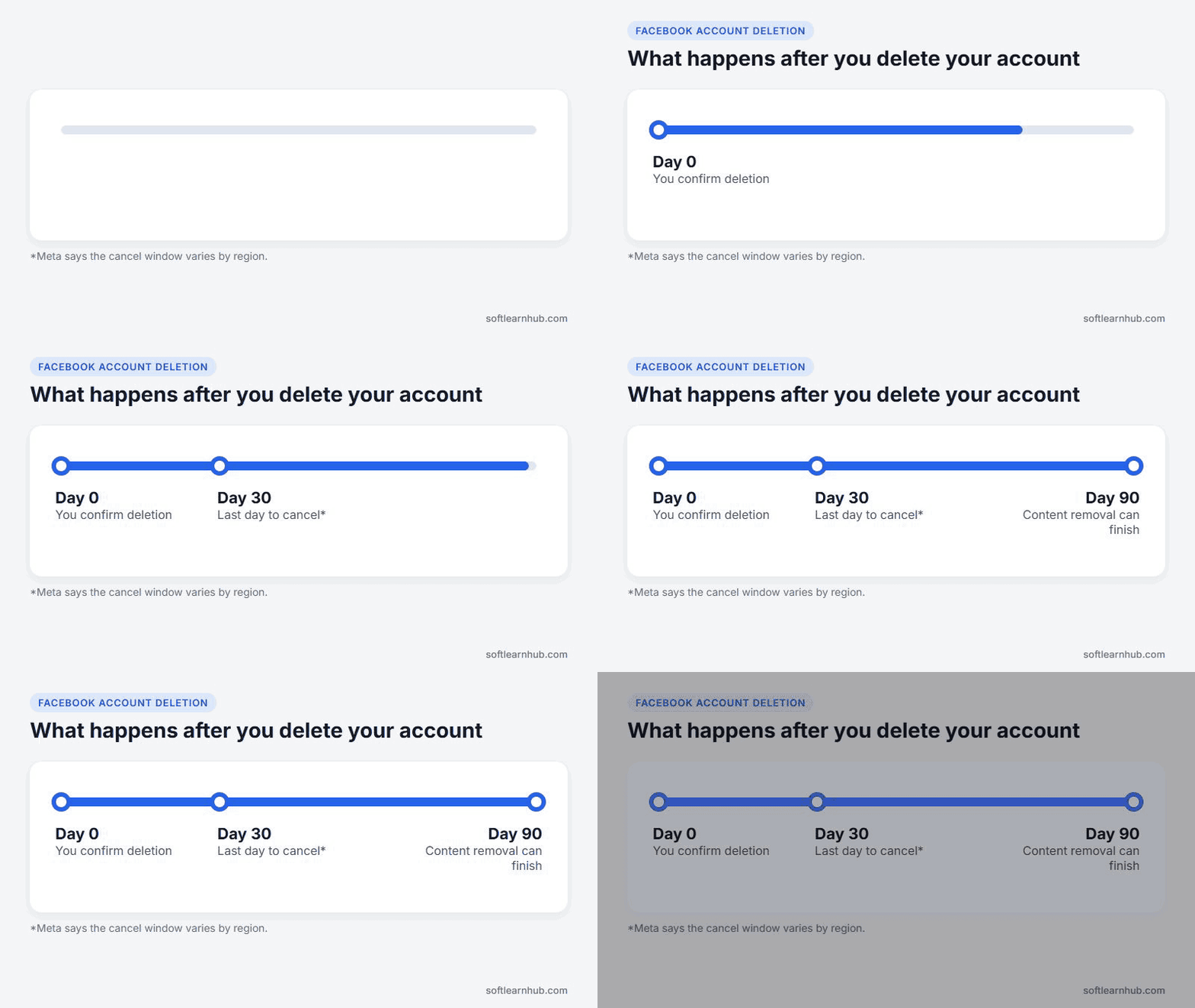
- For about 30 days: you can cancel. After that, your account and information are permanently deleted.
- For up to 90 days: Meta may take this long to delete what you’ve posted. Others can’t reach that content during this time.
- Backups: copies may stay in backup storage for up to 90 days for recovery.
- Some records: Meta can keep certain information for legal reasons, to enforce its terms or to prevent harm.
- Messages: messages you sent may stay visible to the people who got them, because that history isn’t stored on your profile.
Other profiles on the same Meta account aren’t affected. You pick the profile in the deletion screen, so read it carefully if you have more than one.
How to cancel deleting your Facebook account
Changed your mind? Log in within 30 days of starting the deletion and click Cancel deletion. Meta notes that the number of days varies by region, so don’t leave it until the last moment.
Be careful with quick logins during this period. Meta says logging back in during the delay cancels the request, so if you truly want the account gone, stay logged out until it’s over.
Common problems when deleting a Facebook account
| Problem | Likely cause | What to do |
|---|---|---|
| You can’t find Deactivation or deletion | You’re in the wrong menu | Look under Meta Account, then your account details |
| The account came back | You logged in during the waiting period | Start again and stay logged out |
| You can’t export your data | The account is deactivated or scheduled for deletion | Reactivate or cancel deletion first |
| Your Page disappeared | You were its only manager | Cancel the deletion within the window and add a manager |
| Apps won’t log in | They relied on Facebook login | Contact each app to recover the account |
Deletion needs a working login, so if you can’t get into your account, recover it first.
Frequently Asked Questions
How do I permanently delete my Facebook account?
Go to Settings and privacy, then Settings, then Meta Account. Open your account details, select Deactivation or deletion, choose the profile and follow the prompts. Don’t log in again until the waiting period has passed.
How long does it take to delete a Facebook account?
You can cancel for about 30 days, which varies by region. After that, the account is permanently deleted. Removing what you’ve posted can take up to 90 days.
What is the difference between deactivating and deleting Facebook?
Deactivating hides your profile and keeps your content, and you can return by logging in. Deleting is permanent and removes your photos, posts and videos.
Can I reactivate my Facebook account after deleting it?
Only during the waiting period. Log in within 30 days and click Cancel deletion. After that, the account and your information are permanently deleted.
Will people still see my messages after I delete Facebook?
They may. Meta says messages you sent can stay visible to the people who received them, because that history is stored outside your profile.
Does deleting my Facebook account delete my Facebook Page?
Yes, if you’re the only person with control of it. Give someone else full control first if you want the Page to stay online.
Does uninstalling the Facebook app delete my account?
No. Removing the app only takes it off your phone. To delete your Facebook account, you have to complete the deletion steps in your settings.
Featured photo by Detail .co on Unsplash.