
This free QR code generator makes custom, print-ready QR codes for a website, WiFi network, contact card, email, SMS, text or social profile, with your logo, a “Scan me” frame, patterns and colours, or paste a list and download up to 500 codes at once as a ZIP. Download PNG, SVG or WebP up to 4,000 px. The code is drawn in your browser: nothing you type is uploaded, there is no sign-up, and the codes never expire.
Your QR code
What is a QR code generator, and what does this one do?
The Soft Learn Hub free QR code generator creates custom, high-resolution QR codes for URLs, vCard contacts, WiFi networks, email, SMS, text and social profiles entirely in your browser. It supports logos, frames, patterns, gradients and PNG, SVG or WebP downloads up to 4,000 px, checks every design for readability, never uploads your data, and its static codes never expire and have no scan limit or subscription. A Bulk mode turns a pasted list or CSV of up to 500 links or texts into a ZIP of PNG, SVG or WebP codes that share one design.
A QR code (quick response code) is a square barcode that a phone camera turns back into text: a link, a contact card or WiFi login details. A QR code generator encodes your content into that pattern of modules. This one follows the QR standard (ISO/IEC 18004), uses error correction level H when a logo is added, and reads each code back with a scanner before you download it, so you know it works.
- Price
- Free, no watermark, commercial use allowed
- Account
- Not needed
- Content types
- URL, text, vCard, email, SMS, WiFi, social, bulk list
- Design
- 6 patterns, corner shapes, gradients, logo, 5 frames
- Download
- PNG, SVG, WebP; 500 to 4,000 px; ZIP of up to 500 codes
- Code type
- Static: never expires, no scan limit
- Privacy
- Generated on your device; nothing uploaded
How to Make a QR Code in 4 Steps
- Choose what the code should open.
Pick Website, Text, Contact, Email, SMS, WiFi or Social. The fields change to match: a contact needs a name and phone, a WiFi code needs the network name, password and security type.
- Enter the content.
Type or paste it. The preview redraws as you type. For a website, any address works; if you leave out https://, it is added for you. For a social profile, enter the username and the full link is built for you.
- Design it.
Choose a frame with your own call to action, a dot pattern, corner shapes, solid or gradient colours, and a logo: upload yours or pick a WiFi, email, Facebook, Instagram or other icon. The contrast warning and the “Readable” check below the preview tell you straight away if a design is risky.
- Download and print.
Pick PNG for most uses, SVG for designers and print shops, or WebP for the web, then choose a size. 1,000 px suits flyers and menus; 2,000 px or more suits posters. Test the printed code with your own phone before you order a large run.
What You Can Put in a QR Code
Each type encodes a standard format that phone cameras already understand, so scanning does the right thing without an app:
| Type | What happens when it is scanned | Good for |
|---|---|---|
| Website (URL) | Opens the page in the phone’s browser | Menus, booking pages, product pages, Google review links, event sign-ups |
| Text | Shows the text, with options to copy or search it | Serial numbers, table numbers, short instructions, offline notes |
| Contact (vCard) | Offers to add a new contact with name, phone, email, company and address | Business cards, email signatures, trade-show badges |
| Opens a new email with the address, subject and message filled in | Support requests, quote requests, newsletter sign-up by email | |
| SMS | Opens a text message to your number with a pre-written message | “Text JOIN” campaigns, appointment confirmations, taxi and delivery requests |
| WiFi | Joins the network without typing the password | Cafés, hotels, waiting rooms, offices, holiday rentals |
| Social | Opens your Facebook, Instagram, X, LinkedIn, YouTube, TikTok, WhatsApp, Snapchat, Pinterest or Telegram profile | Packaging, counter displays, posters, video end screens |
| Bulk list | Each line becomes its own link or text code; all download as one ZIP | Table numbers, product and asset labels, event badges, serial numbers, per-branch review links |
The formats are the ones scanners expect: https:// links, mailto: and SMSTO: for email and text, the WIFI:T:WPA;S:…;P:…;; string documented by the ZXing barcode project, and vCard 3.0 for contacts, the version iPhone and Android both read reliably. Special characters are escaped and text is UTF-8 encoded, so names with accents and non-Latin scripts come through correctly.
How Do I Make QR Codes in Bulk?
Choose Bulk, paste one link or line of text per line (up to 500), set the design once and click Download ZIP. Every row becomes its own QR code with the same pattern, colours, logo and frame, and all of them download together as one ZIP of PNG, SVG or WebP files. It is a free bulk QR code generator that runs in your browser: no account, no per-code fee, and the list is never uploaded. Typical uses are table numbers, product and asset labels, event badges, serial numbers and per-location review links.
- Prepare the list.
One entry per line. To name the files, put a label first, then a Tab, then the link, which is what you get when you copy two columns from Excel or Google Sheets. Or upload a CSV: a header row such as
name,urltells the tool which column is the label and which is the content, and quoted cells with commas are handled. - Check the previews.
The first 60 codes appear as thumbnails and the counter shows how many are ready. Lines that are not web addresses, or are longer than 1,000 characters, are listed by line number so you can fix them, or switch to “Plain text” for serial numbers and IDs.
- Design once, apply to all.
Frame, pattern, corner shapes, colours and logo apply to every code in the batch. With a frame on, tick “Use each label as the frame text” and the cards read “Table 1”, “Table 2” and so on.
- Download the ZIP.
Files are numbered in list order and named from the label or the link (
01-table-1.png,02-table-2.png), and aqr-codes.csvmanifest maps each file to its content. A batch holds up to 500 codes at 500 or 1,000 px, 200 at 2,000 px and 50 at 4,000 px, so the browser’s memory is never exhausted.
| What you paste or upload | Example | What you get |
|---|---|---|
| Links, one per line | softlearnhub.com/menu | https:// is added; the file is named from the address |
| Label, Tab, link | Table 1 ⇥ example.com/order?t=1 | File named 01-table-1.png; the label can be the frame text |
| CSV with a header row | name,url, then one row per code | Columns chosen by name; the file name comes from the label column |
| Plain text | SN-2026-00042 | Encoded as text; accents and non-Latin scripts are kept (UTF-8) |
Each code in the batch is a static code, so nothing expires and there is no scan limit: 500 labels cost nothing now and nothing later. For codes that must be tracked or redirected after printing, see static vs dynamic QR codes below.
Design Options That Keep the Code Scannable
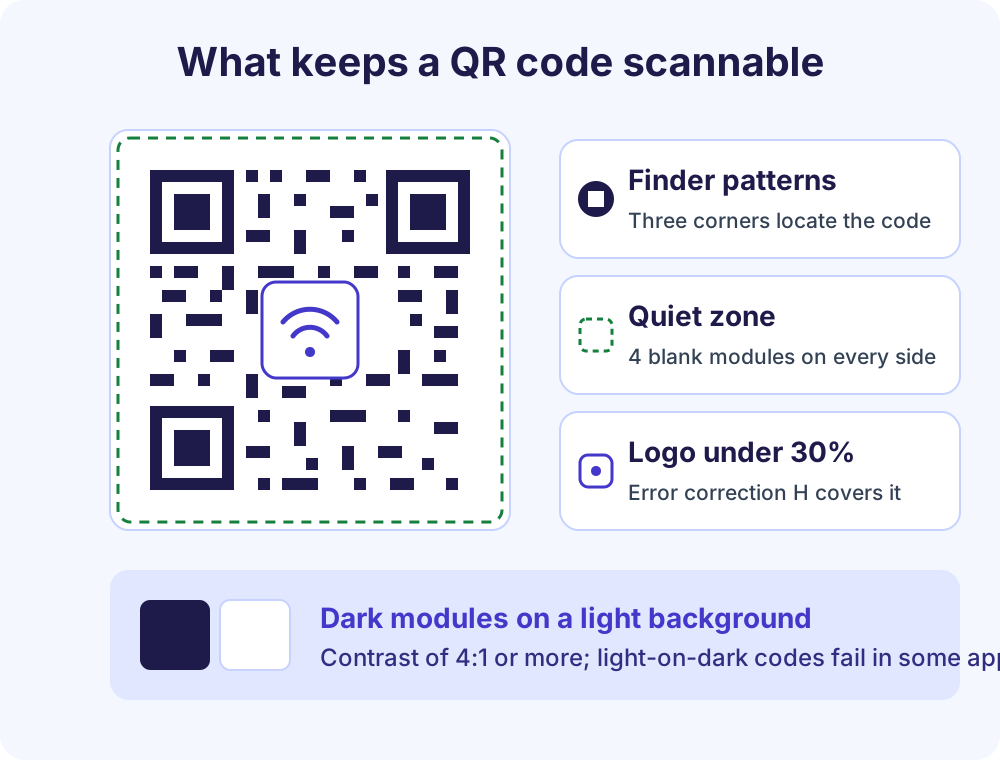
Custom QR codes fail for three reasons: too little contrast, a logo that hides too much, or a missing quiet zone. The generator guards against all three and tells you when a design crosses the line.
QR code with a logo in the middle
Upload a PNG, JPG, SVG or WebP, or choose a built-in icon. The logo is placed in the exact centre and the error correction level switches to H (30%), the highest in the QR standard, so the modules it covers are rebuilt by the scanner. Keep it at 30% of the width or less; the size slider stops at 40% and the readability check warns you.
Frames with your own text
Five frames: label below, label above, badge, card and ribbon. Change “SCAN ME” to “Scan for the menu”, “Join our WiFi” or “Leave a review”, and pick the frame colour. The frame sits outside the quiet zone, so it never interferes with scanning.
Patterns and corner markers
Squares, dots, rounded, fluid, classy and classy-round patterns, with square, rounded or circular outer corner markers and square or circular inner ones. Patterns change the look of the modules, not the data, so every option stays readable.
Colours and gradients
Solid colours, linear or radial gradients for the code and a solid, gradient or transparent background. The contrast meter uses the darkest and lightest colours in a gradient and flags anything under 3.5:1. Light-on-dark codes get a warning too: many apps read them, some older ones do not.
Readability check
After every change the preview is rendered and decoded with a QR scanner on your device. “Readable” means the scan returned exactly your content. If a logo or colour combination breaks the code, you see it before you print.
Error correction and quiet zone
Choose L (7%), M (15%), Q (25%) or H (30%) in Advanced; higher levels survive more damage but make a denser code. The quiet zone defaults to 2 modules in the file; print it with a clear margin of 4 modules, as Denso Wave, the inventor of the QR code, recommends.
Static vs Dynamic QR Codes
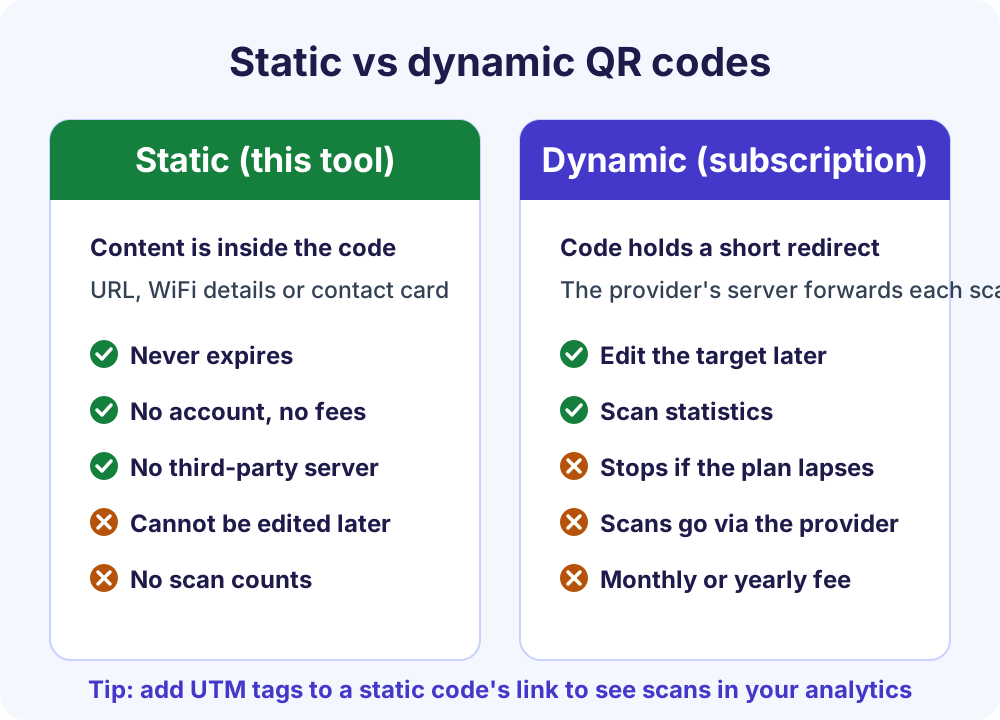
This generator makes static QR codes: the content is stored inside the code itself. A dynamic QR code stores a short redirect link that a provider’s server forwards to your real destination, which is what lets paid services edit the target later and count scans. The trade-off is that a dynamic code stops working if the subscription lapses or the provider shuts down, and every scan passes through a third party.
| Feature | Static (this tool) | Dynamic (subscription services) |
|---|---|---|
| Where the content lives | Inside the code | On the provider’s server |
| Expiry | Never | When the plan ends |
| Edit after printing | No | Yes |
| Scan statistics | Through your own analytics, with UTM tags | In the provider’s dashboard |
| Cost | Free | Usually a monthly fee |
| Privacy | No tracking, no account | Scans are logged by the provider |
To measure scans of a static code, add campaign tags to the link with the free UTM builder before you paste it here; each scan then shows up as a visit from that campaign in Google Analytics. For a link you may need to change later, point the code at a page you control, such as yoursite.com/menu, and update that page instead of the code.
PNG, SVG or WebP: Which File to Download
| Format | Best for | Notes |
|---|---|---|
| PNG | Flyers, menus, documents, slides, most print jobs | Lossless, supports a transparent background; choose 1,000 px for A4 flyers and 2,000 px or more for posters |
| SVG | Designers, print shops, signage, anything that will be resized | Vector, so it stays sharp at any size and opens in Illustrator, Figma, Canva and Inkscape; the logo is embedded |
| WebP | Websites and emails | Smaller than PNG at the same quality, with transparency; supported by all current browsers |
How big should a printed QR code be? A common rule of thumb is a scanning distance of about ten times the code’s width: a 2 cm code for a business card held in the hand, 5 to 8 cm for a table card or flyer, 20 cm or more for a poster read from across a room. Dense codes (long vCards, high error correction) need more size than short links. Always print one test copy and scan it with two different phones.
QR Code Ideas for Small Businesses
- Restaurants and cafés: a URL code for the menu on each table, and a WiFi code at the counter so staff stop reading out the password.
- Shops and markets: a Google review link on the receipt or a counter card, and an Instagram code on packaging.
- Trades and services: a vCard on the van, the invoice and the business card, so a prospect saves your number in one tap. The letterhead maker and invoice generator can place a QR code on your documents too.
- Clinics, salons and studios: an SMS code for appointment requests, or an email code that pre-fills the subject line.
- Events and venues: a URL code for tickets or the programme, and a WiFi code in the guest room or on the welcome sheet.
- Property and holiday lets: a WiFi code by the door and a text code with check-out instructions.
For a logo with a clean, transparent edge, run it through the background remover first; a solid white box behind a logo scans fine, but a transparent one looks better on coloured codes.
Why Making the Code on Your Device Matters
Most online QR code generators send your content to their servers, keep it, and in many cases route every scan through a redirect so they can count it and, after a trial, charge for it. This page sends nothing. The QR rendering library and the scanner run in your browser, your logo never leaves your computer or phone, and the design you are working on is saved only in your browser’s local storage. The site has normal page analytics, described in its privacy policy, but they never include your content.
Check it yourself: open the browser’s developer tools (F12, or Cmd+Option+I on a Mac), select the Network tab, make a code and download it. No request carries your text, your WiFi password or your logo.
| What matters | Soft Learn Hub QR Code Generator | Typical subscription QR services |
|---|---|---|
| Where the code is made | In your browser, on your device | On the service’s servers |
| Account or trial | None | Usually required; free trials expire |
| Code expiry and scan limits | None | Common on free plans |
| Logo, frames, colours | Included | Often paid features |
| Vector SVG download | Included | Often paid |
| Edit the target after printing | Not possible (static code) | Yes, with a dynamic code |
Frequently Asked Questions
Is this QR code generator free for commercial use?
Yes. Use the codes on menus, packaging, business cards, adverts and products with no fee, no attribution and no watermark. There is no account, no trial and no limit on how many codes you make or how often they are scanned.
Do the QR codes expire?
No. They are static codes, so the link or text is stored inside the code and nothing on our side is involved when someone scans it. A code you print today works for as long as the content behind it exists, for example as long as the web page it opens is online.
Can I add my logo to a QR code?
Yes. Upload a PNG, JPG, SVG or WebP, or choose one of the built-in icons such as WiFi, email, Facebook, Instagram, WhatsApp or YouTube. The logo goes in the exact centre, error correction switches to level H, and the readability check confirms the code still scans. Keep the logo at 30% of the width or smaller for the most reliable results.
Why won’t my QR code scan?
The usual causes are low contrast between the code and its background, a light code on a dark background, a logo that is too large, no blank margin around the code, or a print that is too small for the scanning distance. The tool flags the first four as you design. For prints, allow a margin of four modules, keep the code at least 2 cm wide, and test it with a phone before ordering copies.
Is a WiFi QR code safe?
It is as safe as writing the password on a card: anyone who scans it can join the network. Use it for a guest network rather than the one your business systems run on, and reprint the code when you change the password. The password is never sent anywhere by this generator; it is only encoded into the image on your device.
Can I track how many people scan my code?
Not inside the code itself, because a static code has no server behind it. For a website link, add campaign parameters with the free UTM builder before creating the code; scans then appear in Google Analytics as visits from that source and campaign, which is how most businesses measure printed campaigns without paying for a dynamic QR service.
What size should I print a QR code?
A common rule of thumb is a scanning distance of about ten times the width of the code. Use at least 2 cm for business cards, 5 to 8 cm for menus and flyers, and 20 cm or more for posters. Download at 1,000 px for small prints and 2,000 px or the SVG for large ones, and always scan a test print first.
Can I edit the code after I download it?
You can change the design and download it again at any time; your last design is saved in your browser. The content of an already printed code cannot be changed, so for anything that may move later, link to a page you control and update the page instead.
Does the contact QR code work on iPhone and Android?
Yes. It uses vCard version 3.0, which the built-in camera apps on iPhone and Android recognise and open in the Contacts app with an “Add contact” prompt. Name, phone numbers, email, company, job title, website and address are all included when you fill them in.
Can I create QR codes in bulk?
Yes. Choose Bulk, paste one link or line of text per line or upload a CSV with a label column (up to 500 rows), set the design once and click Download ZIP. Every row becomes its own PNG, SVG or WebP file, named from its label or link, with a CSV manifest, and the list never leaves your browser. Larger runs can be split into batches of 500.
More Free Business Tools
- UTM builder: tag the link in your code so scans show up in Google Analytics.
- Invoice generator: invoices and quotations as PDF, with your logo and a payment QR code.
- Letterhead maker: letterheads as PDF, PNG and Word, with an optional QR code.
- Background remover: give your logo a transparent background before placing it in a code.
- PDF tools: merge, split, compress and convert PDFs in your browser.
- All free tools: everything in one place.