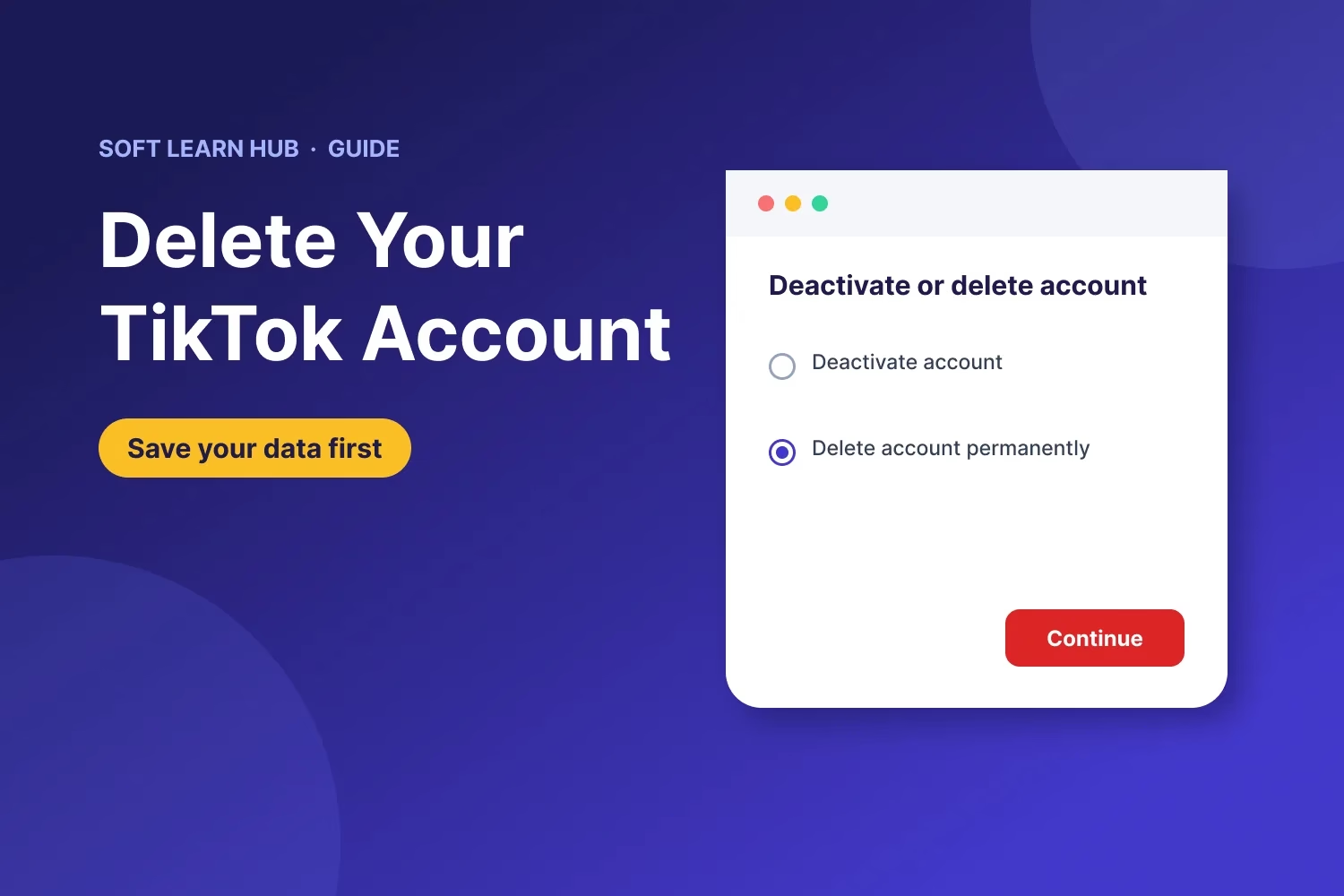
Here’s how to delete TikTok account access for good: in the app, tap Profile, tap the Menu ☰ button, open Settings and privacy, tap Account, then Deactivate or delete account, and follow the instructions to delete it. Download your data first, because once deletion is final your videos and profile can’t be recovered.
This guide is for anyone ready to leave TikTok or just wanting a break. You’ll see the official steps (checked against TikTok’s Help Center in November 2026), the difference between deleting and deactivating, how to save a copy of your data, what to do if you can’t log in, and exactly what you give up.
In this guide
Key takeaways
- You delete your account inside the app: Profile > Menu ☰ > Settings and privacy > Account > Deactivate or delete account.
- Deactivating is a temporary hold. Your data is kept and you can come back by logging in and tapping Reactivate.
- Deleting is meant to be permanent. The app explains the timeline before you confirm, and that waiting period is typically 30 days.
- Request your data before you delete. TikTok can take a few days to prepare the file, and the download link only lasts up to 4 days.
- Uninstalling the app does not delete your account.
Before you delete: download your TikTok data
Before you go into the settings to delete TikTok account access, save what you want to keep. Deleting removes your videos, profile and history. If there’s anything you want to keep, request a copy first. TikTok’s article on requesting your data says the file may include your username, watch history, comment history and privacy settings.
- In the TikTok app, tap Profile at the bottom.
- Tap the Menu ☰ button at the top, then tap Settings and privacy.
- Tap Account, then tap Download your data.
- Choose the information to include and pick a file format.
- Tap Request data.
TikTok notifies you in the app when the file is ready, and it may take a few days. To grab it, go back to Download your data, open the Download data tab and tap Download. The file is available for up to 4 days, so don’t start the deletion until you’ve saved it somewhere safe.
Two caveats from TikTok’s help page: some data isn’t included, such as data that affects other people’s privacy, and the last 24 to 48 hours of some categories may be missing. Also save any videos you care about to your phone separately, since the data file isn’t a neat video archive.
How to delete TikTok account on iPhone and Android
The steps below come from TikTok’s help article on how to delete your account. They’re the same on iPhone and Android.
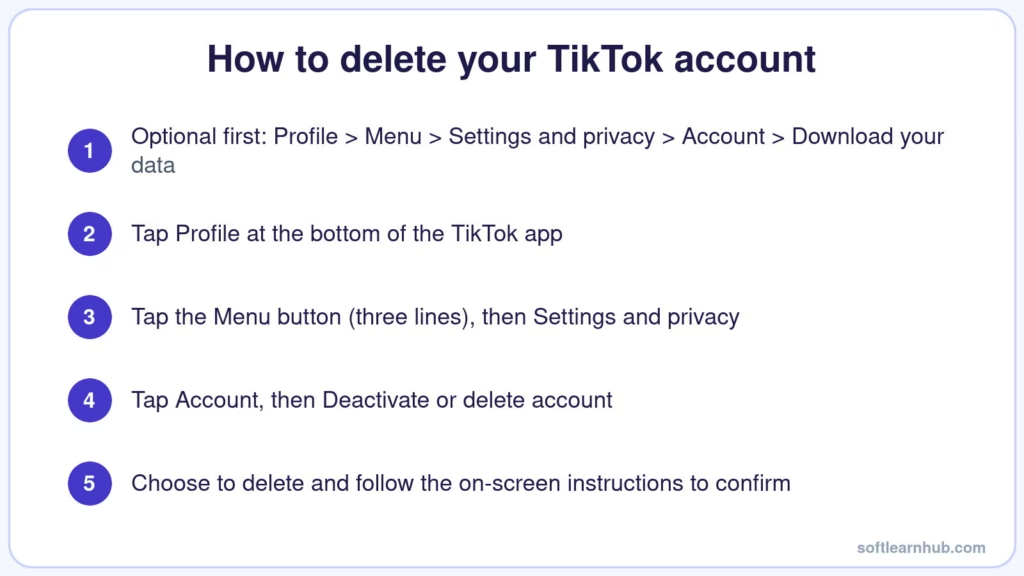
- Open the TikTok app and tap Profile at the bottom.
- Tap the Menu ☰ button at the top.
- Tap Settings and privacy.
- Tap Account, then tap Deactivate or delete account.
- Choose to delete your account and follow the on-screen instructions to confirm.
The app walks you through a few confirmation screens before anything happens. Read them rather than tapping through, because they spell out what you’ll lose and how long you have to change your mind.
What the 30-day window means
TikTok’s help article doesn’t print a timeline, but the deletion flow in the app explains what happens next, and it has typically described a 30-day period: the account is deactivated first and only permanently deleted after that window. Go by the exact wording on your screen, since it reflects the terms for your account.
During that window your profile isn’t visible to others. If you log back in before it ends, the app gives you the option to reactivate instead of finishing the deletion. Once the window passes, the deletion is final and TikTok can’t restore your videos or followers.
Delete TikTok account without the app
If you’ve already uninstalled TikTok, the simplest fix is to reinstall it, log in and follow the steps above. On a computer, you can reach your settings at tiktok.com by hovering over your profile at the top and clicking Settings, which is how TikTok’s web help articles describe getting there. Look for the account management section, where the delete option sits on the web version.
Whichever device you use, you need to be logged in. TikTok won’t delete an account just because you ask without proving it’s yours.
Delete TikTok account without a phone number
Lost access to the phone number on the account? You can still log in with another method you set up, such as your email, username and password, or a linked Google or Apple sign-in, then delete from settings. TikTok may ask you to verify through whichever contact method is on file.
If you can’t get into the account at all, TikTok’s help articles point you to its feedback and report form for account issues. Explain that you’ve lost access and want the account removed, and be ready to prove ownership.
Delete TikTok account vs. deactivate: which should you choose?
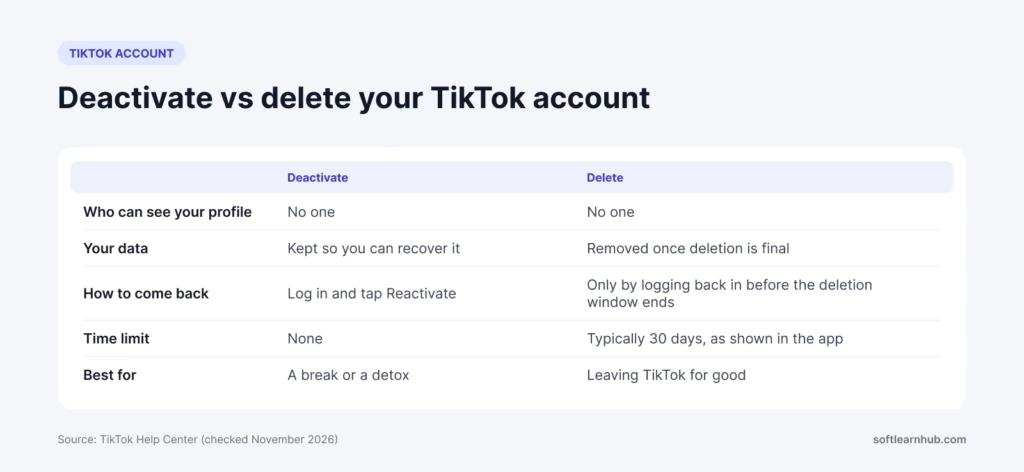
If you just need a break, deactivating is the safer choice. TikTok’s deactivation article describes it as a temporary hold you can undo at any time. Deleting is for when you’re sure you’re done.
| Deactivate | Delete | |
|---|---|---|
| Who can see your profile | No one | No one |
| Your data | Kept so you can recover it | Removed once deletion is final |
| How to come back | Log in with the same credentials and tap Reactivate | Only by logging back in before the deletion window ends |
| Time limit | None | Typically 30 days, as shown in the app |
| Best for | A break, exam season, a detox | Leaving TikTok for good |
To deactivate, follow the same path (Profile > Menu ☰ > Settings and privacy > Account > Deactivate or delete account) and tap Deactivate account. TikTok notes that while you’re deactivated, direct messages you sent may stay visible to the people you sent them to, and Duets or Stitches made with your videos may still be visible.
What you lose when you delete your TikTok account
Once deletion is final, assume everything tied to the account is gone. That means:
- Your profile, username and bio.
- Every video you’ve posted, with its views, likes and comments.
- Your followers, the accounts you follow, likes, comments and saved posts.
- Any Coins or other balances left on the account, so use or withdraw them first.
- Logins to other apps where you used Continue with TikTok. Switch those to an email login first.
A few things may outlive the account. Messages you sent can remain in other people’s inboxes, and content other people made with yours, like a Duet or Stitch, may stay up. If you also run ads or sell on TikTok Shop, handle those separately: TikTok Shop has its own process to close a seller account, and any Promote balance should be withdrawn before you leave.
How to cancel a TikTok account deletion
Changed your mind during the window? Log in to the account with the same details you used before. The app should ask whether you want to reactivate, and tapping Reactivate restores the account with your videos and followers. Once the window ends, there’s no undo, so if you’re on the fence, deactivate instead of deleting.
Why can’t I delete my TikTok account?
If you’ve followed the steps to delete TikTok account access and it isn’t working, one of these common snags is usually to blame:
- You’re not logged in. You must be signed in to the account you want to delete.
- Verification fails. If the code goes to an old phone number or email, log in another way, update your contact details, then try again.
- You have open money matters. Unfinished orders, a Promote balance or a TikTok Shop seller account can complicate deletion. Settle or close those first.
- Your app is outdated. Update TikTok, then look for Deactivate or delete account under Account again.
- You expected uninstalling to be enough. It isn’t. Removing the app leaves your account and videos live.
Tips before you delete TikTok
A little preparation means you can delete TikTok account data without regrets later. Work through these before you confirm.
- Tell your audience. If you have followers who rely on you, post a short goodbye and say where they can find you next.
- Save your best videos. Download them to your phone or cloud storage alongside your data file.
- Fix linked logins. Change any app that uses Continue with TikTok over to email first.
- Consider your business presence. If TikTok drives sales, deleting cuts off that channel. Our guide to what makes a TikTok campaign perform may help you decide whether to rebuild your approach instead of leaving.
- Clean up the rest of your social footprint. If you’re stepping back from social media generally, our guides on how to delete a Facebook account and how to delete a Facebook page cover Meta’s side.
Frequently asked questions
How long does it take to delete a TikTok account?
Following the how to delete TikTok account steps above takes a minute or two, but the deletion isn’t instant. TikTok’s app explains the timeline before you confirm, and it’s typically 30 days. During that window the account is deactivated and hidden, and logging back in lets you reactivate it. After the window ends, the deletion is permanent.
Can I recover a deleted TikTok account?
Only during the deletion window. Log in with the same credentials and choose to reactivate, and your account comes back. Once the window has passed, TikTok permanently deletes the account and its data, and there’s no way to restore your videos, followers or username.
Does deleting the TikTok app delete my account?
No. Uninstalling the app only removes it from your phone. Your profile and videos stay live. TikTok’s inactive account policy says that if an account isn’t used for 180 days or more, its username may be reset to a random number, but the account itself isn’t deleted.
Can I delete my TikTok account without logging in?
No. You have to be signed in to delete an account, which stops other people from deleting yours. If you’ve lost access, try another login method or a password reset first. If that fails, contact TikTok through its feedback and report form and explain that you can’t get in.
What happens to my TikTok messages when I delete my account?
Your own inbox goes away with the account, but messages you already sent may remain visible to the people who received them. TikTok says this about deactivated accounts, so assume the same for deletion. If a conversation matters, save what you need before you start.
The bottom line
Now you know how to delete TikTok account access properly: save your data, then go to Settings and privacy > Account > Deactivate or delete account. If you’re unsure, deactivate instead, because it keeps everything. And if you’re tidying up other platforms too, start with our guide on deleting your Facebook account.