
Structured data errors are the messages Search Console, the Rich Results Test and schema validators show when your markup is broken, incomplete or ignored. Most of them have a one-line fix once you can translate the message. This guide lists every error type you are likely to meet, what causes it, how to fix it and how to make sure the fix sticks, with the exact wording Google uses so you can search this page for the message in front of you.
What are structured data errors?
Structured data errors are problems in a page’s schema.org markup that stop Google from parsing it or from using it for a rich result. They fall into four groups: syntax errors that make the whole block unreadable, missing required fields, invalid values of the wrong type or format, and duplicate or conflicting items. Errors block the rich result; warnings only limit it.
The same mistake can be reported with different wording depending on where you see it. Search Console says “Missing field ‘image'”; the Rich Results Test says the same but groups it under the rich result type; a vocabulary validator says nothing, because image is optional in schema.org and only Google requires it. Knowing which tool is talking tells you how serious the message is, so that is where we start.
In this guide
Errors vs warnings: what actually blocks a rich result
Google sorts every structured data issue into two buckets. An error (red, labelled “Critical issue” in newer Search Console reports) means the item cannot be used for a rich result at all. A warning (amber, “Non-critical issue”) means the item is eligible but a recommended property is missing, so Google may show a plainer version of the rich result or none at all. A page can carry a dozen warnings and still earn a full rich result; a single error on the item takes it out of the running.
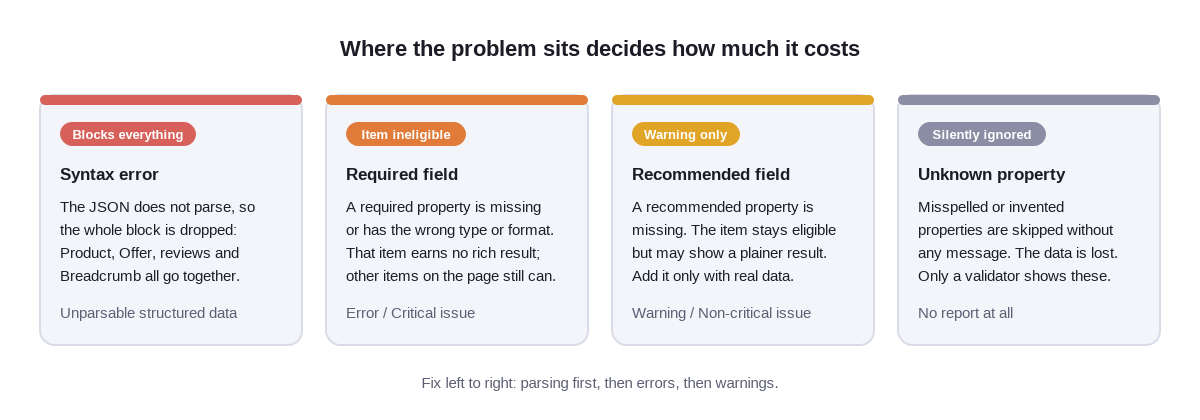
That hierarchy decides your order of work. Fix anything that stops the block parsing first, because until it parses nothing else in it can be judged. Then clear the errors on each item. Only then spend time on warnings, and only where you have real data for the missing property, because inventing a rating or a price to silence a warning is a policy violation, not a fix.
Where structured data errors show up
- Search Console, Enhancements and Shopping reports. One report per rich result type Google has detected on your site, each with a chart of valid, warning and error pages over time. This is the only place you see errors across the whole site, and the only place you can tell Google you have fixed them.
- Search Console, URL Inspection. Shows the enhancements Google recorded for one URL at its last crawl, with the same error and warning wording. Useful for confirming whether a fix has been recrawled yet.
- Google Rich Results Test. Live check of one URL or code snippet against Google’s rules. Our Rich Results Test guide covers how to read every status it returns.
- Schema validators. Our free Schema Validator reports syntax, vocabulary and Google required-field problems in one pass with line numbers, and suggests the right spelling for misspelled properties. validator.schema.org covers vocabulary only.
- Bing Webmaster Tools. URL Inspection there shows the markup Bing extracted; Bing is more forgiving but reads the same formats.
1. Unparsable structured data (syntax errors)
Search Console lists these under a dedicated Unparsable structured data report because the markup was so broken Google could not even tell which rich result type it was meant to be. In JSON-LD this is almost always a JSON syntax problem. The whole <script type="application/ld+json"> block is discarded, so one stray comma can take a Product, its Offer, its reviews and your Breadcrumb out together.
| Message | Usual cause | Fix |
|---|---|---|
| Parsing error: Missing ‘,’ or ‘}’ | A property line without a trailing comma, or an extra comma after the last property | Add the missing comma, remove the trailing one; JSON does not allow a comma after the final item |
| Parsing error: Missing ‘,’ or ‘]’ | Same mistake inside an array such as image or itemListElement | Check every array for a stray or missing comma |
| Invalid top-level element / Unexpected token | Curly “smart” quotes pasted from a word processor, single quotes, or a comment inside the JSON | Replace with straight double quotes; JSON has no comments and no single-quoted strings |
| Incorrect value type / Bad escape | An unescaped double quote or line break inside a string, often in a description copied from the page | Escape inner quotes as \" or use HTML entities; keep each string on one line |
| Missing ‘}’ or object member name | A property name without quotes (name: instead of "name":) | Quote every key; JSON is stricter than JavaScript |
| Nothing detected at all | Script tag has the wrong type, or the block is inside an HTML comment or a template that never rendered | Use exactly type="application/ld+json" and check the rendered page source |
Google’s report only tells you the line, not what is wrong on it. Paste the block into the Schema Validator and it names the problem (curly quotes, trailing comma, unquoted key, pasted <script> tag) with the exact position. For Microdata the equivalent failures are an itemprop outside any itemscope, or a missing itemtype; our guide to JSON-LD vs Microdata explains why the JSON-LD version is easier to keep valid.
2. Missing field errors
“Missing field ‘x'” is the most common structured data error in Search Console and the easiest to misread. Whether it is an error or a warning depends on whether Google lists the property as required or recommended for that rich result type, and the answer is in the feature’s documentation, not in schema.org, where almost every property is optional.
| Type | Required (error if missing) | Recommended (warning if missing) |
|---|---|---|
| Article | none strictly required, but headline and image are needed for the visible result | author, datePublished, dateModified, publisher |
| Product (snippet) | name, plus at least one of offers, review or aggregateRating | image, description, sku, brand, gtin |
| Offer | price (or priceSpecification), priceCurrency | availability, url, itemCondition, priceValidUntil |
| AggregateRating | ratingValue, plus ratingCount or reviewCount | bestRating, worstRating (when not 5 and 1) |
| Review | author, itemReviewed (when standalone) | reviewRating, datePublished |
| Event | name, startDate, location | endDate, image, offers, performer, eventStatus |
| LocalBusiness | name, address | telephone, openingHoursSpecification, geo, url, priceRange |
| Recipe | name, image | author, cookTime, recipeIngredient, recipeInstructions, nutrition |
| JobPosting | title, description, datePosted, hiringOrganization, jobLocation | baseSalary, validThrough, employmentType |
| BreadcrumbList | itemListElement with position and name on each ListItem; item on all but the last | — |
| FAQPage | mainEntity Question with name and acceptedAnswer text | — (rich result now limited to government and health sites) |
Two traps. First, a nested object has its own required fields: a Product can be complete while its Offer is missing priceCurrency, and Search Console reports the Offer’s problem against the Product page. Second, “Missing field” sometimes means the field is present but unusable, for example "image": "" or an author array with an empty object. Omit a property entirely rather than leaving it blank; an empty string is still a value, and the wrong one.

3. Invalid value and wrong type errors
Here the property exists but the value is not what the vocabulary or Google expects. The messages vary (“Invalid object type for field”, “Value in field must be numeric”, “Invalid string length”, “Invalid enum value”, “Invalid URL in field”, “Invalid date in field”) but they come down to a handful of patterns.
| Message | What you wrote | What it should be |
|---|---|---|
| Invalid object type for field “author” | "author": "Zubair Shahzad" | "author": {"@type": "Person", "name": "Zubair Shahzad"} |
| Invalid object type for field “publisher” | "publisher": "Soft Learn Hub" | An Organization object with name and a logo ImageObject |
| Value in field “price” must be numeric | "price": "$19.99" or "19,99" | "price": "19.99" with "priceCurrency": "USD"; dot as decimal separator, no symbol |
| Invalid date in field “datePublished” | "10/08/2026" or "October 8, 2026" | ISO 8601: "2026-10-08" or "2026-10-08T09:00:00+05:00" |
| Invalid value in field “availability” | "availability": "In stock" | The schema.org URL: "https://schema.org/InStock" |
| Invalid value in field “ratingValue” | "ratingValue": "4.5 stars" or a value above bestRating | A number between worstRating and bestRating, as a string or number |
| Invalid URL in field “image” / “url” / “logo” | A relative path such as /img/photo.jpg, or a page URL instead of an image file | Full absolute https:// URL to a crawlable image |
| Invalid string length in field “name” | A name over the type’s length limit, often an entire product description pasted in | Keep names short; put the long text in description |
| Invalid value type for field “position” | "position": "1" is fine; "first" is not | An integer |
| Invalid duration in field “cookTime” | "30 minutes" | ISO 8601 duration: "PT30M" |
Enumerations and capitalisation catch people constantly. https://schema.org/InStock is valid; https://schema.org/instock and InStock on their own are not. Property names are case-sensitive too: dateModified works, DateModified and date_modified are unknown properties that a strict validator flags and Google silently ignores.
4. Duplicate, conflicting and unknown-property errors
These are the errors you get when markup comes from more than one place: an SEO plugin, a theme, a page builder and a hand-written block all describing the same page. Each source is valid on its own; together they contradict each other.
- Duplicate field “x”. The same property appears twice in one object. JSON parsers keep one and drop the other, and you do not get to choose which. Remove the duplicate.
- Multiple items of the same type. Two
Organizationblocks with different names, or twoProductitems on one product page, make Google pick. Keep one source of truth per type; our LocalBusiness schema guide walks through the usual Rank Math versus theme overlap. - Unnamed item. Microdata with
itemscopebut noitemtype, or a JSON-LD object with properties but no@type. - Unknown property / not a known valid target type. A misspelled property (
datepublished,reviewcount), an invented one (subtitleon Article), or a value of a type the property does not accept (aThingwhere aPersonis required). Google ignores these rather than erroring, which is worse: the data is simply lost. A vocabulary validator is the only way to see them. - Either “offers”, “review”, or “aggregateRating” should be specified. A Product with none of the three has nothing Google can display. Add the one you have real data for.
5. Policy problems that no validator catches
Some structured data errors never appear in a report. They surface as a rich result that quietly stops showing, or as a manual action in Search Console under “Spammy structured markup”. Google’s structured data policies are short and worth reading once; the violations we see most are:
- Markup that describes content not visible on the page: a review rating with no reviews shown, FAQ markup for questions that are not on the page, an event that is actually a sale.
- Self-serving reviews on your own Organization or LocalBusiness. Google ignores them for the review snippet.
- Marking up the whole site as one Product, or every blog post as a Recipe, to chase a result type.
- Markup for content behind a paywall or login without the
isAccessibleForFreeandhasPartproperties Google asks for. - Technically valid
HowToandFAQPagemarkup on ordinary sites, which is harmless but earns nothing: How-to rich results were removed in September 2023 and FAQ rich results are now shown only for authoritative government and health sites. Our FAQ schema guide covers what is still worth doing.
How to fix structured data errors step by step
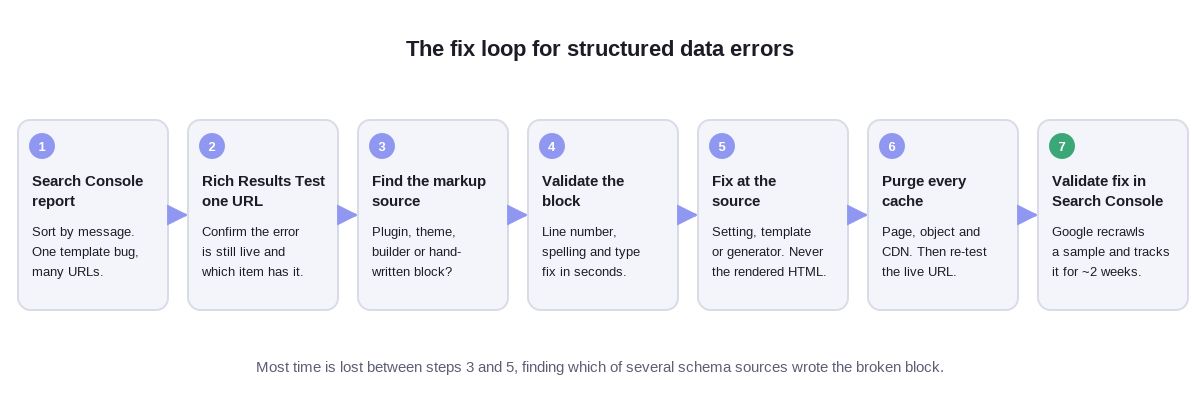
- Start from the Search Console report, not from a single page. Open Enhancements, pick the report with errors, and sort by the error message. One template bug usually produces one message across hundreds of URLs; fix the template once and every URL clears.
- Open one affected URL in the Rich Results Test. Confirm the error is still live (the report can lag the site by days) and note which item it belongs to.
- Find where the markup comes from. View the rendered source and search for
ld+json. If there are several blocks, work out which plugin or template wrote each one; the Search Console error will be in exactly one of them. - Paste that block into a validator to get the line number and the spelling or type fix. For syntax errors this is the fastest route by a wide margin.
- Fix at the source. Edit the plugin setting, the template or the generator, never the rendered HTML, or the error comes back on the next save. If you are writing the block by hand, generate it with the Schema Markup Generator instead, which only outputs valid structures.
- Purge every cache (page cache, object cache, CDN) and re-test the live URL. A surprising share of “the fix didn’t work” is a cache serving the old block.
- Click Validate fix in Search Console. Google recrawls a sample of the affected URLs and tracks the result for up to about two weeks. If the validation fails, the report shows which URLs still have the error.
Preventing structured data errors on WordPress sites
WordPress sites generate most of their structured data automatically, which is why they also generate most of the errors we fix. A few habits remove nearly all of them.
- One schema source. Let your SEO plugin (Rank Math, Yoast, SEOPress) own Organization, WebSite, Breadcrumb and Article, and switch off the theme’s or page builder’s duplicate output. Add custom types in the plugin’s schema settings, not in a second plugin.
- Fill the global fields. Logo, organisation name, social profiles, author bios and featured images are where “Missing field” warnings come from. The data is usually one settings screen away.
- Featured images at 1200 px or wider, because Article rich results want large images and the plugin passes the featured image through as
image. - Treat custom HTML blocks as code. Hand-written JSON-LD in a Custom HTML block breaks every time someone edits it in the visual editor and the quotes get converted. Generate, validate, paste once, and never touch it in the visual editor again.
- Check after every plugin or theme update. Run the Rich Results Test on one page of each template; it takes two minutes and catches the regressions before Search Console does.

Confirming the fix in Search Console
After you press Validate fix, Search Console changes the issue to “Started” and begins recrawling. Three outcomes are possible. Passed means every sampled URL is clean and the issue disappears from the report. Failed means at least one URL still had the error; open the list, test that URL live, and either it is cached or there is a second template with the same bug. N/A means the URLs could not be crawled, usually a robots or server problem.
If the report is slow to update, URL Inspection on a fixed page shows whether Google’s last crawl saw the new markup, which is the real test. And if you want the whole site checked rather than one page at a time, our SEO and GEO service includes a structured data audit in the first review.
Frequently Asked Questions
Do structured data errors affect rankings?
Not directly. Structured data is not a ranking factor, so a broken block does not push the page down. It does remove the rich result the page might have earned, which lowers click-through, and a manual action for spammy markup can remove rich results across the whole site.
What is the difference between a structured data error and a warning?
An error means a required property is missing or invalid and the item cannot produce a rich result. A warning means a recommended property is missing; the item is still eligible but may show a reduced result. Fix errors first and add recommended properties only when you have real data for them.
Why does Search Console say “unparsable structured data”?
The JSON-LD block has a syntax error, most often a missing or trailing comma, curly quotes or an unescaped quote inside a string, so Google could not read any of it. Paste the block into a validator to get the exact line and fix.
How long do structured data errors take to clear after a fix?
The Rich Results Test shows the fix instantly on the live URL. Search Console updates as pages are recrawled, which can take days to a few weeks; clicking Validate fix speeds this up and tracks the result.
Should I remove schema markup that has errors?
Fix it rather than remove it. Only remove markup that describes content not on the page, or types that no longer produce a rich result and that you cannot keep accurate. Broken markup is ignored, so leaving it costs nothing but earns nothing either.
Can a schema validator catch every structured data error?
It catches syntax, vocabulary and required-field errors, which is most of them. It cannot see whether the markup matches the visible page, whether Google rendered the page the same way, or whether a policy applies, so finish with the Rich Results Test on the live URL.