
Why Is My Website Not Showing Up on Google?
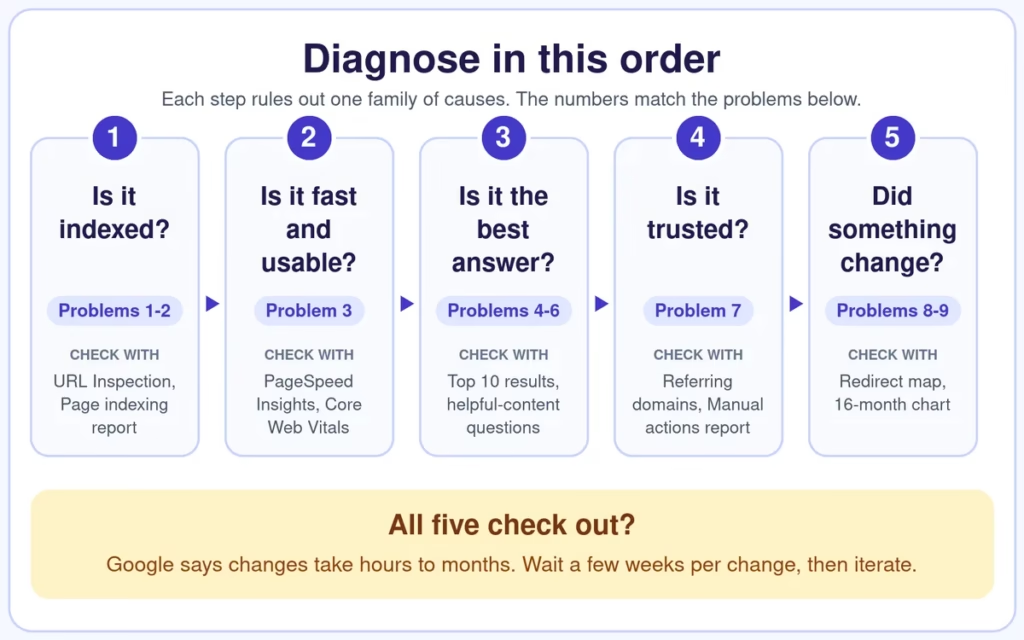
A website not showing up on Google usually has one of nine causes: it isn’t indexed, crawlers are blocked, pages are slow, content is thin, search intent is missed, keywords are too competitive, backlinks are weak, redirects broke, or it’s too new. Check them in this order.
In this guide
Key Takeaways
- Check indexing first. A website not showing up on Google is often an indexing problem, not proof that SEO has failed.
- Test before you change anything. A
site:search and the URL Inspection tool show whether Google knows the page. - Give changes time. Google says to allow at least a week after submitting a sitemap or an indexing request.
- Fix blockers before writing more content. Noindex tags, robots.txt rules and broken redirects hide good pages.
- Measure impressions and clicks, not a single keyword position.
Is Your Website Not Showing Up on Google? Check This First
Before fixing anything, confirm the page is really missing. Google’s own troubleshooting guide points out that many people assume they are not on Google when their page simply appears low in the results, or is left out because of the specifics of the search, such as a page that only works on desktop. A website not showing up on Google for a site: search is missing; one that appears but ranks low needs a different fix.
- Turn off SafeSearch, which can filter results.
- Search for the site. Type
site:yourdomain.comfor the whole site, orsite:yourdomain.com/exact-pagefor a single page. - Read the result. If the page appears, it is indexed and you have a ranking problem. If nothing appears, you have an indexing problem.

Duplicates can also confuse the check. If several URLs show the same page, Google picks one as the canonical version and shows only that one, and the URL Inspection tool tells you which it chose. Google’s page-missing guide also says to allow at least a week after submitting a sitemap or an index request before assuming a problem.
In Search Console’s Page indexing report, two statuses cause most of the worry. Crawled – currently not indexed means Google crawled the page but has not indexed it yet, and it may be indexed later. Discovered – currently not indexed means Google found the URL but has not crawled it yet.
Quick Diagnosis: Match Your Symptom to the Cause
| What you see | Likely cause | First check |
|---|---|---|
A website not showing up on Google at all, even for a site: search | Not indexed or blocked (problems 1 and 2) | URL Inspection tool in Search Console |
| The page is indexed but sits far down the results | Content, intent or keyword fit (problems 4 to 6) | Compare your page with the current top five results |
| Plenty of impressions, very few clicks | Weak title or snippet (see the section on clicks) | Performance report: click-through rate by query |
| A sudden sitewide drop after a redesign or URL change | Missing or wrong redirects (problem 8) | Compare old and new URLs and their status codes |
| A new site with slow but steady growth | Authority and time (problems 7 and 9) | Track impressions over three to six months |
1. Google Hasn’t Indexed Your Pages
Google can only rank pages it has stored in its index, so an unindexed page is a frequent cause of a website not showing up on Google. New sites are the usual suspects. Googlebot finds pages by following links and reading sitemaps, and a new site has few of either.
How to check: inspect the exact URL in the URL Inspection tool. It reports whether the page is on Google and, if not, why. Google’s own help page suggests simple site: searches for smaller sites, and says a site with fewer than about 500 pages probably does not need the full Page indexing report.
Fix: link the page from your navigation and related posts, submit an XML sitemap in Search Console (SEO plugins such as Rank Math generate one automatically), then request indexing for your key URLs. Google notes that a sitemap helps discovery but does not guarantee that every URL is crawled and indexed. If a page is still missing, this guide to Search Console indexing statuses explains each one, and our technical SEO basics post covers sitemaps and crawl errors.
2. A Noindex Tag or robots.txt Rule Is Hiding the Site
A stray noindex tag, a robots.txt rule that blocks a folder, or a canonical tag pointing at the wrong URL can keep a website not showing up on Google even when the content is excellent. The classic WordPress case is a launch setting left on: under Settings, then Reading, the box “Discourage search engines from indexing this site” must be unticked on a live site. Most website builders also have a “hide from search engines” or password setting worth checking.
One subtlety trips people up: noindex only works if the page is not blocked by robots.txt, because Google has to crawl the page to see the tag. Fix: inspect each key page in URL Inspection and view the crawled HTML, remove leftover noindex or Disallow rules, and make sure canonicals point to the page itself unless you are deliberately consolidating duplicates. Then request a recrawl. Google says it can take months for Googlebot to revisit a page, depending on its importance, so do not wait passively.
3. The Site Is Slow or Isn’t Mobile-Friendly
Google uses the mobile version of a site’s content for indexing and ranking, which it calls mobile-first indexing. Google recommends responsive design because the same HTML works on every device. A desktop-only layout can leave a website not showing up on Google for the searches that matter most.
Google also recommends good Core Web Vitals and says they align with what its core ranking systems seek to reward. Its targets are Largest Contentful Paint within 2.5 seconds, Interaction to Next Paint under 200 milliseconds and Cumulative Layout Shift under 0.1. Speed rarely rescues weak content on its own, but a slow, jumpy page loses visitors.
Fix: use a responsive theme, compress and correctly size images (WebP or AVIF), cache pages, remove unused plugins and scripts, and upgrade hosting if the server itself is slow. Measure with PageSpeed Insights. On this site, delaying non-critical JavaScript until the first interaction and removing an unused icon stylesheet lifted the mobile PageSpeed Insights score of our blog posts from the mid-60s to the mid-90s in one optimisation pass. A lab score is not a ranking guarantee, but it shows how much weight scripts and unused CSS can add.
4. The Content Is Thin, Duplicated or Hard to Trust
Pages with a few hundred generic words, or several near-identical pages chasing the same query, give Google no clear reason to prefer yours. Google’s helpful content guidance asks whether a page gives a substantial, complete description of the topic, adds real value compared with other pages in the results, and makes clear who created it, how and why. Thin or copied pages are a quiet reason for a website not showing up on Google.
Trust signals matter here. Name the author, add an about page and contact details, and serve every page securely over HTTPS. Fix: merge overlapping pages into one stronger resource and 301-redirect the old URLs to it. Google lists redirects first, as a strong signal for choosing the canonical URL, followed by rel="canonical". Then expand genuinely thin pages with real answers, original examples, screenshots or data. Padding does not count: Google’s guidance warns against content made mainly to attract search visits.
5. The Page Doesn’t Match Search Intent
Search engines match page format to what searchers want. A single-brand product page will struggle for a query where every result is a troubleshooting checklist, and it can leave a website not showing up on Google for the exact query you wanted. Open the top ten results for your target query and note the format, the questions they answer and the entities they mention.
For example, when we checked the US results for “website not showing up on google” in October 2026 with SEOPacket’s live SERP lookup, Google’s own help page ranked beside Squarespace and Shopify guides, agency blog posts and forum threads. The winning format was a practical checklist that starts with verifying the problem. Competing guides covered new sites, robots.txt, noindex, penalties, duplicate content and mobile experience, which is why this post covers each of them. Fix: rebuild the page to match the dominant format, then add what the current results leave unanswered.
6. Your Keywords Are Too Competitive
Aiming a new site at head terms it cannot win is a common reason a website is not showing up on Google for anything. Specific, problem-based queries are easier to win and closer to how people actually search. In SEOPacket’s US keyword data (October 2026), the gap between easy and hard targets is large:
| Keyword | US monthly searches | Difficulty (KD) |
|---|---|---|
| how to get your website to show up on google | 1,000 | 11 |
| why is my website not showing up on google | 480 | 5 |
| how long does seo take to work | 390 | 22 |
| how to make your website show up on google first | 170 | 3 |
| how to rank higher on google | 720 | 36 |
| how to improve google search ranking | 390 | 43 |
Fix: give every page one primary query and a few related ones, start with long-tail terms below roughly KD 25, and build toward harder terms as your topic coverage and links grow. Cover each topic in a cluster of connected pages rather than one-off posts. Winning a specific long-tail query first is easier than fixing a website not showing up on Google for broad head terms. Our guide to SEO and GEO best practices shows how to structure those clusters for both search and AI answers.
7. Backlinks and Brand Signals Are Weak or Risky
Competitive queries usually need links from relevant, trusted sites, and many newer sites simply have not earned them. The opposite problem exists too: links bought or built in a past low-quality campaign can put a site at risk, and a website not showing up on Google after such a campaign may be dealing with a manual action. If you are new to the subject, start with what backlinks are and how link building works.
Local businesses have another lever. Google says local results are mainly based on relevance, distance and popularity, and that businesses with complete and accurate Business Profile information are more likely to appear in local results.
Fix: audit your referring domains, then earn links with useful resources, original data, free tools and genuine outreach rather than paid placements (see what backlink building services really involve, including the risks). Check the Manual actions report, and be careful with the disavow tool. Google says most sites do not need it, and that you should disavow links only if you have a large number of spammy links and they have caused, or are likely to cause, a manual action.
8. A Redesign or Migration Broke Your Redirects
A redesign, migration, domain change or new URL structure without mapped redirects can cause a sharp ranking drop, because Google has to rediscover where every page went. It can also leave a website not showing up on Google under its new URLs for weeks. Fix: follow Google’s site move guidance. Map every old URL to its new equivalent and use server-side permanent redirects (301 or 308). Avoid redirect chains, and do not send many old URLs to the home page, which Google may treat as a soft 404.
Then update canonical tags, remove any noindex or robots.txt blocks that were only needed during the move, test with URL Inspection and monitor in Search Console.
9. The Site Is Too New: How Long Does SEO Take to Work?
Sometimes nothing is broken, and a new website not showing up on Google is simply early. Google says changes can take effect in a few hours or take several months, and suggests waiting a few weeks before judging a change (SEO Starter Guide). Ahrefs analysed one million random URLs and found that only 1.74% of newly published pages reached Google’s top 10 within a year (6.11% in a second analysis limited to non-empty English pages), and that 72.9% of pages in the top 10 are more than three years old.
So how long does SEO take to work? Expect months, not days. Ahrefs advises updating a page rather than waiting if it is still outside the top 10 after roughly six months. Fix: rule out problems 1 to 8 first. If they all check out, keep publishing useful content, keep earning links, and review progress monthly. A structured SEO audit can confirm that nothing else is holding the site back.
Ranking but Not Getting Clicks
If impressions hold steady but clicks drop, or never arrive, Google says you may not be showing the best page title and snippet. In its guide to debugging traffic drops it also advises against fixating on average position, since impressions and clicks are the real measure of success.
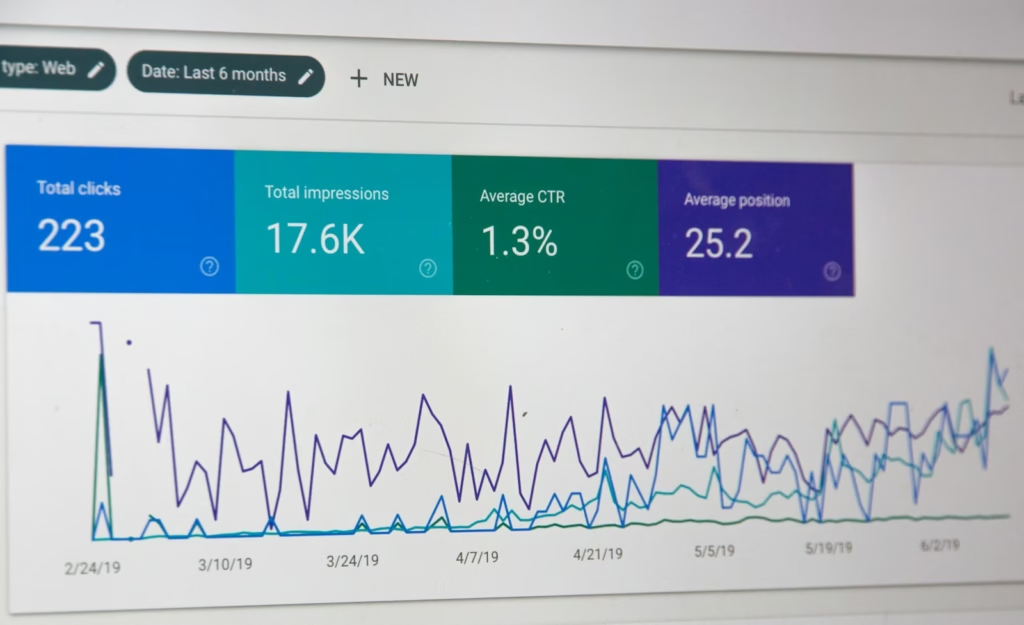
Rewrite the title tag with the main keyword near the front and a clear benefit, and keep the meta description specific. It is often the cheapest fix for a website not showing up on Google’s top results, because it needs no content or technical changes.
How to Get Your Website to Show Up on Google This Week
- Day 1: run a
site:search for your five most important pages, inspect any that are missing, and open the Manual actions report to rule out a penalty. - Day 2: fix any noindex, robots.txt or canonical problems, submit your sitemap, then run PageSpeed Insights on your key pages.
- Day 3: compare your top page for each target query with the current top five results, and note the gaps.
- This week: rewrite the titles of the pages with the most impressions and fewest clicks, then wait a few weeks before judging.

The same foundations decide whether AI answer engines can find and cite your pages. Our Generative Engine Optimization playbook shows how to build on them once the basics are healthy, and our local SEO guide for small businesses covers the Business Profile side. Use this checklist again whenever you find a website not showing up on Google.
If you would rather have someone work through these checks for you, our SEO, GEO and technical SEO service starts with a free review of your indexing, speed and content.
Frequently Asked Questions About a Website Not Showing Up on Google
Why is my website not showing up on Google after launch?
New sites often take days or weeks to appear. Google says to allow at least a week after submitting a sitemap or an indexing request. If nothing appears after that, check for a noindex tag, a robots.txt block and a missing sitemap, then inspect the URL in Search Console.
How long does SEO take to work?
Google says changes can take a few hours or several months. Ahrefs found that only 1.74% of newly published pages reached the top 10 within a year, so plan on months. If a page is still outside the top 10 after about six months, update it rather than waiting.
How can I tell if my website is indexed?
Search Google for site: followed by your domain, or paste a page URL into the URL Inspection tool in Search Console. If a site: search returns nothing, you have a website not showing up on Google because it is not indexed. The tool shows when the URL was last crawled and, if excluded, why.
Can a Google update or penalty explain a website not showing up on Google?
Yes, though updates usually lower rankings rather than remove pages. Compare the drop with Google’s list of ranking updates, then open the Manual actions report. A green check mark means no manual action, so the cause is technical or algorithmic.
Does page speed really affect rankings?
Google recommends good Core Web Vitals and says they align with what its core ranking systems reward, but speed alone rarely lifts weak content. Aim for Largest Contentful Paint within 2.5 seconds, Interaction to Next Paint under 200 milliseconds and Cumulative Layout Shift under 0.1.
Should I disavow bad backlinks?
Usually not. Google says most sites do not need the disavow tool. Use it only if you have a large number of spammy links that have caused, or are likely to cause, a manual action. Remove the links first where you can.
Should I change my SEO strategy or agency if nothing works?
Usually not immediately. A website not showing up on Google usually traces back to one or two fixable problems, so run a diagnostic audit before abandoning the approach. A structured audit covers indexing, technical health, content quality and backlinks, and ends with a prioritised list of fixes.
