Interactive ads are paid ads that ask people to do something, such as tap, swipe, vote, play, try on or shop, instead of only watching. This guide is for small-business owners and marketers deciding whether interactive advertising is worth the effort. You get the formats that exist today on Meta, Google, YouTube, TikTok and Snapchat, their verified specs, a comparison table, a build checklist and an honest way to measure results.
What are interactive ads?
Interactive ads are paid placements that respond to a viewer’s input, such as a tap, swipe, vote, mini-game, AR try-on or in-ad product browse. The main formats today are playable ads, Meta Instant Experience and collection ads, HTML5 display ads, YouTube video ads with calls to action or product feeds, Snapchat AR Lenses and TikTok interactive add-ons. Each platform names and specs them differently, so plan one placement at a time.
The common thread is that the viewer acts and the ad responds. One practical point before you brief a designer: “interactive ad” is a category, not a setting. You won’t find that button in any ads manager, so you need each platform’s own format name, and each one comes with its own objectives, placements and file rules.
In this guide
Interactive ad formats compared by platform
Ten interactive ad formats are documented today by the platforms or standards bodies behind them. The table shows which platform sells each one, where it earns its place, how hard it is to build and the number to watch. Build effort is our rough estimate for a small team; the specs behind it are in the platform sections below.
| Format | Platform | Best use | Build effort | Key metric |
|---|---|---|---|---|
| Playable ad | Meta, TikTok, Google App campaigns | App installs from people who tried the app first | High (HTML5 developer) | Cost per install, then post-install events |
| Instant Experience | Meta, mobile only | Full-screen product story after a tap | Low to medium (templates) | Instant Experience view time and view percentage |
| Collection ad | Meta | Browsing a catalog from Feed | Low, if you have a catalog | Product clicks and purchases |
| Product-feed video (shoppable ads) | YouTube via Demand Gen, TikTok Catalog Ads | Selling feed products next to a video | Medium (clean feed needed) | Conversions and return on ad spend |
| HTML5 rich media display | Google Ads, Display & Video 360, Campaign Manager 360 | Interactive display ads on websites and apps | High | Interaction rate, then conversions |
| Video CTA, lead form and sitelinks | YouTube | Leads and site visits from video | Low | CTA clicks, leads, engaged-view conversions |
| CTV QR code or remote action | YouTube on TV screens, Amazon streaming TV | Moving TV viewers to a phone or cart | Low | Visits to the tagged URL, add-to-cart actions |
| SIMID interactive video | Programmatic video players using VAST 4.x | Interactive video across publisher sites | High | Interaction rate and completion rate |
| AR Lens | Snapchat | Product try-on and brand play | Medium (Lens Web Builder) to high (custom 3D) | Play time and shares |
| Interactive stickers and cards | TikTok in-feed | Votes, countdowns and offers on short video | Low | Add-on interactions and clicks |
One format that older articles list is missing on purpose. We could not find a current Meta help article for poll stickers in ads (the older links now redirect to general pages), so check the creative options in Ads Manager before you plan one. The old VPAID video standard is also left out, because it is being replaced, as the SIMID section explains.
Meta: playable ads, Instant Experience and collection ads
Meta documents three kinds of interactive ads across Facebook and Instagram, all built in Meta Ads Manager. Instant Experience and collection ads only appear on mobile devices, so test them on a phone.
Playable ads
Meta describes playable ads as interactive video ads that give people a short preview of your mobile app before they download it. They can run in Feeds, Stories and Reels on Facebook and Instagram and on Meta Audience Network, including in Advantage+ app campaigns. People first see a video; a tap opens a full-screen playable, followed by an install call to action.
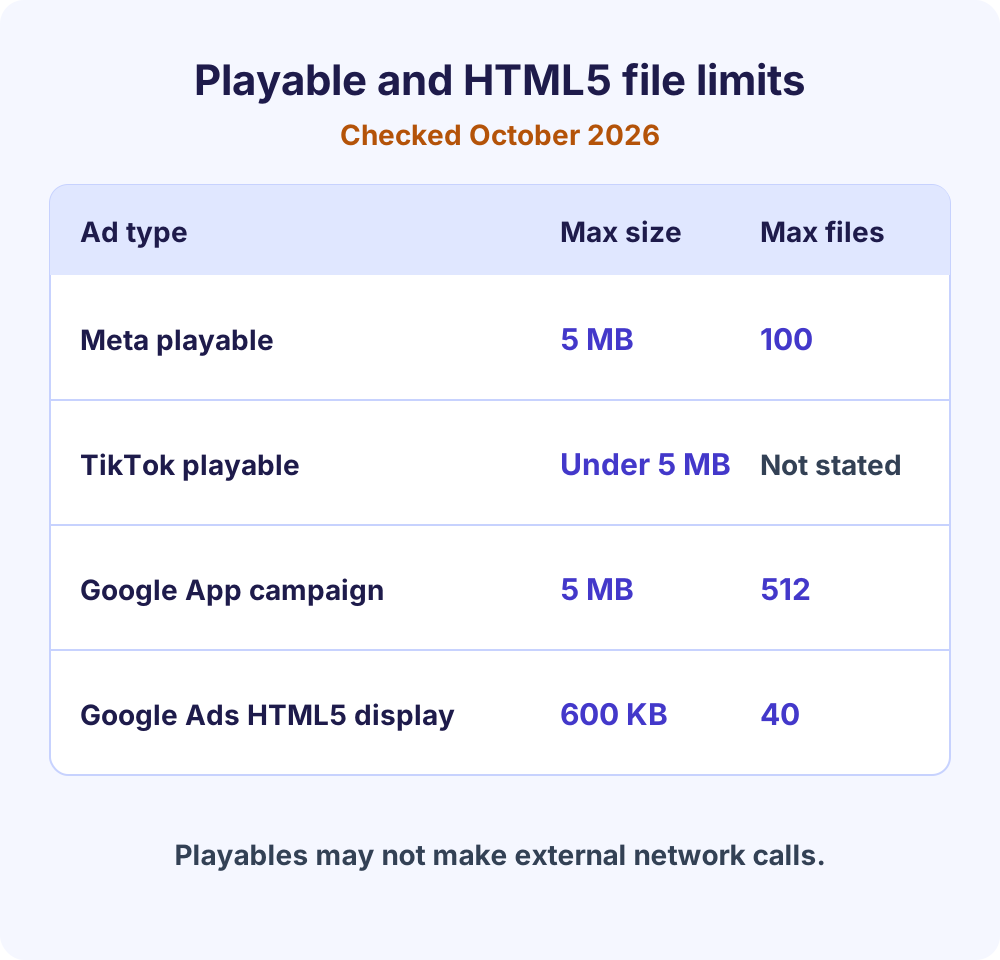
The build rules are strict. Meta’s specifications for playable ads assets ask for one HTML5 file with every asset data-URI encoded, or a ZIP with index.html at the root. Either way the limit is 5 MB, and a ZIP may hold no more than 100 files. External network calls, JavaScript redirects and mraid.js are not allowed. Build in portrait, keep it responsive, call FbPlayableAd.onCTAClick() for the install button, and supply a lead-in video.
Instant Experience
An Instant Experience is a full-screen page that opens after someone taps your ad on a mobile device. It never appears on desktop and can’t be attached to an organic Page post. Meta lists supported objectives as Awareness, Traffic, Engagement, Leads, App promotion and Sales.
Start from a template unless you have a designer. Meta’s current Instant Experience templates are Storefront and Lookbook (both need the collection format and a catalog), Customer acquisition, Storytelling and Sell products without a catalog. Two limits to plan around: it isn’t compatible with carousels that contain video, and some components, such as product tagging and the store locator, don’t work on Instagram.
For reporting, open Columns, choose Customize columns, select Media under Engagement and tick Instant Experience view time and Instant Experience view percentage. Those two columns tell you whether people read the experience or closed it at once.
Collection ads
Collection is Meta’s main shoppable ads format: a cover image or video above a grid of smaller product images. Tapping the cover opens a full-screen Instant Experience to browse, and tapping a product opens your product detail page. Per Meta’s collection ad specifications, a catalog product set needs at least four products, and Meta suggests ordering products dynamically when you run on both Facebook and Instagram.
Google and YouTube: interactive display and video ads
Google’s interactive advertising inventory splits in two: HTML5 display ads are code you build, while YouTube video ads get their interactive layer from assets Google renders for you. The second route is far easier for a small team.
HTML5 interactive display ads
Interactive display ads on Google’s network are HTML5 creatives, usually built in Google Web Designer. Google’s Web Designer overview says there is no cost to download or use it for business, and it covers animation, 3D, touch events and components such as image galleries and maps. You pick an ad environment first (Google Ads, AdMob, Display & Video 360 or a non-Google ad server), because it sets the checks and code added when you publish.
Google Ads limits HTML5 uploads to established accounts. Its uploaded display ads specifications list an account older than 90 days, a good policy record and a lifetime-spend threshold (US$9,000 in the minimum requirements, with a separate US$1,000 figure in the approval criteria), and approval isn’t guaranteed. Files are capped at 600 KB, with no more than 40 files in the ZIP. Expandable ads aren’t supported in Google Ads or AdMob, so build those in the Display & Video 360 environment, which also covers Campaign Manager 360 and Ad Manager.
A change is underway too. Google is moving Display campaigns into Demand Gen: the migration tool began a phased rollout in June 2026, and uploaded HTML5 display ads are listed as coming to Demand Gen, planned for late 2026, with timelines subject to change. If you don’t qualify for HTML5, Google points to responsive display ads or uploaded AMPHTML ads instead.
App advertisers have a separate path. HTML5 and playable assets for App campaigns are uploaded as ZIP files of up to 5 MB and 512 files, with up to 20 per ad group, and Google asks that sound stays off until the user interacts.
Interactive video ads on YouTube
On YouTube, interactive video ads are standard video ads with interactive features attached. Google’s list of interactive features for video ads includes a call-to-action button, sitelink assets, lead form assets, location assets, product feeds, related videos and end screens.
The call-to-action button works on mobile, desktop and TV. On TV it’s only available for Video campaigns with the Brand awareness and reach or Product and brand consideration goals, and signed-in viewers can send the link to their phone. A lead form asset collects an email address or phone number inside the ad. You need a video and assets, not a developer, which makes this the easiest interactive format to start with on Google.
Connected TV: QR codes and remote actions
TV is where interactivity solves a real problem, since nobody clicks a TV. Google Ads can show your final URL as a system-generated QR code for connected TV in Demand Gen and Performance Max campaigns that target TV screens, and on non-skippable YouTube Select and Reservation ads, where the code appears after five seconds. Google advises against baking your own QR code into the video, and the code only shows on TVs that can resize the player.
Amazon Ads describes interactive video ads on streaming TV, including Prime Video and Fire TV, where viewers use the remote or voice to add the featured product to their Amazon cart or ask for more information by email. Amazon says interactivity is enabled by default across its streaming TV inventory.
Shoppable ads: video that doubles as a product shelf
Shoppable ads let people browse and tap products without leaving the ad, so they are the interactive format closest to a sale. Besides Meta collection ads, two documented versions matter.
- YouTube through Demand Gen. Link a Google Merchant Center feed with Shopping ads enabled, then add it to a Demand Gen campaign. Google’s product feed guide for Demand Gen supports a single product but recommends at least four, calls 50 the best practice, and warns new feeds can take up to three days to approve. Product ads render as a carousel, and a vertical video lets the ad serve on YouTube Shorts.
- TikTok Catalog Ads. Interactive add-ons for Catalog Ads, such as product cards, product tiles, showcase tiles and info cards, can show up to 20 products along the bottom of a video. Pick one add-on yourself or a dynamic add-on that TikTok chooses.
Shoppable ads are only as good as the feed behind them. Wrong prices, missing images or out-of-stock items show up inside the ad, so fix the feed before you touch the creative.
AR try-on and interactive stickers: Snapchat and TikTok
Camera-first and short-video apps sell the most playful interactive ads. They suit awareness and consideration goals more than direct sales.
Snapchat Sponsored AR Lenses
Snap’s Sponsored Lenses overview frames the value as play time, the time people spend playing with your ad. Face Lenses alter the face and are used to try on makeup, jewelry and sunglasses; World Lenses use the rear camera to place 3D objects in a room. The overview says Face Lenses are required for auction and Reach and Frequency buys, so check creative-type rules before you build a World Lens.
Snap lists three ways to buy Lenses: the auction, billed on CPM; Reach and Frequency, which needs approval and runs only in listed countries; and First Lens, a flat-fee day when yours is the first sponsored Lens people see in a country. Without 3D skills, Lens Web Builder inside Snapchat Ads Manager lets you start from a template or from scratch and preview on your phone with Try Your Lens Live.
TikTok interactive add-ons and playables
TikTok layers interactive add-ons onto in-feed video. Standard add-ons aim at clicks and conversions: Display Card, Download Card, Voting Sticker, Gift Code Sticker and Countdown Sticker. Premium add-ons aim at awareness: Pop-out Showcase, Gesture, Super Like, Story Selection and Shake Surprise, which is only available in TopView.
The Voting Sticker is the low-cost way to test interactivity, because it needs no developer, only a question on a video you already have. The answers also show what each segment cares about, which feeds the personalized advertising approach that is replacing one-size-fits-all creative. For the video underneath, see what makes a TikTok campaign perform.
TikTok Playable ads run in the For You feed under the App Promotion objective, only in the upgraded Smart+ experience. The ZIP must be under 5 MB, with index.html and a config.json file that sets orientation, and it may not make HTTP requests.
Interactive video ads in programmatic: SIMID replaces VPAID
If you buy video through a demand-side platform instead of one platform’s ads manager, interactive video ads depend on an industry standard. IAB Tech Lab is replacing VPAID with two narrower specs: OMID for measurement and verification, and SIMID (Secure Interactive Media Interface Definition) for interactivity. IAB Tech Lab lists SIMID 1.2 as the latest version.
In practice, a SIMID creative is an HTML layer delivered in VAST 4.x through an InteractiveCreativeFile element whose apiFramework is SIMID. Per the SIMID specification, the player loads it in a cross-origin iframe and keeps control of the video, which suits server-side ad insertion and live streams. The spec also warns that some TV sets and OTT boxes can’t load external assets, so SIMID reach on connected TV is limited. New to this buying route? Read how programmatic advertising works, then ask your DSP whether its publishers’ players support SIMID before you commission a build.
When interactive ads are worth it, and when they aren’t
Interactive ads earn their extra cost when the interaction answers a buyer’s question. Trying a game, seeing glasses on your face or browsing a product shelf removes doubt; a tap that leads nowhere only adds friction.
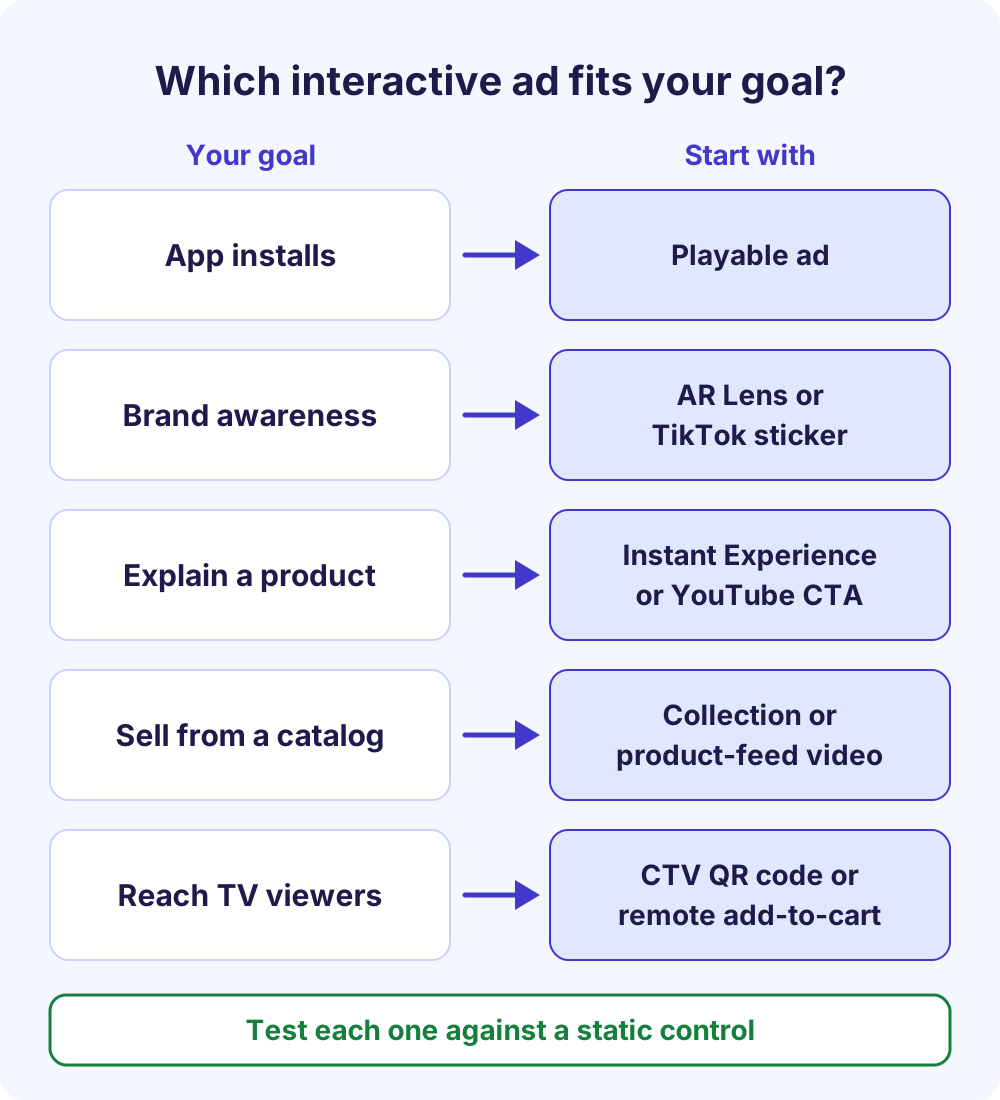
They are usually worth it when:
- You sell an app or game and a short try beats any description (playable ad).
- The product is visual and personal, like eyewear or makeup (AR try-on).
- You have a clean product catalog and a sales goal (collection or product-feed ads).
- You buy TV inventory and need a path to your website (QR code or remote action).
Skip or postpone them when:
- You can’t meet the spec or eligibility bar, such as Google’s HTML5 spend rule.
- Your budget can’t fund a static control next to the interactive version, so you would never know if the interaction helped.
- The interaction has no payoff: no offer, no answer and no product to see.
Deciding who should build and run these? See what a paid social media agency manages before you choose between in-house and outsourced work.
How to build interactive ads in 7 steps
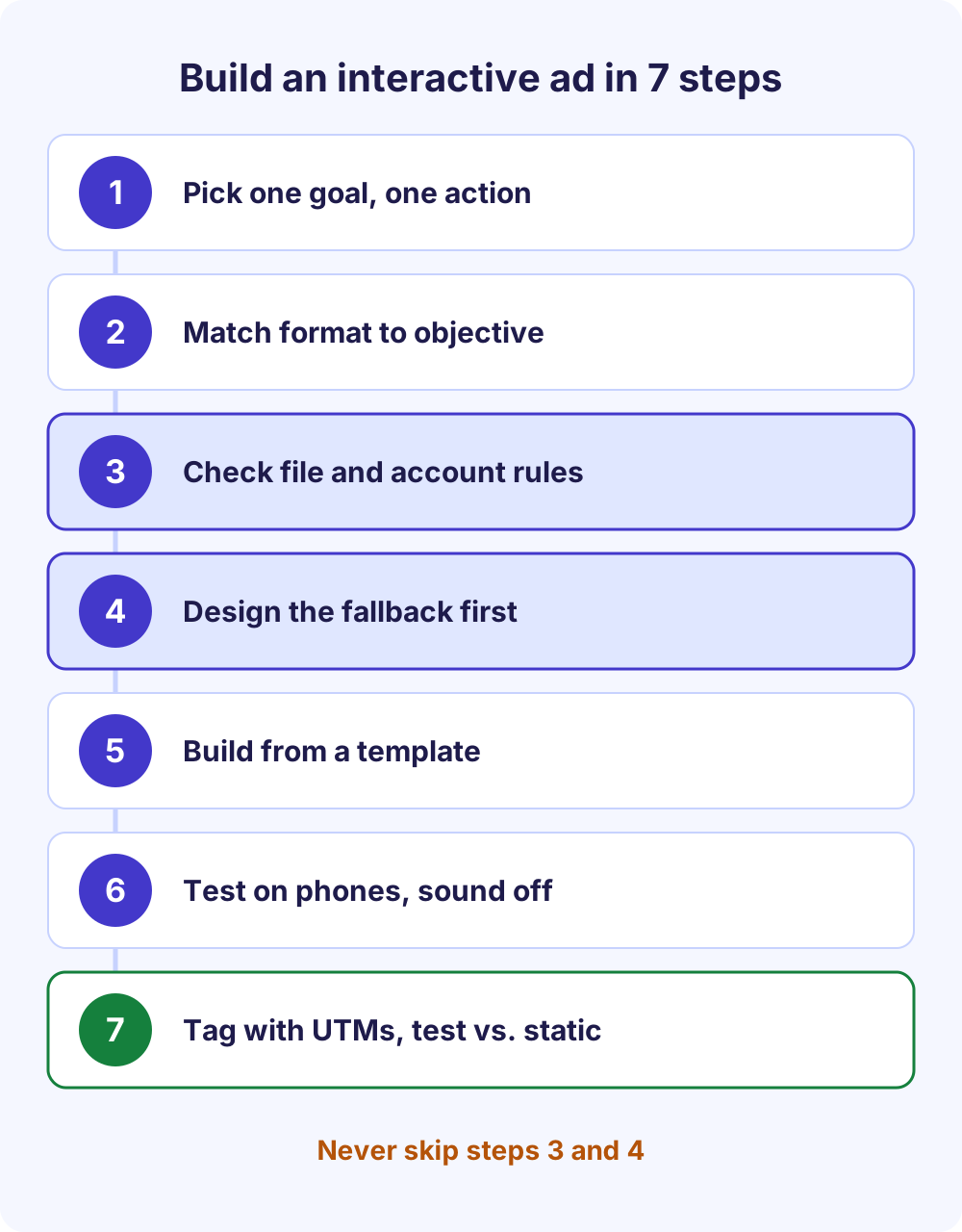
The same seven steps apply on every platform. Don’t skip steps 3 and 4; they decide whether the build can run at all.
- Pick one goal and one action. Installs, leads, sales or awareness, and one gesture that serves it: play, tap, vote, try on or browse.
- Confirm the format fits your objective and placement. Meta playables are built for app promotion, Storefront and Lookbook templates need the collection format and a catalog, and TikTok playables need the App Promotion objective.
- Check the file and account rules. File size, file count, orientation and network calls for HTML5, plus account eligibility such as Google’s HTML5 requirements.
- Design the fallback first. Many impressions show the lead-in video, cover image or static frame, so that version has to work on its own.
- Build from a template where one exists. Instant Experience templates, Lens Web Builder and Google Web Designer templates are faster than custom code.
- Test on real phones with sound off. Check every tap target, the load time on a mobile connection and what happens when the interactive layer fails.
- Tag links and launch against a static control. Give each creative its own UTM tags and compare it with a non-interactive version in the same campaign.
Before anyone writes code, compare the file limits side by side. A 4 MB playable fits Meta’s cap but is far too large for Google Ads HTML5 display, which stops at 600 KB.
How to measure interactive advertising
Measure interactive advertising in layers. The interaction tells you the format caught attention; only a downstream number tells you it worked.
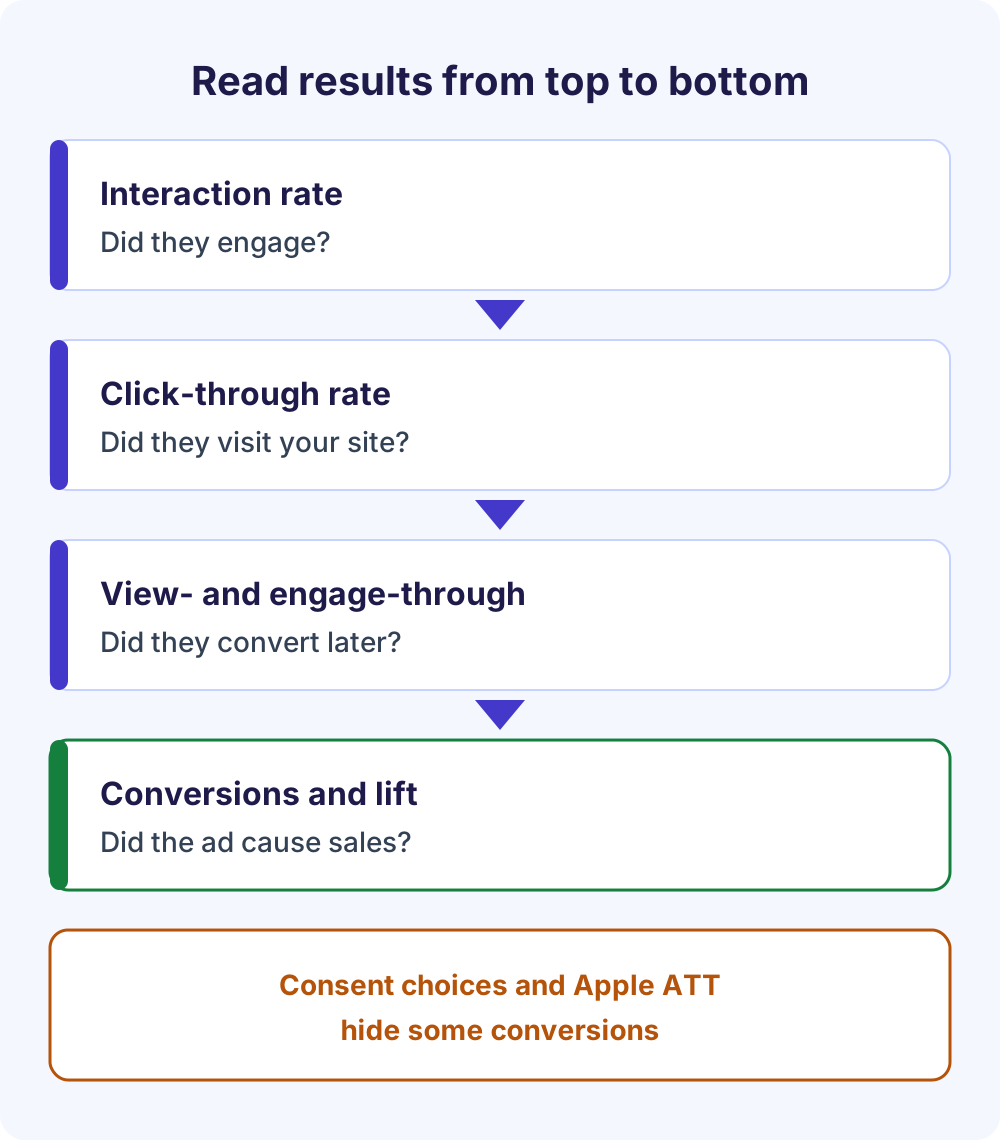
Engagement rate vs. conversion rate
For interactive ads, engagement or interaction rate (interactions divided by impressions) is the easiest metric to report and the easiest to be misled by. Each platform defines an engagement differently, so don’t compare the rate across platforms.
Pair it with a downstream number that fits the stage: click-through rate for consideration, and conversion rate or cost per acquisition for sales. If interaction is high but the downstream number doesn’t move, the format is entertaining people without moving them, so fix the payoff or the offer rather than the mechanic.
View-through and engage-through conversions
Interactive ads often convert later, without a link click. Meta’s standard attribution settings count click-through conversions within 1 or 7 days of a link click, view-through within 1 day of an impression, and engage-through within 1 day of a non-link click or a 5-second video play.
In Google Ads, view-through conversions appear in the View-through conversions and All conversions columns, not in Conversions, except for some campaign types such as Demand Gen and App. YouTube engaged-view conversions need 10 seconds of a skippable in-stream ad, or 5 seconds for in-feed and Shorts ads.
Privacy and consent limits
Every number above shrinks when people opt out. On iOS 14.5 and later, apps need permission through Apple’s App Tracking Transparency framework to track users across other companies’ apps and websites. Google’s EU user consent policy requires consent for cookies and ad personalization from users in the EEA, the UK and Switzerland.
Consent mode passes those choices to Google’s tags and models some of the conversions you can’t observe. Expect gaps, read trends over weeks rather than single days, and never treat modeled numbers as exact.
Tag every creative and keep a control
Give each interactive creative its own utm_content value so clicks land in analytics split by format; Google Analytics’ guidance on campaign URLs recommends content values unique to each creative. Our free UTM builder makes tagged links in seconds. Then run the interactive version against a static control, so you compare like with like.
Interactive ads best practices
These habits apply to all interactive ads, from a TikTok sticker to a custom HTML5 unit.
Ask for one action
A single tap, swipe or vote beats a multi-step interaction that most people won’t finish. Show the gesture early; TikTok’s playable guidance suggests prompts such as “Tap”, “Swipe” or “Hold” at the start.
Make the payoff worth it
The interaction should lead somewhere useful: a real discount, a quiz result that recommends a product, a try-on that answers “will this suit me?” or a product page. A dead end feels like a gimmick and teaches people to skip your next ad.
Design the fallback first
An easy early mistake is scope, not creative. Teams build an elaborate experience for a placement that doesn’t support it, then find the ad falls back to a static version on many impressions. Confirm which placements and devices render the interactive layer, and make the fallback good enough to run alone.
Make interactive ads accessible
WCAG 2.2, the W3C’s web accessibility standard, is a sensible yardstick for interactive creatives. It asks for pointer targets of at least 24 by 24 CSS pixels and a way to pause, stop or hide moving content that starts on its own and lasts more than five seconds.
Add captions or on-screen text so the ad works with the sound off, and make sure the core message survives if the interactive layer never loads. A poll or quiz that fails behind a slow connection should leave a readable ad, not a blank unit.
Frequently Asked Questions
What is interactive advertising in digital media?
It is the same idea seen from the media side: digital ad space that accepts input instead of only showing content. Interactive digital advertising covers HTML5 display ads on websites, interactive video ads on YouTube and streaming TV, AR Lenses in camera apps and shoppable ads in social feeds. The test is whether the viewer can act inside the ad.
Are interactive ads more expensive to produce?
Usually, yes, but the range is wide. A TikTok Voting Sticker, a YouTube call-to-action button, a Meta Instant Experience template or a Lens Web Builder Lens needs no developer and little beyond the video or images you already have. Playable ads, custom HTML5 display units and custom AR Lenses need developer or 3D time, so test cheap formats first.
Which platforms support interactive ads?
Meta supports playable ads, Instant Experience and collection ads. Google and YouTube offer HTML5 display, App campaign playables, and video ads with calls to action, lead forms, product feeds and TV QR codes. TikTok has interactive add-ons, playables and Catalog Ads, Snapchat has Sponsored AR Lenses, and Amazon runs interactive streaming TV ads. Check each help center, because formats change often.
What are interactive video ads?
Interactive video ads are video ads with a layer the viewer can use: a call-to-action button, lead form, product carousel, QR code on a TV screen, or a custom HTML layer delivered through the SIMID standard in programmatic buys. YouTube adds that layer from campaign assets, so you need no code, while SIMID units need a developer and a compatible player.
What are shoppable ads?
Shoppable ads show products people can browse or tap inside the ad. Examples include Meta collection ads, with a cover video above a product grid, YouTube ads that use a Merchant Center product feed through Demand Gen, TikTok Catalog Ads with product cards or tiles, and Amazon’s add-to-cart remote action on streaming TV. All of them depend on an accurate product feed.
Do interactive ads work on connected TV?
Yes, but the action usually moves to another device. Google Ads can show a system-generated QR code or a send-to-phone option on TV screens for eligible YouTube campaigns, and Amazon lets streaming TV viewers add items to their cart with the remote or by voice. Measure TV interactivity with tagged landing URLs, because TV responses don’t behave like web clicks.
What is the difference between interactive ads and rich media ads?
Rich media is the older display-industry term for ads with motion, video, expansion or other advanced features, usually built in HTML5. Interactive ads are the broader idea of any ad that responds to input, including formats a platform assembles from your assets, such as Instant Experiences or TikTok stickers. Most rich media ads are interactive, but not every interactive ad is rich media.
Next steps
Pick one goal, one platform and the cheapest interactive format that serves it, then run it against a static control for a few weeks. If you want help planning or running that test, see our Meta ads management service or our Google Ads management service, or get in touch.