Here’s how to block someone on TikTok: open their profile in the app, tap the Share button at the top, tap Block, then tap Block again to confirm. They won’t get a notification, and from then on you can’t see each other’s posts, find each other in search or exchange messages.
This guide is for anyone dealing with a spam account, a troll in the comments, an ex or a creator you’d rather not see again. It covers blocking from a profile, a comment thread and your inbox, blocking several accounts at once, unblocking, and when muting, removing a follower or reporting makes more sense. All steps were checked against TikTok’s Help Center in November 2026.
In this guide
Key takeaways
- How to block someone on TikTok in short: open their profile, tap Share, tap Block, then confirm. TikTok doesn’t notify them.
- Once blocked, neither of you can view the other’s posts, find each other in search or send direct messages, and any follow between you is removed.
- To block many commenters at once, use Manage multiple comments on your post, then More > Block accounts.
- You can unblock anytime from their profile or from Settings and privacy > Privacy > Blocked accounts.
- If an account is breaking the rules, report it too. Blocking protects you, but only a report asks TikTok to act on the account.
How to block someone on TikTok from their profile
The profile route is the main method in TikTok’s official help article on blocking. It works for any account whose profile you can open, whether they follow you or not, and it’s the same on iPhone and Android.
Steps in the TikTok app (iPhone and Android)
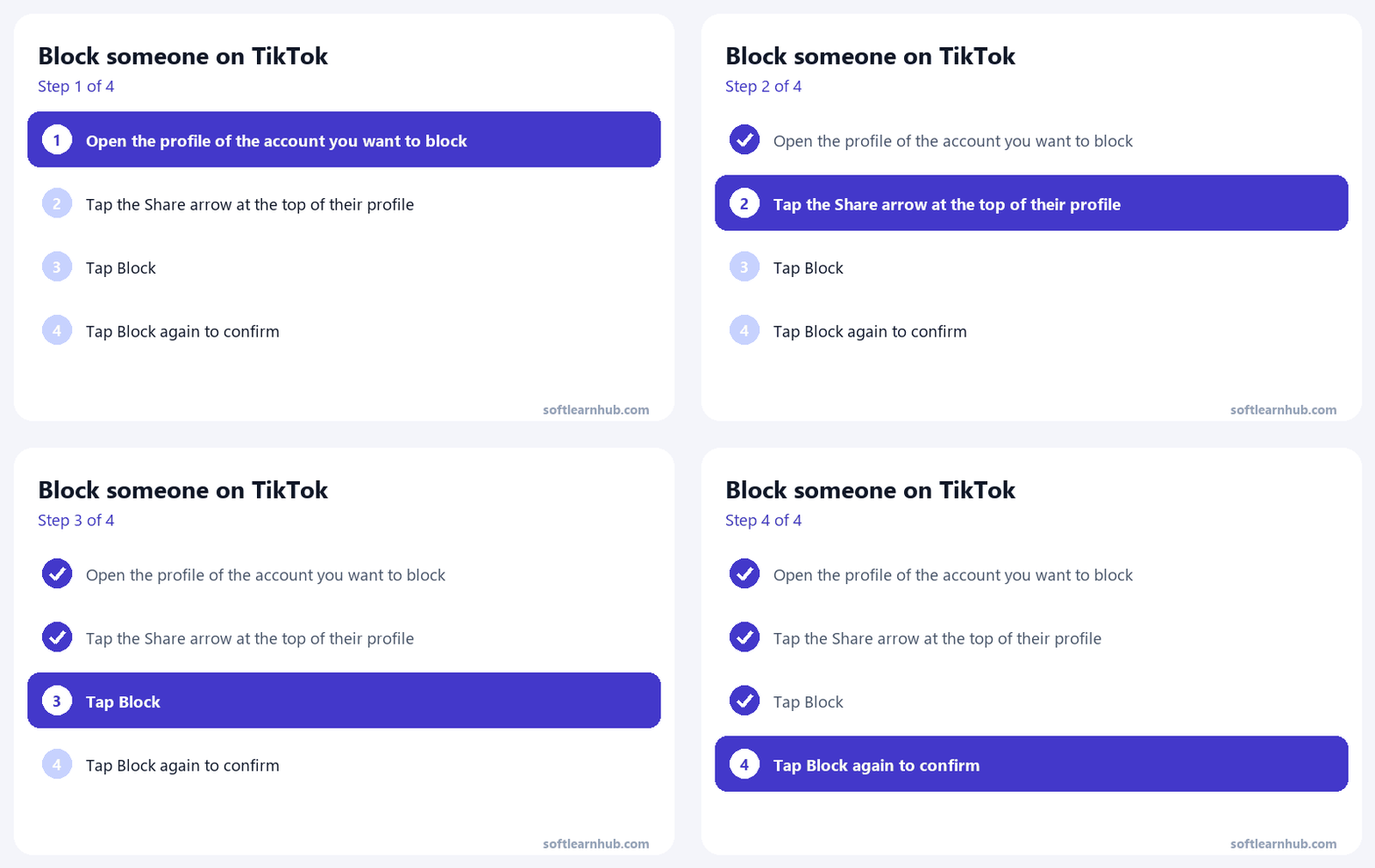
- Open the TikTok app and go to the person’s profile. Tap their username on a video or comment, or search for them.
- Tap the Share button at the top of their profile.
- Tap Block at the bottom of the menu that opens.
- Tap Block again to confirm.
That’s how to block someone on TikTok from a profile. The block covers their entire account, not just one video, so you won’t need to repeat it for each post they make.
Can you block someone on TikTok from a computer?
TikTok’s help center explains how to block someone on TikTok in the mobile app only. On tiktok.com in a browser, account actions such as Report sit under the More options (…) button on a person’s profile, according to TikTok’s article on reporting accounts. If you don’t see Block in that menu in your browser, do it from the app on your phone. A block is tied to your account, so it applies wherever you’re logged in.
How to block on TikTok from comments or messages
Learning how to block on TikTok from comments or chats is simple, because there’s no separate block button there. Both routes lead back to the person’s profile, which takes a couple of extra taps but works every time.
Block one commenter
- Open the comments on your post.
- Tap the commenter’s profile photo or username to open their profile.
- Tap Share, tap Block, then confirm.
Deleting their comment is a separate step. Press and hold the comment and tap Delete if you also want it gone from your post.
Block someone from your DMs
- Tap Inbox at the bottom of the app and open the chat.
- Tap the person’s name or profile photo in the chat to open their profile.
- Tap Share, tap Block, then confirm.
After that, they can’t send you direct messages or message requests. Group chats are the exception: TikTok notes you may still see a blocked person in a group chat you share, so leave the group if that’s a problem.
How do you block someone on TikTok in bulk?
If a video takes off for the wrong reasons, blocking accounts one at a time gets old fast. So how do you block someone on TikTok when there are dozens of them? TikTok has a built-in way to block several commenters at once from a single post.
- Open one of your posts and tap the Comments button.
- Press and hold a comment, then select Manage multiple comments. You can also tap the Filters button at the top.
- Select the comments from the accounts you want to block.
- Tap More at the bottom, then tap Block accounts.
- Tap Block to confirm.
TikTok’s comment help says this multi-select screen lets you pick up to 100 comments at a time when deleting in bulk, so work in batches on a busy post. It’s the fastest way to clear out a wave of spam or a coordinated pile-on.
What happens when you block someone on TikTok?
Blocking is a two-way wall. Based on TikTok’s help center, here’s what changes for both of you:
- Neither of you can view the other’s posts.
- You can’t find each other’s profiles in search.
- You can’t exchange direct messages, and they can’t send you message requests.
- They can’t comment on your videos, like them or follow you.
- Any existing connection between you is removed, so follows in both directions are cleared.
- TikTok doesn’t send them a notification.
What the blocked person sees
They get no alert, but a block isn’t invisible either. If they look for your profile, you won’t show up in search, and they can’t watch your videos or message you. Someone who goes looking will usually work out what happened, so block for your own peace of mind, not to stay hidden.
Where you might still cross paths
TikTok is upfront that a block isn’t absolute. You may still see each other in a multi-host LIVE, in Duets that other people post, or in group chats you’re both in. If you need stronger separation, pair the block with tighter comment and message settings, covered in the comparison below.
How to unblock someone on TikTok
Changed your mind? Unblocking takes a few taps, and you can block the same person again later if you need to.
From their profile
- Go to the person’s profile.
- Tap the Share button at the top.
- Tap Unblock at the bottom.
From your Blocked accounts list
Because blocked profiles don’t appear in search, the settings list is often the easier route. TikTok’s guide to finding your blocked list shows the path:
- Tap Profile at the bottom of the app.
- Tap the Menu ☰ button at the top, then select Settings and privacy.
- Tap Privacy.
- Tap Blocked accounts. You may need to scroll down to find it.
- Find the account and use the Unblock option next to it.
The block removed any follow between you, so unblocking won’t bring it back on its own. Either of you would need to follow the other again.
Block vs. mute, remove follower and report on TikTok
Blocking is the strongest tool, but it isn’t always the right one. TikTok’s US help center doesn’t list an Instagram-style Restrict feature, so here are the real alternatives and when each one makes sense.
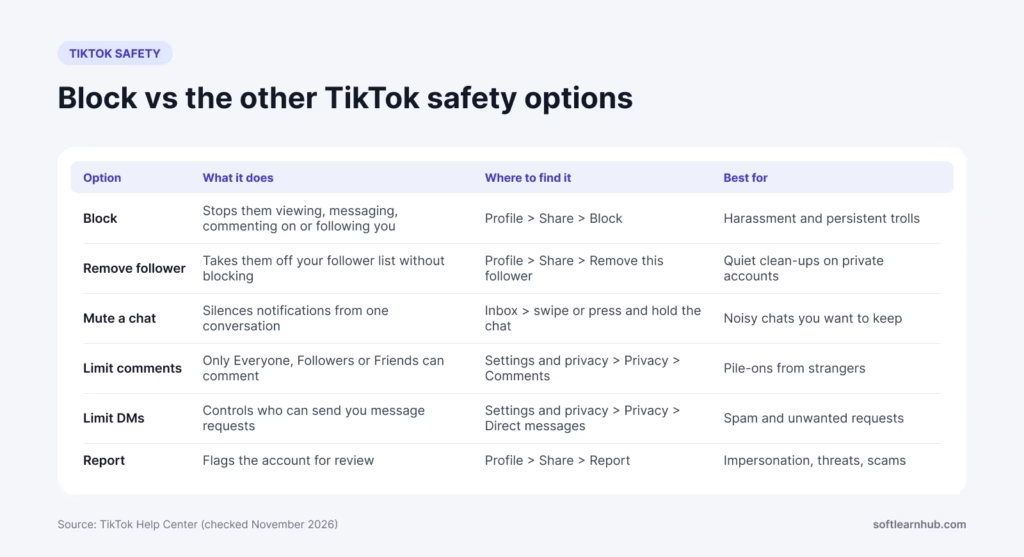
| Option | What it does | Where to find it | Best for |
|---|---|---|---|
| Block | Cuts off viewing, search, DMs, comments, likes and follows in both directions | Profile > Share > Block | Harassment, exes, persistent trolls |
| Remove follower | Takes them off your follower list without blocking them | Profile > Share > Remove this follower | Private accounts and quiet cleanups |
| Mute a chat | Stops notifications from one conversation | Inbox > swipe the chat (iPhone) or press and hold it (Android) > Mute | Noisy chats with people you don’t want to cut off |
| Limit comments | Lets only Everyone, Followers or Friends comment, plus keyword and spam filters | Settings and privacy > Privacy > Comments | Pile-ons from strangers |
| Limit DMs | Controls who can send you message requests | Settings and privacy > Privacy > Direct messages | Spam and unwanted requests |
| Report | Flags the account to TikTok for review against the Community Guidelines | Profile > Share > Report > Report account | Impersonation, threats and scams |
Reporting and blocking work well together. A report asks TikTok to review the account, while a block protects you in the meantime. TikTok’s guide to reporting an account also links the separate forms for impersonation.
Why can’t I block someone on TikTok?
If you know how to block on TikTok but the Block option isn’t where you expect it, one of these is usually the reason:
- You’re looking in an old menu. Older guides mention a three-dot menu. TikTok’s current instructions use the Share button at the top of the profile.
- You already blocked them. Check Settings and privacy > Privacy > Blocked accounts.
- Your app is out of date. Update TikTok from the App Store or Google Play, then try again.
- You’re in a browser. If the web menu doesn’t show Block, use the mobile app instead.
- You’re trying to block from a comment or chat. Open the person’s profile first. That’s where the Block option lives.
Tips for handling trolls and unwanted accounts
Knowing how to block on TikTok is only half the job. A few habits make blocking less of a chore, especially if you post often or run a brand account.
- Screenshot before you block. If you plan to report harassment, capture the comments or messages first so you have a record.
- Tighten comments before a big post. In TikTok’s comment settings you can limit comments to Followers or Friends, or turn comments off for a single post.
- Use keyword filters. If the same insult or spam phrase keeps showing up, add it to your comment filters so it’s held back automatically.
- Don’t argue in public. Replying to a troll usually feeds the algorithm and the troll. Block, delete and move on.
- Write a simple moderation rule for brand accounts. Block spam, scams and abuse, but leave honest criticism alone. A clear rule fits naturally into a wider content marketing strategy.
Frequently asked questions
Does TikTok notify someone when you block them?
No. TikTok says people you block aren’t notified. They may still figure it out because your profile no longer appears in their search results and they can’t watch your videos or send you messages. TikTok doesn’t send any alert, email or in-app message about the block.
Can a blocked person see my TikTok videos?
Not from the blocked account. Blocking stops both of you from viewing each other’s posts and finding each other in search. TikTok lists a few exceptions where you may still cross paths, such as a multi-host LIVE, Duets posted by other people and group chats you both belong to.
How many people can you block on TikTok at once?
You can block several commenters in one action from a single post. Open the comments, choose Manage multiple comments, select the comments, then tap More and Block accounts. TikTok’s help center says the multi-select screen handles up to 100 comments at a time for bulk actions on comments, so work in batches.
Does blocking someone on TikTok remove them as a follower?
Yes. TikTok says any prior connection is removed when you block someone, so they stop following you and you stop following them. If you unblock them later, the follow doesn’t come back automatically. Either of you would need to follow the other again.
How do I see who I’ve blocked on TikTok?
Go to Profile, tap the Menu ☰ button, then Settings and privacy. Tap Privacy, then Blocked accounts, which you may need to scroll down to find. The list shows every account you’ve blocked, and you can unblock anyone from there in a couple of taps.
Is blocking on TikTok permanent?
It lasts until you undo it. There’s no expiry date, so the block stays in place until you unblock the person from their profile or your Blocked accounts list. You can also block them again at any time if things flare up after you unblock.
The bottom line
Now you know how to block someone on TikTok: four taps from a profile, and the bulk tool handles a comment pile-on in one go. Use it without guilt, because your feed is yours. If you manage TikTok for a business, pair a clear moderation habit with a solid plan, and read our guide to what makes a TikTok campaign perform. Stepping back from social media more broadly? Here’s how to delete your Facebook account too.